


 Extension

TL;DR
The best AI PRD generators for startups go beyond filling a template: they use your company's context to write a complete document, including problem statement, user personas, feature specs, and risks. This article compares six tools, shows how each performs against startup-specific criteria, and walks through a step-by-step example of generating a full PRD from a single conversation.
Try TicNote Cloud for Free and generate a complete, company-grounded PRD using the Startup COO skill agent.
Founders waste hours trying to coax generic AI into writing a PRD that fits their product. Each session starts fresh, the output is too broad, and the sections read like they belong to a different company - and a wrong PRD ships as misaligned builds and wasted sprints. TicNote Cloud's Startup COO skill builds a persistent Company Profile from your first message and writes every document from that context, so you never start from scratch again.
What Makes a Good AI PRD Generator for Startups
Most PRD tools give you structure. The good ones give you a document that actually reflects your product.
It has to know your company
A generic PRD prompt will produce a generic PRD. If you paste "write a PRD for my app" into ChatGPT, you'll get clean formatting and the right section headers. You won't get a problem statement that matches your actual users, or a feature list that reflects your real constraints. The output is a template you still have to rewrite from scratch.
An AI PRD generator worth using learns your company context: what you're building, who it's for, what stage you're at, and what decisions have already been made. Without that, it's not generating a PRD, it's generating a skeleton.
Quick decision guide
Before comparing tools, here's the short answer:
- Best overall: TicNote Cloud Startup COO. Builds a persistent Company Profile, writes a complete PRD, and surfaces risks and next steps. Best for founders who need a document they can actually send to engineers or investors.
- Best if you're already in ChatGPT: ChatGPT with a detailed prompt. Most flexible, but you do all the context work every session.
- Best for Notion-native teams: Notion AI. Writes inline and connects to your existing docs, but needs a template to fill.
Three criteria to evaluate any AI PRD tool
When evaluating tools for breaking down product requirements into actionable tasks, these three questions cut through the noise:
- Does it learn your company context? Or does every session start from zero?
- Does it produce a complete document? Not just headers and bullet placeholders.
- Does it surface risks and next steps? A PRD that ends with a feature list is only half-done.
Best AI PRD Generators: Top 6 Tools Compared
Six tools, all tested against the same three startup criteria: company context, full PRD output, and surface risks. TicNote Cloud is listed first.
Six tools, all tested against the same three startup criteria: company context, full PRD output, and surface risks. TicNote Cloud is listed first.
| Tool | Company context | Full PRD output | Visual output | Free tier | Best for |
| TicNote Cloud Startup COO | ✅ Persistent | ✅ Complete | ✅ HTML/Markdown | ✅ Yes | Founders who need a complete, grounded PRD |
| ChatGPT | ❌ Per session | Partial | ❌ | ✅ Yes | Prompt-comfortable founders |
| Notion AI | ❌ None | Partial | ❌ | Partial | Notion-native teams |
| GitHub Copilot Workspace | Partial (repo) | Technical only | ❌ | ❌ | Engineering-led teams |
| Aha! | ❌ None | ✅ Templates | ✅ Roadmap | ❌ | Established PM teams |
| Productboard AI | Partial (feedback) | Partial | ❌ | ❌ | Teams with user feedback data |
1. TicNote Cloud Startup COO
Best for: Founders who need a complete, company-grounded PRD in minutes.
Website: ticnote.com | Pricing: Free / $12.99/mo
Key features:
- Builds a persistent Company Profile from your first conversation, used as context for every document after that
- Generates a fully filled PRD in Markdown, covering problem statement, user personas, feature specs, and risks
- Covers all standard PRD sections without requiring a template
- Surfaces risks and blockers explicitly, with a concrete next action at the end of every document
- Visual HTML output for roadmaps and OKRs, ready to share with your team or investors
Limitations:
- Requires you to describe your company upfront before the first document is accurate
- Web-first: best experienced in the TicNote Cloud web app
Why it stands out: TicNote Cloud's Startup COO is the only tool on this list that builds a persistent Company Profile and uses it as the foundation for every document you generate. You don't re-explain your product each session.
2. ChatGPT
Best for: Founders who are comfortable writing detailed prompts.
Website: chat.openai.com | Pricing: Free / $20/mo
Key features:
- Highly flexible with GPT-4 quality output on custom PRD prompts
- Wide ecosystem of community PRD prompt templates
- Works across virtually any product type or industry
Limitations:
- No memory of your product: every session starts from zero
- Output quality is directly tied to how detailed your prompt is
- Produces a structured outline, not a filled document, unless you push hard with examples
Why it stands out: The most flexible option, but also the most effort-intensive. Best for founders who already know what a good PRD looks like and can prompt for it.
3. Notion AI
Best for: Teams already documenting everything in Notion.
Website: notion.com | Pricing: Add-on $10/mo
Key features:
- Writes inline inside any Notion page, connected to your existing docs
- Good for filling template blocks and expanding brief notes into full sections
- Integrates naturally into a Notion-based knowledge base
Limitations:
- Template-dependent: needs an existing PRD structure to fill
- No product-context awareness across pages
- Not purpose-built for PRDs
Why it stands out: Best for teams already inside Notion who want AI writing assistance without switching tools.
4. GitHub Copilot Workspace
Best for: Engineering-led teams writing technical PRDs.
Website: github.com | Pricing: $10/mo
Key features:
- Repo-aware context for technical spec generation
- Good for API contracts, data models, and architecture sections
- Integrates directly into the development workflow
Limitations:
- Dev-tool focus: weak on business context, user stories, and goals
- Not designed for non-technical founders or business-facing PRD sections
Why it stands out: Strongest for the engineering spec half of a PRD. Needs a separate tool for the product strategy half.
5. Aha!
Best for: Product managers who need PRD and roadmap in one tool.
Website: aha.io | Pricing: From $59/mo
Key features:
- Structured PRD templates with deep roadmap integration
- Stakeholder workflow and approval management
- Purpose-built for product management processes
Limitations:
- Enterprise-priced: steep for solo founders or early-stage teams
- Overkill for a startup that needs one good PRD, not a full PM suite
Why it stands out: Full PM platform for teams that have outgrown ad-hoc tools and need process structure.
6. Productboard AI
Best for: Product teams with existing user feedback data.
Website: productboard.com | Pricing: From $20/mo
Key features:
- Converts raw user feedback into feature specs with AI prioritization
- Strong feedback-to-requirements pipeline
- Structured insight management across customer data
Limitations:
- Most valuable with a large existing feedback dataset: less useful at zero-to-one stage
- Better for roadmap prioritization than fresh PRD generation
Why it stands out: Best feedback-to-spec pipeline. Complements a PRD tool but doesn't replace one at the early stage.
For teams looking at competitor intelligence as part of the requirements process, pairing a PRD tool with a competitor analysis workflow adds depth to the problem statement and use case sections.
How to Generate a Product Requirements Document Step by Step
The steps below demonstrate the process using TicNote Cloud's Startup COO skill as an example. TicNote Cloud works on both Web and App, so the walkthrough covers both platforms: Web is the primary flow for document generation, and the App is where you continue the conversation on the go.
Step 1: Add the Startup COO skill agent
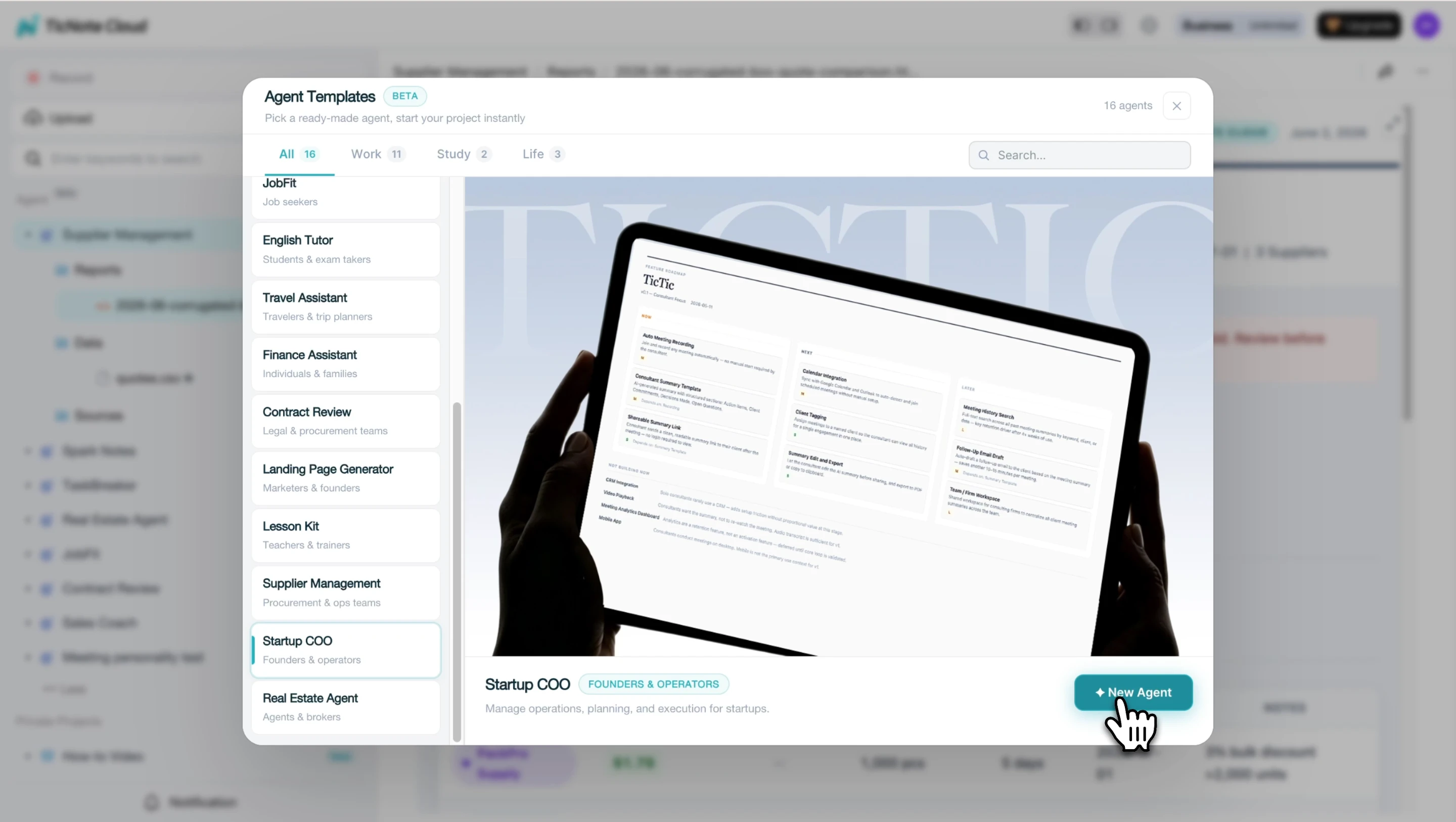
In TicNote Cloud, click Add Agent and browse the Skill Agent library. Find the Startup COO skill and select it to add it to your workspace. No configuration is needed: once added, the agent appears in your list and is ready immediately.
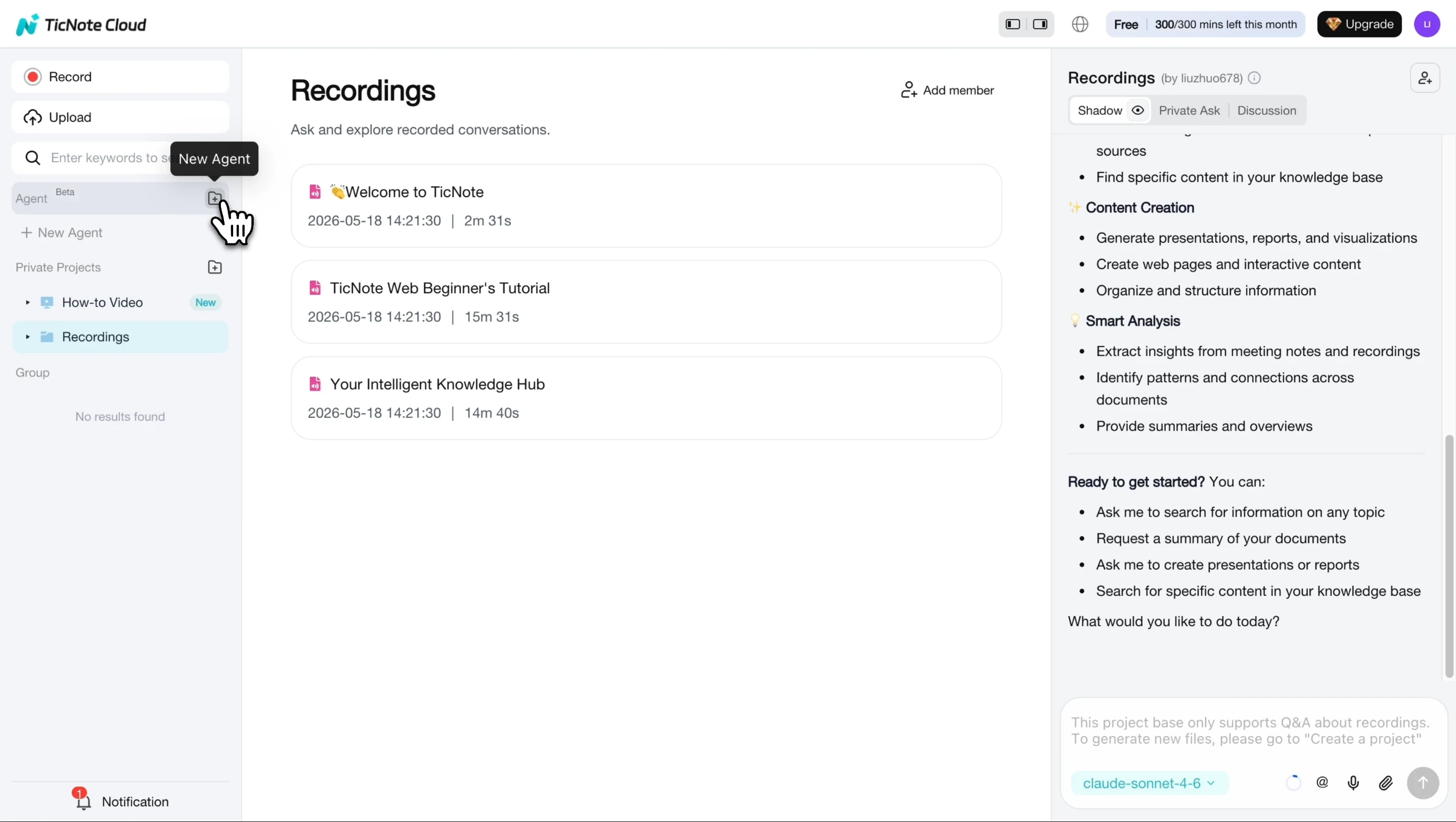
Once added, the Startup COO agent appears in your workspace and is ready to start.
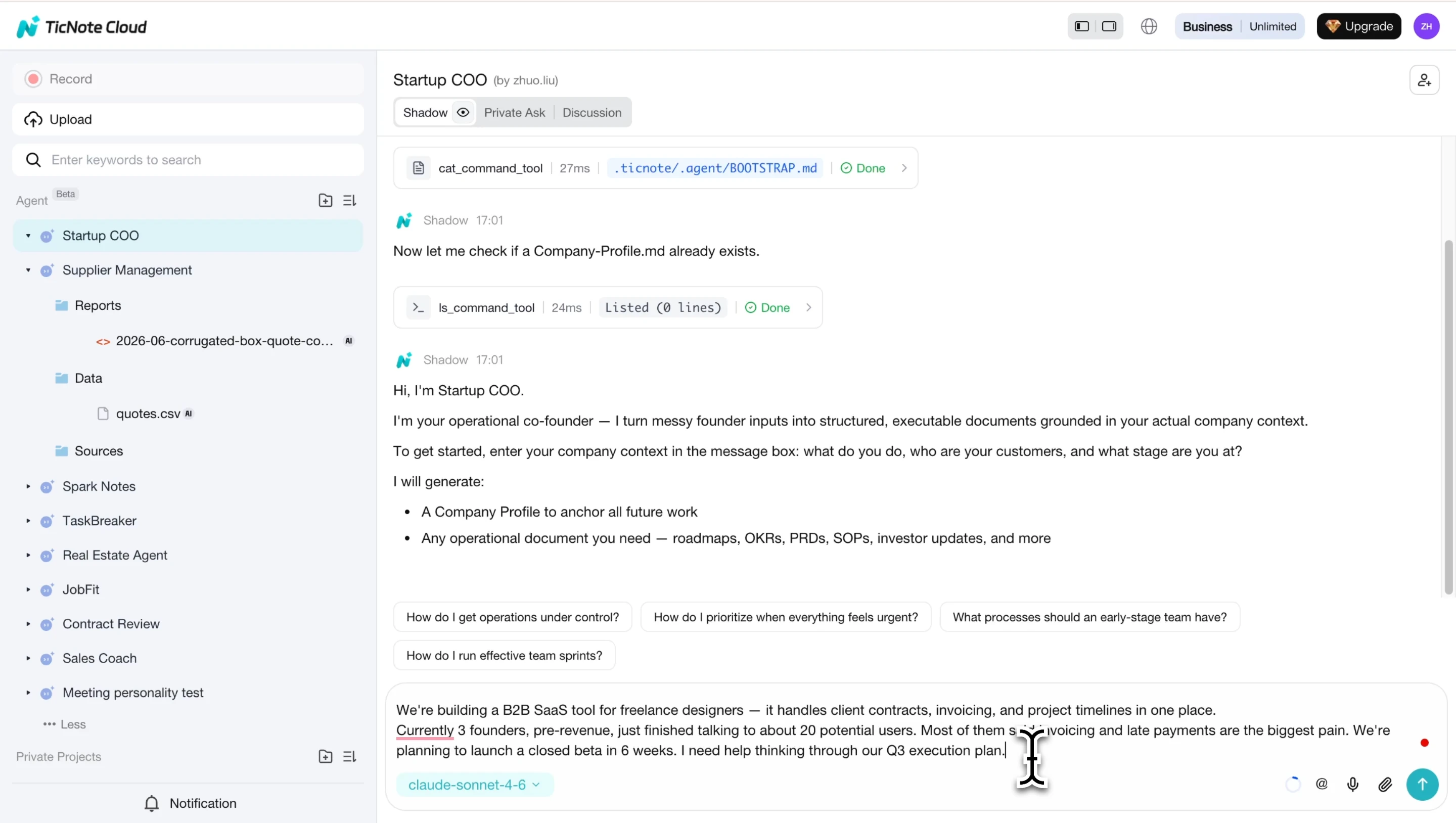
Step 2: Describe your company and request the PRD
Tell the agent what your company does, who your customers are, and what stage you're at. The skill saves this as a Company Profile, which it uses as the foundation for every document going forward. Then ask for what you need: a PRD, an execution roadmap, an investor update, or help organizing a set of meeting notes.
Step 3: Review the draft and answer follow-up questions
The skill generates an initial document and may ask follow-up questions to sharpen it. For a PRD, that might mean clarifying the pricing model, target user segment, or a specific feature scope. Review the draft and answer to get a more accurate final output.

Step 4: View the final document
Once you've provided full context, the skill generates the final version. Roadmaps and OKRs are rendered as visual HTML files you can share directly with your team or investors. Each document ends with a concrete next action, not a generic summary.
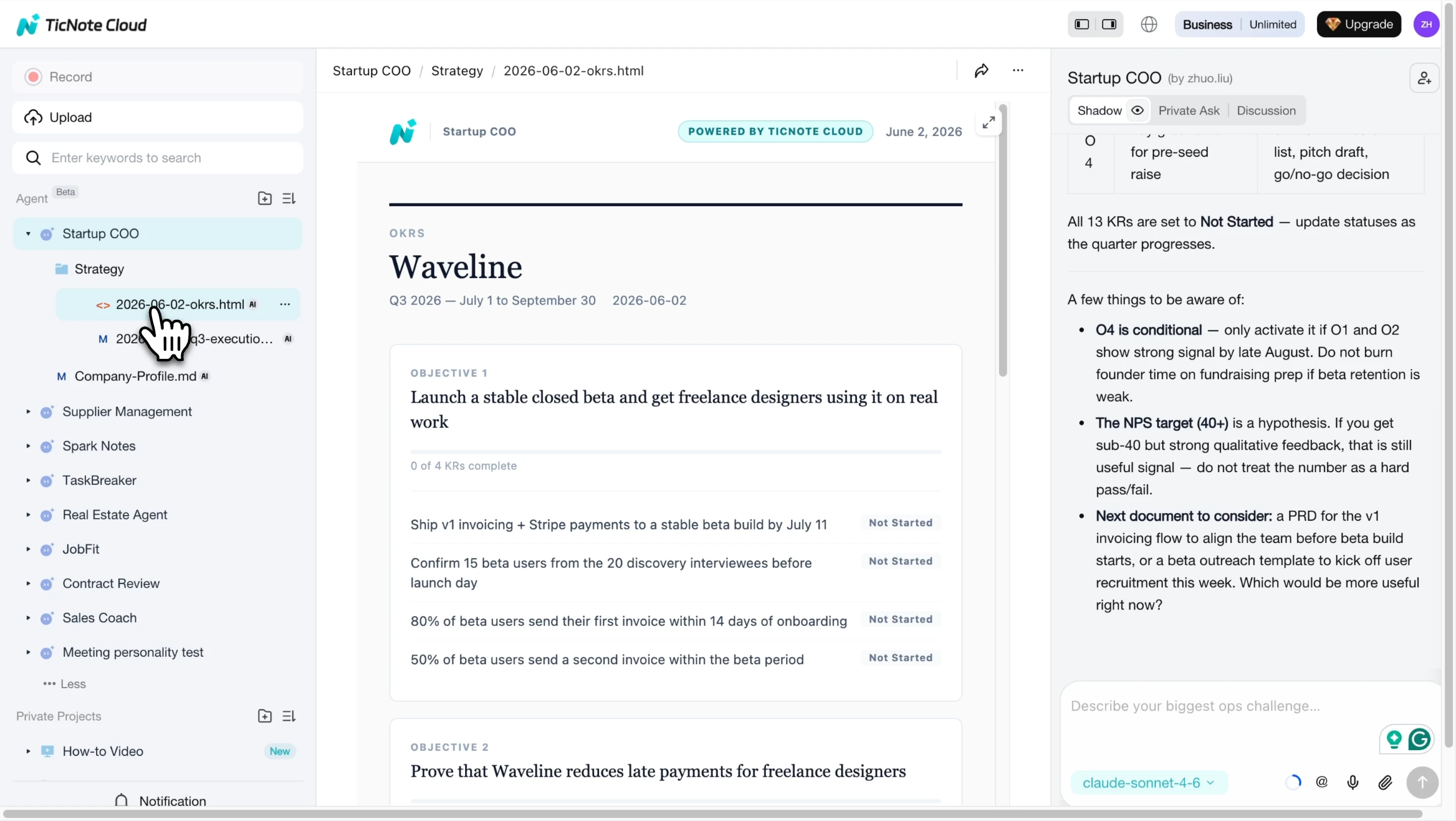
Step 5: Open and review the generated PRD
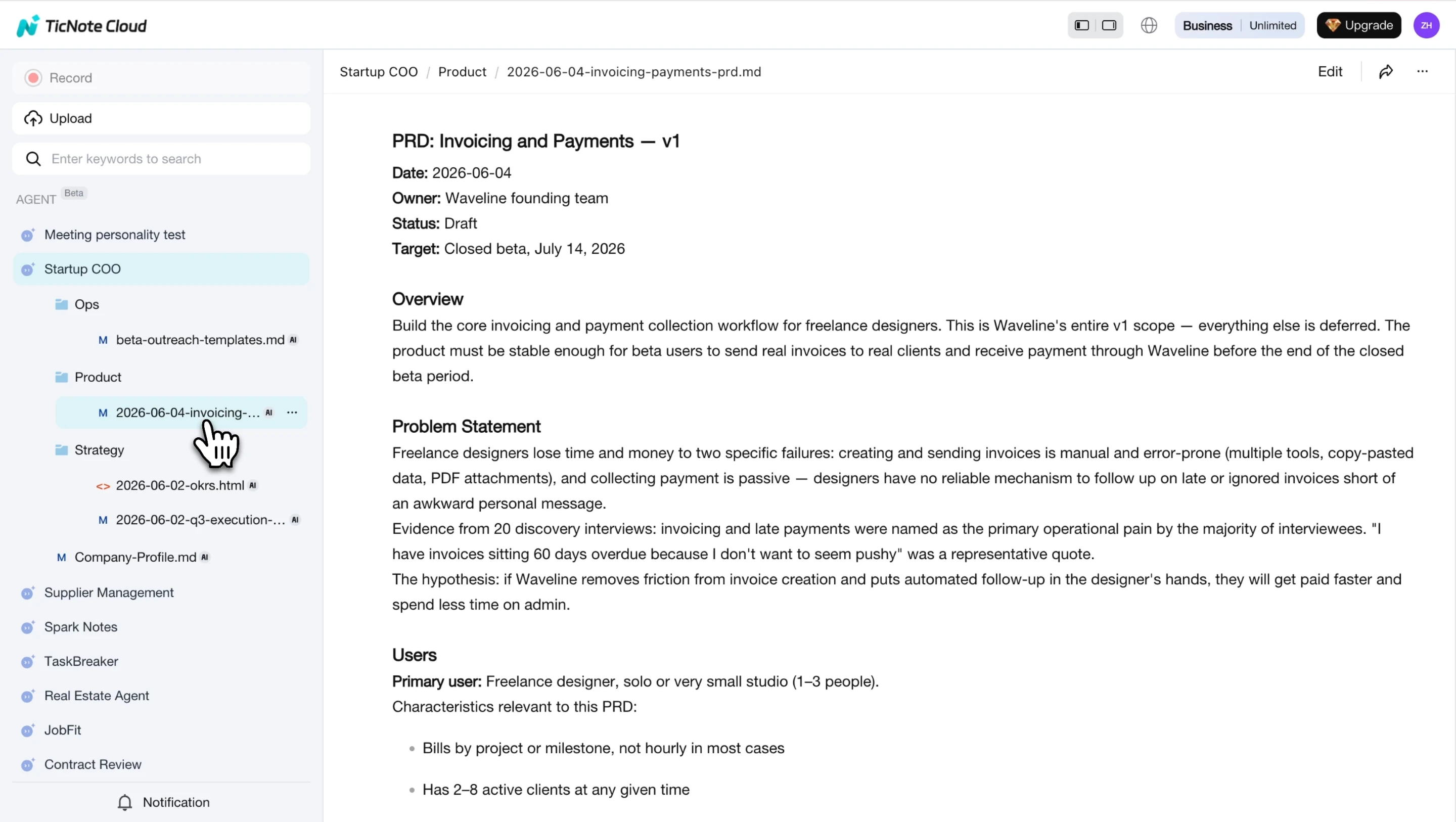
Product requirements documents are saved as Markdown files in the Product folder inside your Startup COO workspace. Open any file to read the full PRD, including Overview, Problem Statement, Users, and Feature Specs, directly inside TicNote Cloud.
For founders using TicNote Cloud on mobile, the App follows the same conversation flow: describe your company, request the document, answer follow-up questions, and the output is saved to your workspace automatically.
If you use OKRs alongside your PRD to track product goals, the Startup COO skill can generate both in the same session.
Why Generic AI Tools Struggle with PRDs
Generative AI is good at writing. It's less good at writing something specific to a company it doesn't know.
The context problem
Every useful PRD is specific: it names real users, real constraints, and real decisions that have already been made. A generic AI session has none of that. You can paste in a feature description and get back something that looks like a PRD, but the problem statement will be generic, the user personas will be invented, and the feature rationale won't connect to anything real. The output reads like it was written for a different company, because it was.
The completeness problem
Most AI PRD output is a skeleton. You get the section headers and a few bullet points under each one, but the actual reasoning is missing. There's no real problem statement, no clear user motivation, and no explicit tradeoff. A skeleton is useful as a template. It's not useful as a document you hand to an engineer or present to an investor.
The startup context gap
Enterprise PRD frameworks, written for teams with dedicated product operations and months of planning cycles, don't translate to a 3-person team moving fast. Knowing your competitors' positioning matters when writing a differentiated problem statement, but a standard AI PRD prompt won't ask for it. A good AI PRD tool for early-stage startups should output something a founder can act on in 48 hours, not a 30-page artifact that collects dust in a shared drive.
According to RAND Corporation, The Root Causes of Failure for Artificial Intelligence Projects (RRA2680-1), more than 80 percent of AI projects fail, twice the rate of non-AI IT projects, often because the implementation lacks the operational context needed to deliver specific, actionable outputs. PRD generation is a clear example: without persistent company context, every AI session produces the same generic output regardless of the tool.

Conclusion
A PRD that actually gets read is one that reflects your product, your users, and your current constraints. Generic AI can format one, but it can't ground it in a company it doesn't know.
TicNote Cloud's Startup COO builds that foundation from your first conversation: it saves a Company Profile and uses it to generate every document after that, so you're never starting from scratch again.



