


 Extension

TL;DR: Which AI note taker is best for capturing ideas?
AI note takers aren't just transcription apps anymore. I tested this category around one question: what helps you catch a thought fast, clean it up, and move it into real work without adding friction.
Wearable capture: TicNote Watch for one-tap thought capture and spontaneous conversations Structured voice memos: TicNote AI Voice Recorder for card-style capture, calls, and turning raw notes into usable drafts Bot-free privacy: Granola for local-feeling desktop meeting notes without a meeting bot Searchable archives: Fireflies.ai for team-wide search across a large meeting library Live transcription: Otter.ai for interviews, lectures, and seeing text appear in real time
In the full comparison, I break each tool down by capture moment, editing burden, privacy sensitivity, export destination, pricing, and setup friction. If you want the shortest answer, TicNote AI Voice Recorder is the best AI note taker for capturing ideas overall, while TicNote Watch is the best choice when speed and portability matter most.
Quick picks: the best AI note takers for capturing ideas
AI note taking has expanded far beyond meeting bots. I tested these picks for the moments when ideas actually show up: while walking, between meetings, during a hallway chat, or mid-call. If you want the short answer before the deeper breakdown, start here. I organized the picks by scenario, not by feature count, because capture speed matters more than a long checklist.
| Tool | Best for | Why it stands out | Main tradeoff | Starting price or known plan detail |
| TicNote Watch | Walking voice notes and wearable capture | Best fit when ideas hit on the move; the wrist button and Random Thought shortcut make hallway chats and quick thoughts easy to catch | Higher upfront hardware cost than apps | $249 hardware; includes Plus plan with 600 transcription minutes/month |
| TicNote AI Voice Recorder | Phone-call capture and portable voice memos | Better if you want a dedicated recorder for speaker conversations and calls; card-size hardware is easier to keep with your phone | Another device to carry | $159.99 hardware; includes Plus plan with 600 transcription minutes/month |
| Granola | Private bot-free desktop conversations | Strong for founders and consultants who want local-feeling desktop notes without adding a bot to the call | Less useful away from your laptop | Paid plan pricing varies |
| Fireflies.ai | Searchable team knowledge | Best when your goal is archive search across lots of calls, meetings, and follow-ups | More meeting-centric than spontaneous capture | Free plan available; paid tiers available |
| Otter.ai | Live transcription and interviews | Great for live captions, real-time transcripts, and spoken interviews where you want text immediately | Can feel less natural for informal capture | Free plan available; paid tiers available |
For a closer look at dedicated recording hardware, I found this guide on AI recorders for meetings, calls, and in-person notes useful context before comparing software-only tools.
Best-for matrix
- Best AI voice note taker for ideas: TicNote Watch for instant wrist capture when stopping to open your phone would kill the moment.
- Best AI note taker for brainstorming: Granola for desktop thinking sessions and private, bot-free conversations.
- Best AI note taker for voice memos: TicNote AI Voice Recorder if you want cleaner long-form memos and phone-call capture.
- Best wearable AI note taker: TicNote Watch.
- Best AI note taker with transcription and summaries: Otter.ai for live captions, TicNote for stronger hardware-first capture.
- Best AI note taker with Notion export: TicNote, thanks to direct export to Notion and Obsidian.
- Best private AI note taker for conversations: Granola on desktop; TicNote Watch if privacy and discreet in-person capture both matter.
Pricing normalization snapshot
Don't compare sticker price alone. Hardware tools combine a one-time device cost with an AI plan, while software tools usually start with a monthly subscription. With TicNote, the Watch costs $249 and the Voice Recorder costs $159.99, and both include the Plus plan with 600 minutes per month. If you need more, the hardware-user Pro plan is $79/year, about $6.58/month, and Business is $239/year, about $19.92/month. Compare cost per month and cost per minute, not just the first number you see.
5 best AI note takers for capturing ideas
Most lists in this category are really lists of meeting bots. That misses how ideas actually show up for solo professionals, creators, founders, consultants, students, and mobile workers: halfway through a walk, right after a client call, in a hallway chat, or while talking through a problem alone. So I ranked these tools capture moment first, then output quality, then workflow fit.
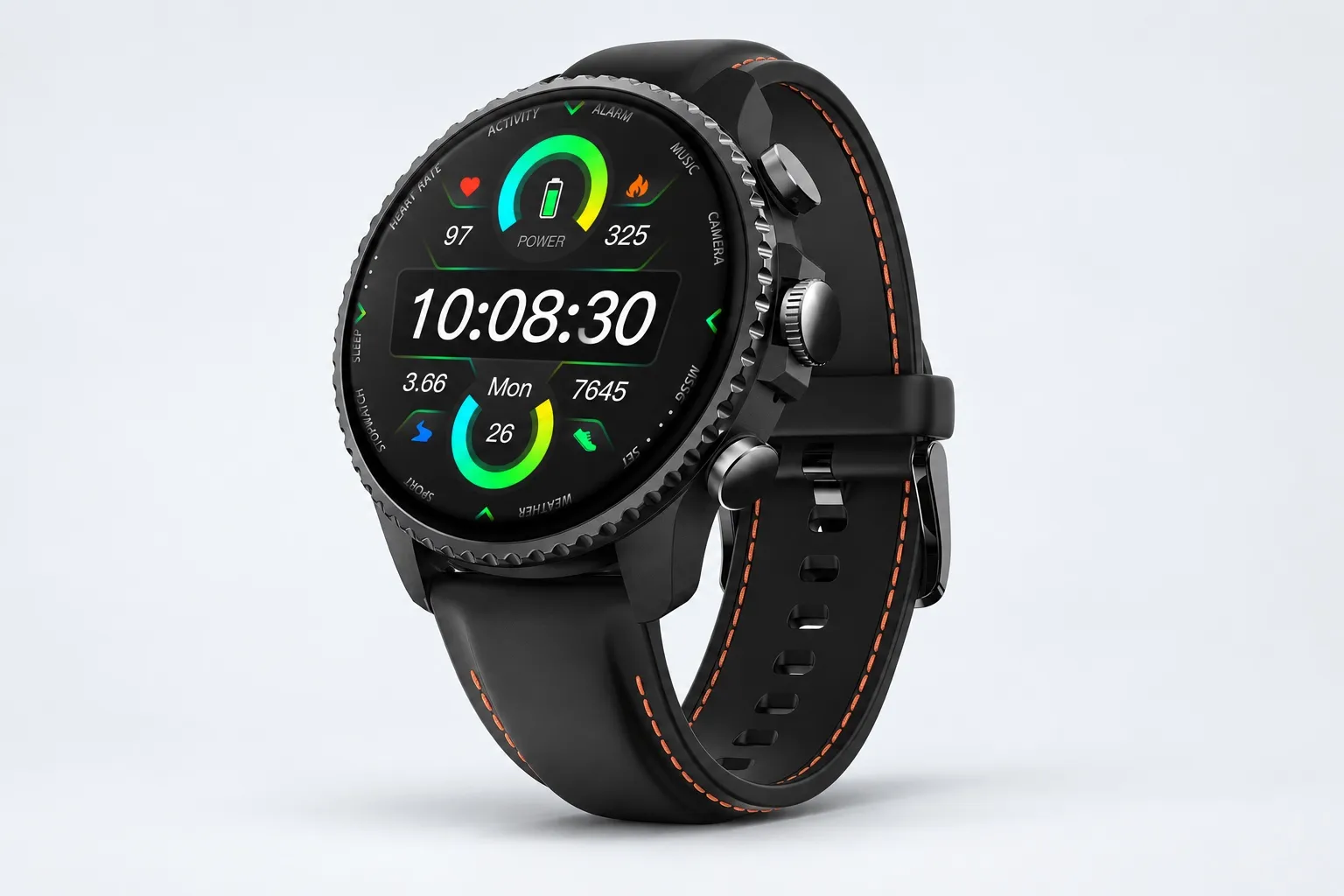
TicNote Watch: best for capturing ideas while moving
The hardest ideas to keep are often the ones that arrive when pulling out your phone would break the moment. I've had this happen walking between meetings, standing outside after a call, or in a quick conversation where reaching for a device feels awkward. A wrist-based recorder solves that better than an app because it's already there when the idea shows up.
That's where TicNote Watch stands out. It has a dedicated top recording button, and a double-tap Random Thought shortcut that captures a 60-second idea from any screen. Discreet Recording Mode keeps capture low friction, Bluetooth call recording handles both sides of a call with transcription, and live transcription appears on the wrist in 17 languages. The middle button also gives you One-Tap Highlight, which works offline and carries those markers into the transcript later.
If your workflow starts with spontaneous ideas and ends in notes you can actually use, wearable AI note capture for walking thoughts and hallway conversations is the clearest fit.
What makes it more than a recorder is what happens after capture. AI summary cards can show on the watch face, AI Journal builds a daily timeline and auto-tags Random Thought clips, and Shadow Recap links body-signal changes to recorded meetings so you can see which conversations spiked stress or drained energy. Add a READINESS score, 24-hour heart rate, SpO2, stress and sleep tracking, 100+ sports modes, built-in GPS, over 24 hours of continuous recording, dual omnidirectional microphones with 3 to 5 meter pickup, and exports to Notion and Obsidian, and it starts to look like a full idea-capture system rather than a single-purpose gadget. Mindmap and Spark Notes are especially useful if you want to turn raw voice notes into outlines, action items, or draft copy.
Key features
- Random Thought: double-tap from any screen to save a quick idea up to 60 seconds
- One-Tap Highlight: mark key moments offline and carry markers into the transcript
- AI Journal: builds a daily timeline and auto-tags Random Thought captures
- Shadow Recap: connects recorded meetings to changes in heart rate, stress, and sleep against your baseline
- READINESS: morning score based on sleep, heart rate, and stress
- Transcript with speaker identification and time stamps
- AI summary templates with 100+ formats
- Mindmap for turning messy conversation into structure
- Spark Notes for outlines, editorial drafts, and idea development
- Notion and Obsidian export
- Privacy controls including private-by-default storage, encrypted recordings, no model training on user data, and optional on-device processing
Pros
- Costs $249 and includes the Plus plan with 600 transcription minutes per month
- Records continuously for over 24 hours and lasts up to 14 days on standby
- Bluetooth call recording is built in, which is rare on a wearable
- Live transcription on the wrist supports 17 languages
- Lowest-friction option here for hands-free capture in motion
Cons
- 3 to 5 meter mic pickup is better for personal-range conversations than room-wide capture
- Single files cap at 5 hours before auto-segmentation
- If you mainly work at a desk, a wearable may be more device than you need
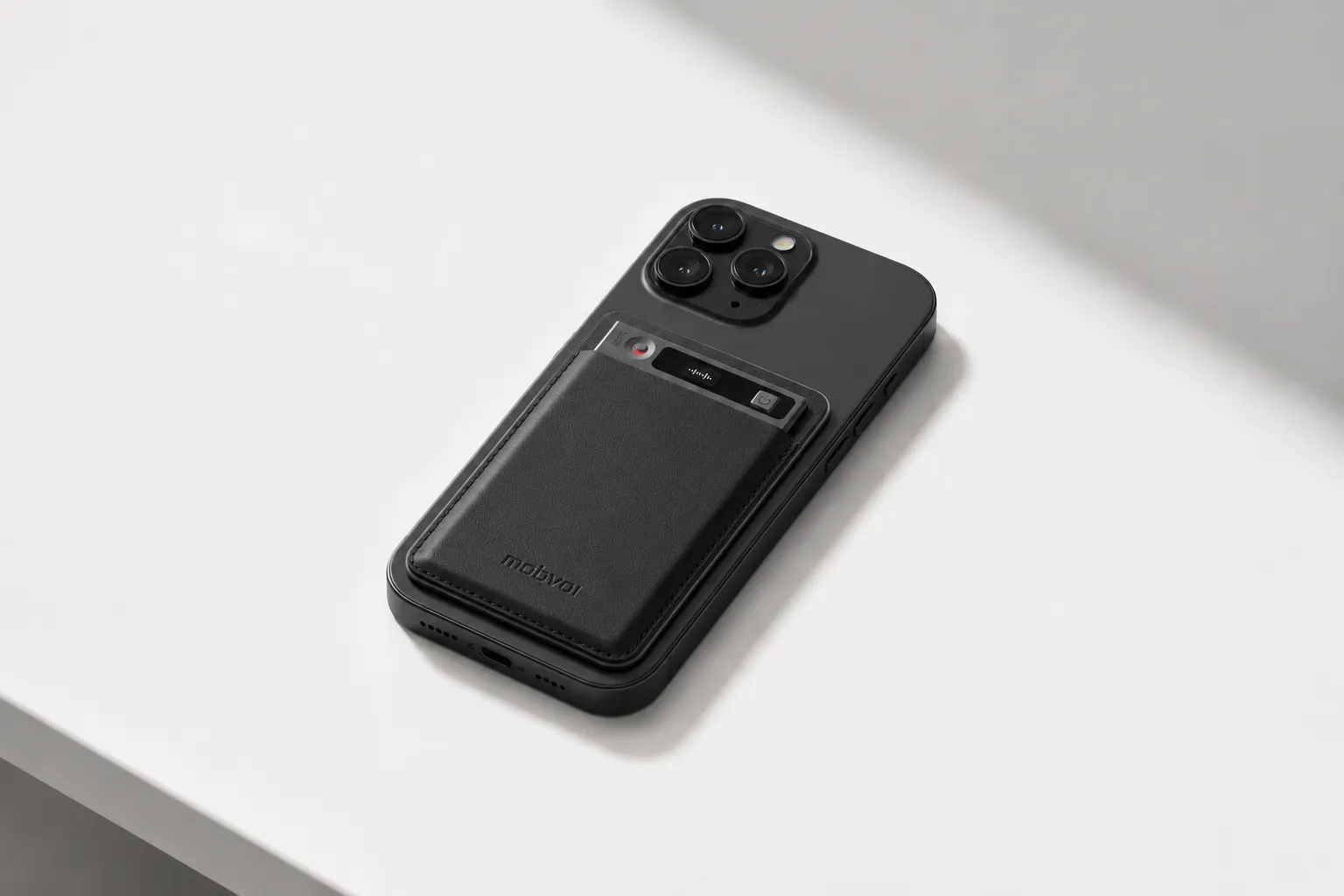
TicNote AI Voice Recorder: best dedicated recorder for ideas, calls, and long brainstorms
Some people don't want a smartwatch. They want one dedicated device that can catch ideas across calls, interviews, desk sessions, and long solo brainstorms without burning phone battery or getting buried in app clutter. That's where a card-style recorder makes more sense.
TicNote AI Voice Recorder is built for that use case. It stays with your phone, flips between Earphone mode for phone calls and Speaker mode for room capture, and uses a 3-mic array with up to 10 meter pickup. You also get 25-hour battery life, 64GB of local storage for roughly 434 hours, real-time transcription and translation, offline recording with later sync, time-stamped transcripts with speaker identification, and AI summaries built from 100+ templates.
If you want a hardware-first workflow without wearing a watch, a dedicated AI note-taking device for calls and longer sessions is often the simpler choice, and you can also explore the card-style recorder setup here.
This one also does more post-capture work than most voice recorders. Mindmap helps shape messy thinking, Aha Moment pulls out strong ideas, Ask AI lets you query recordings, Project Knowledge Base organizes related sessions, and Spark Notes can turn recordings into editorial calendars, outlines, and draft content. For people building articles, client deliverables, or course material from spoken notes, that matters as much as transcription quality. Notion and Obsidian exports and the same private-by-default, encrypted, no-training-on-user-data posture round it out.
Key features
- Earphone and Speaker modes for calls and in-room capture
- 3-mic array with up to 10 meter pickup
- 25-hour battery life
- 64GB storage for about 434 hours
- Transcript, speaker identification, and AI summary outputs
- Mindmap for structure after capture
- Spark Notes for turning recordings into outlines and drafts
- Project Knowledge Base for organizing idea streams by topic
- Notion and Obsidian export
- Privacy controls with encrypted recordings and no training on user data
Pros
- Costs $159.99, which is lower than most specialized hardware note devices
- Up to 10 meter pickup works better than a wearable for rooms and group brainstorms
- 25 hours of battery life supports long sessions and travel days
- 64GB local storage gives you months of recording headroom
- Hardware users get the Plus plan with 600 transcription minutes monthly
Cons
- Less discreet than a watch for hallway chats or walking thoughts
- You still need to carry a dedicated device
- Capturing an idea is not as instant as a wrist double-tap
Granola: best for private desktop brainstorming without a meeting bot
Granola fits a very specific moment: you're on a laptop, talking through ideas with a cofounder, client, or your own voice notes, and you want AI cleanup without dropping a bot into the conversation. For founders, consultants, and writers who spend most of the day at a desk, that lower social friction is the main reason to use it.
Where it works well is desktop privacy and post-call cleanup. You can keep the conversation more natural and still get structured notes afterward. Where it falls short is obvious: it isn't built for walking voice memos, wearable capture, or logging a thought the second it appears away from your computer.
Key features
- Bot-free capture for desktop conversations
- Strong desktop note cleanup and summarization
- Privacy-sensitive positioning for people who don't want obvious meeting automation
Pros
- Better fit than a meeting bot for sensitive desktop conversations
- Reduced social friction in client or founder discussions
- Good option if most idea capture happens at a laptop
Cons
- Weak fit for walking voice notes and on-the-go capture
- No wearable path for spontaneous hallway or outdoor ideas
- Less useful when you need instant logging away from a computer
Fireflies.ai: best for searchable meeting archives and recall later
Fireflies.ai is strongest when your ideas are spread across dozens of meetings and calls and the real problem is recall. If your week generates 10 to 20 conversations and you need to find the one sentence from three Tuesdays ago, searchable transcripts matter more than one-tap capture.
That's why I see Fireflies as an archive tool first and an idea-capture tool second. Its strength is searchable transcripts, summaries, and a large meeting archive workflow. It's much less natural when the job is saving a random thought in 8 seconds while you're moving.
Key features
- Searchable transcripts across many calls and meetings
- AI summaries and post-call notes
- Meeting archive workflow built for retrieval
Pros
- Strong shared knowledge retrieval across teams
- High value after lots of calls have accumulated
- Good for finding and reviewing old conversation details
Cons
- Less natural for random thoughts and solo brainstorming
- Not optimized for mobile-first, hardware-first idea capture
- Better after the conversation than during the moment of inspiration
Otter.ai: best for live transcription during interviews, lectures, and active brainstorming
Otter.ai is the pick when seeing words appear as they're spoken is the priority. In interviews, lectures, or active brainstorming sessions, live captions reduce memory load because you can verify phrasing in real time instead of trusting recall.
That said, live transcription doesn't automatically mean low-friction capture. In noisy environments, on walks, or in short hallway exchanges, software-only capture can still add enough setup friction that the moment passes.
Key features
- Live transcription during active conversations
- AI summaries after sessions
- Transcript review and search workflow
Pros
- Strong live capture for interviews and lectures
- Familiar workflow for people already using transcription apps
- Useful when you need to monitor wording as it happens
Cons
- Weak fit for wearable capture and hands-busy moments
- Less natural in hallway conversations and mobile contexts
- Higher friction than dedicated hardware when speed matters
Taken together, the five tools split cleanly by use case. TicNote Watch wins on capture moment and lowest device friction, TicNote AI Voice Recorder wins when you want longer sessions and better room pickup, Granola fits privacy-sensitive desktop talk, Fireflies.ai fits archive search, and Otter.ai fits live transcription. If your priority is catching ideas before they disappear, hardware-first options reduce editing burden and setup friction the most, while desktop and software-first tools make more sense when privacy sensitivity, transcript review, or archive search matter more than instant capture.
How I evaluated AI note takers for brainstorming, voice memos, and spontaneous conversations
Most roundups overrate meeting bots. That's fine if your work happens only on Zoom. It doesn't help when an idea hits while you're walking to the train, driving between appointments, or finishing the real conversation after the meeting ends.
Why most AI note taker lists miss idea capture
I evaluated these tools around messy, real moments. A founder leaving a client lunch with three usable angles needs speed, not a calendar bot. A consultant pacing while outlining a proposal needs low-friction voice capture. A student recording a memo after class needs searchable notes without 20 minutes of cleanup. That's also why it helps to understand when an AI note taker beats a basic voice recorder for in-person conversations instead of assuming they're interchangeable.
The 5 variables I used
Capture moment is how fast recording starts after the thought appears. Editing burden is how much cleanup the note needs before you can use it. Privacy sensitivity is whether the moment can tolerate cloud processing or visible recording. Export destination is where the note has to end up, whether that's Notion, Obsidian, or a searchable project base. Device friction is simple: is the tool already on your wrist, in your pocket, or trapped on a desktop?
Those five variables matter because idea capture is a speed problem first. If starting takes 15 seconds, many ideas are gone.
Quick comparison
| Tool | Works well when | Falls short when | Best for |
| TicNote Watch | you need to capture a thought mid-walk with a hardware button or double-tap Random Thought | you want the cheapest app-only option | consultant who captures ideas while walking |
| TicNote AI Voice Recorder | you want a pocket recorder with 25-hour battery, offline capture, and direct export to Notion or Obsidian | you want wrist-level speed | creator who wants card-style voice memos and Notion export |
| Granola | you want private-feeling desktop notes during calls without inviting a bot | the idea happens away from your laptop | founder who wants bot-free private desktop notes |
| Fireflies.ai | you need searchable call archives across recurring meetings | the conversation starts in a hallway or car | manager who needs searchable call archives |
| Otter.ai | you want live lecture or meeting transcription with strong real-time visibility | you need discreet capture in motion | student who wants live lecture transcription |
How to choose the right AI note taker for your capture style and workflow
The mistake I see most often is picking an AI note taker based only on transcription accuracy. That matters, but it's rarely the deciding factor. The real question is where your ideas show up, how many seconds you have to catch them, and what those raw notes need to become afterward: a searchable archive, a clean summary, or a usable draft.
Pick for the moment your ideas actually happen
If my best ideas hit while I'm walking, networking, or squeezing between meetings, I'd choose TicNote Watch. The reason is simple: double-tap Random Thought captures a passing idea in up to 60 seconds from any screen, so I don't need to unlock a phone or stop moving. One-Tap Highlight also helps mark the exact line that matters during a live conversation, and AI Journal plus Spark Notes can turn scattered fragments into outlines I can actually use later. If that's your pattern, Learn more about TicNote Watch for wearable idea capture use cases, especially if you want a wrist-first note-taking setup instead of another app buried on your phone.
If my ideas mostly come from calls, interviews, desk sessions, or longer voice memos, I'd switch to TicNote AI Voice Recorder. Earphone mode is built for phone calls, Speaker mode handles rooms, and 64GB with a 25-hour battery removes the low-grade anxiety of wondering whether the device will die halfway through a long day. For that use case, Explore TicNote AI Voice Recorder for card-style capture workflows.
Filter by privacy, retrieval, and live viewing needs
If privacy is your first filter, Granola makes more sense for bot-free desktop conversations. But if you still want dedicated hardware, TicNote is worth a serious look because its privacy position is clear: private by default, encrypted in transit and at rest, not used to train models, and user-controlled storage with on-device processing for key features.
If I needed a searchable archive across dozens of conversations, I'd lean toward Fireflies.ai for retrieval-heavy workflows. I'd choose TicNote Watch or TicNote AI Voice Recorder instead when I also need hardware-first capture and direct export to Notion or Obsidian.
If I need live words on screen during a lecture or interview, Otter.ai is the better fit. It's stronger for active real-time viewing than for low-friction, wearable, spontaneous capture.
Before you commit, test one real scenario, one export path, one privacy-sensitive conversation, and one full week of consistency. That short test will tell you more than any feature grid.
Conclusion: the best AI note taker is the one you will actually use in the moment
After testing this category, I don't think the winner is the app with the longest feature list. It's the tool that helps you capture the idea before it disappears, then turn that rough note into something usable with the least cleanup. If you want the fastest wearable capture, TicNote Watch is the strongest pick. If you need longer voice memos, phone calls, and structured sessions, TicNote AI Voice Recorder is the better fit, especially once its summaries, mind maps, and Spark Notes workflow turn raw audio into outlines and drafts. Granola is best for private desktop conversations, Fireflies.ai is best for searchable archives, and Otter.ai is best for live transcription. Before you buy, take 10 minutes to list the last three places you lost an idea, match each one to a capture method, and compare a dedicated note-taking device versus an app based on that real moment, not the flashiest demo.


