
 Extension


AI lecture tools have changed fast. I tested them for the parts that matter in class: capture quality, summary accuracy, export options, privacy, language support, and whether the app still helps when the lecture is over.
Quick picks: best device, TicNote; best budget, Otter; best for source-grounded study chat, NotebookLM; best for simple transcription, Trint; best for multilingual lectures, Notta; best for privacy-conscious device users, Plaud; best for turning recordings into notes and study guides, Coconote.
I'll break down the full weighted rubric, side-by-side comparison logic, pricing tradeoffs, privacy checkpoints, file and lecture-length limits, and scenario-based picks next.
Quick picks: the best lecture summarizer app options at a glance
If you want the answer before the deep dive, this is it. I picked these tools based on real lecture workflow needs like 60- to 90-minute class capture, study-note exports, multilingual transcription, and whether the app actually helps after class, not just during recording.
- Best device for students who want lecture capture plus study outputs: TicNote Lite AI Voice Recorder. Best if you record 60- to 90-minute classes and want a summary as soon as class ends, with one-press recording, a $129.99 price, 25-hour battery, about 28 hours of local storage, AI summaries, mind maps, quiz and study-guide generation in interactive HTML, Notion and Obsidian export, and 120+ language transcription and translation support.
- Best for premium long-term storage and heavier class loads: TicNote AI Voice Recorder. Best if you also record seminars, interviews, and long workshops, with a $159.99 price, 64GB storage for about 434 hours, 25-hour battery life, offline recording with later sync, searchable transcripts, AI summaries, and Lesson Kit for turning lectures into study materials.
- Best for source-grounded study chat after class: NotebookLM. Best if you already have slides, PDFs, and readings and want summaries tied back to uploaded sources, but it fits document-heavy review better than live lecture capture.
- Best for quick lecture transcription and meeting-style notes: Otter. Best if your priority is a live transcript and searchable text during class, and you care less about deeper study outputs like quizzes or structured review packs.
- Best for multilingual lecture transcription and note organization: Notta. Best for language-heavy courses and cross-language review when you need transcription and organized notes across multiple languages.
- Best for simple recorder-to-summary use: Plaud Note. Best if you want dedicated capture hardware and a straightforward path from recording to summary without building a larger study workflow.
- Best free-style starter option: TicNote free plan. Best if you want app-only testing before buying hardware, with $0 pricing and 300 minutes per month, but no recorder is included.
If you want a closer look at AI tools for recording lectures and turning them into study notes, that comparison fills in the workflow details behind these picks.
How I evaluated each AI note taker for lecture summaries
Most "best AI tools summarize lecture" lists don't help students because they judge apps like generic transcription software. That misses the real job. If I'm dealing with a 75-minute biology lecture before a quiz, I don't just need a clean transcript. I need a tool that cuts rewatch time, keeps the professor's examples attached to the right concepts, and exports notes into the apps I already study from.
Focus on study value, not just transcript quality
A transcript is only the raw material. The useful output is what happens next: can I jump to the section on cellular respiration, pull out the professor's exam hint, and turn the recording into a summary, mind map, or quiz in under 10 minutes?
That's the gap most comparison roundups miss. Students don't buy lecture summarizers to admire punctuation accuracy. They use them to review faster, find likely test points, and avoid replaying the same hour-long class twice.
Use 4 variables that match the real student workflow
I scored every tool on four weighted decision factors.
- Capture reliability (35%): Does it handle live lectures, weak classroom audio, long recordings, and offline capture without failing?
- Study-output quality (30%): Does it produce summaries that are actually useful for review, plus extras like structured notes, mind maps, quizzes, or study guides?
- Review workflow fit (20%): Can you search transcripts, sync across phone and desktop, and export into tools like Notion or Obsidian?
- Privacy and consent fit (15%): Does the tool give you control over storage, offline capture, and recording behavior that fits classroom rules?
These four criteria drive every recommendation in this guide.
Compare the tools side by side
| Tool | Works well when | Falls short when | Pricing entry point | Privacy notes | Best for |
| TicNote Lite AI Voice Recorder | You want affordable hardware for live classes and quick study outputs | You need maximum onboard storage for months of lectures | $129.99 | Offline capture available; self-claimed encryption and no AI training on user data | Budget student |
| TicNote AI Voice Recorder | You record lots of long lectures and want summaries, mind maps, and exports | You only want app-only software with no device cost | $159.99 | Offline capture plus self-claimed end-to-end encryption | Heavy lecture load student |
| NotebookLM | You already have slides, PDFs, and readings to combine with lecture material | You need dependable live lecture capture hardware | Often free with Google account access | Cloud-based; check institutional policy before uploading class files | Document-heavy grad student |
| Otter | You want real-time transcription and searchable lecture notes | You want stronger study outputs beyond summaries | Free plan available | Cloud processing; review retention settings carefully | Seminar note-taker |
| Notta | You attend multilingual classes and need translation support | You want deeper study-guide generation | Free plan available | Cloud-based; verify storage region and sharing settings | Multilingual learner |
| Plaud Note | You prefer dedicated hardware for portable recording | You need more flexible exports or lower hardware cost | Around $159 | Hardware plus cloud workflow; check vendor privacy terms | Mobile-first student |
Check consent before you hit record
Before recording any class, confirm three things: your lecturer allows it, your course or campus policy permits it, and your local law allows the type of consent required for recording. Some places follow one-party consent, while others require all-party consent.
That checkpoint matters as much as features. A lecture summary tool is only useful if you can use it without violating classroom rules or privacy expectations.
7 best AI tools to summarize lecture recordings and class notes
AI lecture tools have split into two camps: apps that mostly turn audio into transcripts, and devices plus apps that actually help you study afterward. In this comparison, I'm focusing on what happens after class: can the tool capture a crowded lecture hall, turn a 60-minute recording into usable notes, and export the result into the system where you already review, quiz yourself, or build study guides? Brand products appear first here because they match that hardware-plus-summary workflow most directly, then I move into app and recorder alternatives based on how well they fit real student use.
TicNote Lite AI Voice Recorder: Best for budget-conscious students who want a dedicated AI tool for lecture notes without paying flagship prices
If I were taking four 60-minute lectures a week, my main problem wouldn't be recording audio. My phone can already do that. The real problem would be remembering to start each class, getting clean enough sound from the middle rows, and turning four hours of raw audio into review notes before the next quiz. That's where a low-cost dedicated recorder makes more sense than another app tab I forget to open.
TicNote Lite fits that workflow because it's simple on the front end and more useful on the back end. You press once and it starts recording, with no mode switch to think about, and the 3-mic array is rated to pick up voices from up to 10m away. If that sounds like your setup, you can Learn more about TicNote Lite AI Voice Recorder and see how the device-plus-app workflow works in practice.
What convinced me this is more than a cheap recorder is what happens after class. It can record offline, then sync when you reconnect, which matters if campus Wi-Fi drops out. From there, it generates an AI summary, a mind map, and follow-up answers through Ask AI or Shadow AI, so you can ask things like "What did the professor say about enzyme inhibition?" instead of scrubbing through a full transcript. It also creates interactive HTML outputs for quizzes and study guides, exports notes to Notion and Obsidian, and uses the Lesson Kit skill to turn recordings and uploaded files into lesson-style outputs you can actually study from.
The tradeoff is storage. With 4GB local storage, you get about 28 hours of audio. For a student recording roughly four hours a week, that's several weeks of headroom if you sync regularly, but it's much smaller than the flagship model. If you want a closer look at dedicated AI note-taking devices for lectures and calls, this is the kind of entry-level option that makes sense when price matters more than massive storage.
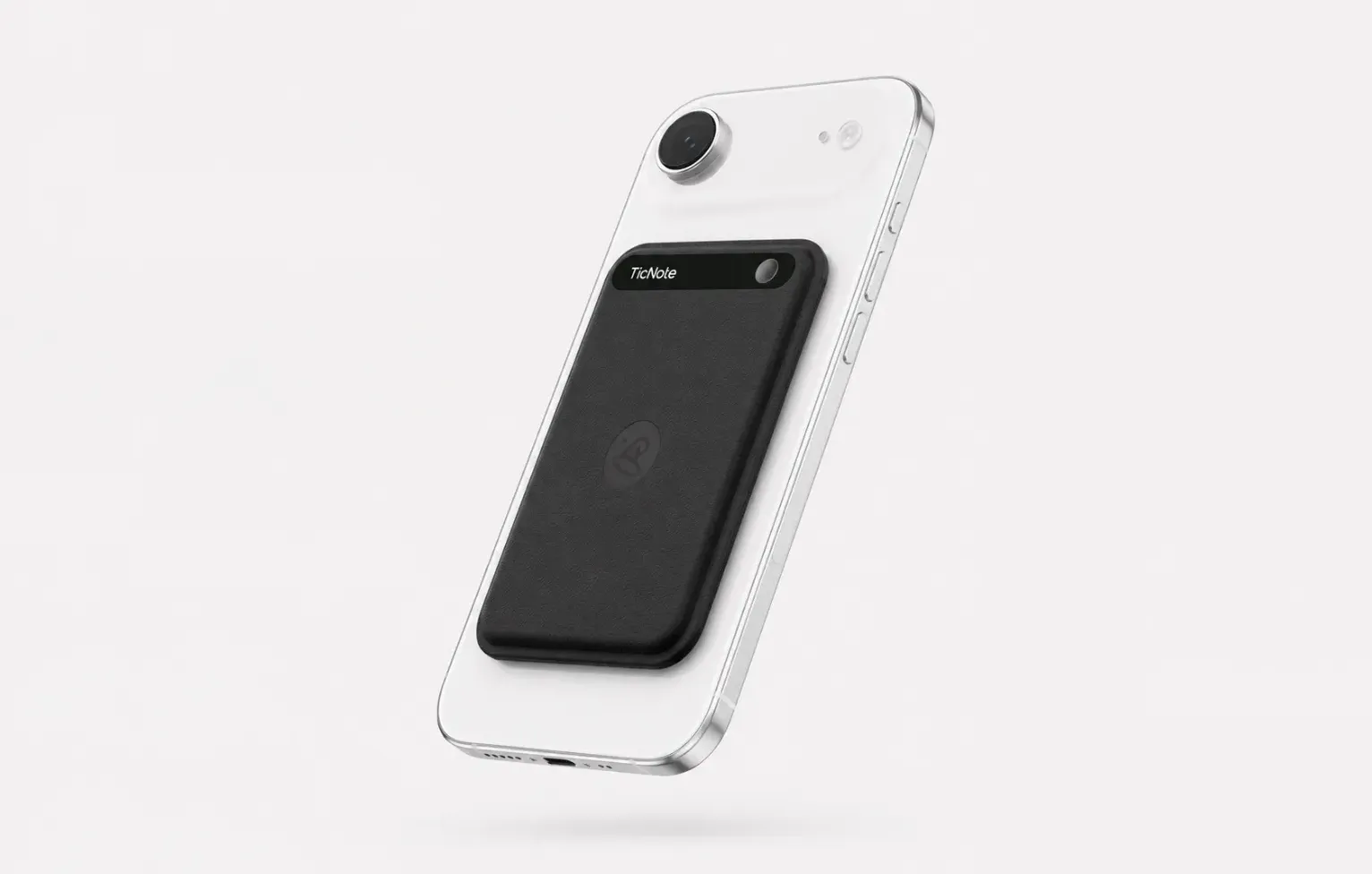
Key features
- One-press recording: fast enough to start before the professor gets through the first slide — no mode switching, no app to open
- 3-mic array with 10m pickup: captures the professor from the back row of a 200-seat lecture hall, not just from arm's length
- 25-hour battery: covers a full week of classes on one charge
- Offline recording with sync on reconnect: works in basement classrooms and older buildings with weak Wi-Fi, syncs when you're back online
- AI summary and mind map: turns a 75-minute lecture into a structured review sheet you can actually study from
- Ask AI: ask "what did the professor say about enzyme inhibition" instead of re-listening to the whole lecture
- Interactive HTML outputs: turn recordings into quizzes and study guides for exam prep
- Export to Notion and Obsidian: your lecture notes live where your study notes already are
- Lesson Kit skill: turns recordings into lesson-style study materials
Pros
- Lower hardware cost than flagship devices at about $129.99
- Easier to use than app-only tools when you just want one-tap lecture capture
- Strong post-class outputs for students, not just transcript storage
- Works even when you record offline during class and sync later
Cons
- 4GB storage is small compared with premium recorders
- Best experience depends on syncing to the app and cloud features after class
- Students recording long seminars all term may outgrow the storage faster than expected
TicNote AI Voice Recorder: Best for students who record long lectures, seminars, interviews, and multilingual classes and need more storage headroom
Some students can get by with a few hours of weekly capture. Others can't. If you're a grad student recording 90-minute seminars, advisor meetings, field interviews, conference sessions, and guest lectures in the same month, running out of space is not a minor inconvenience. It means missed material you can't recreate.
That's why the flagship TicNote model is the safer choice for heavy academic use. The big difference is 64GB of storage, which the company lists as about 434 hours of audio. Pair that with a 25-hour battery and offline recording, and you get the kind of margin that lets you record first and organize later. If that sounds closer to your term, Explore TicNote AI Voice Recorder.
Its fit gets stronger when classes or research cross languages. The recorder supports real-time transcription and translated subtitles, with 120+ languages for transcription and translation and 17 live languages. After class, you get searchable time-stamped transcripts with speaker identification, summary templates, mind maps, interactive HTML study outputs, and the Project Knowledge Base for grouping recordings by course or research project. I also like that Lesson Kit can turn recordings and files into lesson-style materials, while Notion and Obsidian export keeps the notes inside a real study workflow instead of a dead-end app folder.
This one isn't for everyone. The extra storage may be overkill if you only record one or two classes a week, and some of the smartest workflows are tied to app or cloud use rather than the hardware alone. But if your biggest fear is losing content because your recorder filled up halfway through the semester, this is the strongest fit in the category.
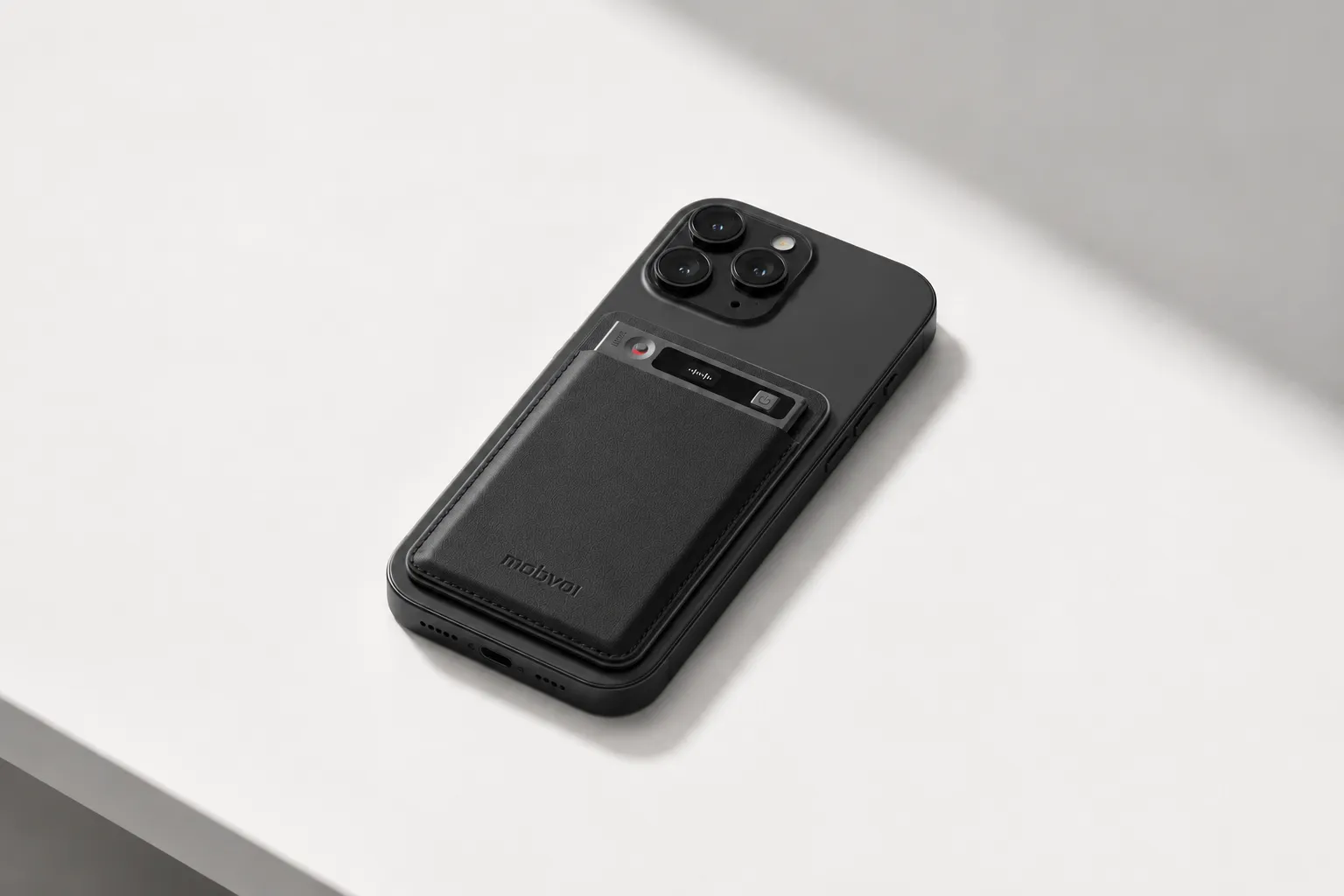
Key features
- 64GB storage for about 434 hours: enough for a full semester of lectures, seminars, and research interviews without worrying about space
- 25-hour battery: covers a full week of heavy recording on one charge
- 3-mic array with 10m pickup: captures the professor from the back row of a large lecture hall
- Real-time transcription and translated subtitles: follow along in 120+ languages during class, review in 17 live languages
- Offline recording with later sync: record in basement classrooms or field sites, sync when you're back online
- Searchable time-stamped transcripts with speaker identification: find exactly when the professor said "this will be on the exam" and who asked that question
- AI summary and mind map: turns a 90-minute seminar into a structured review sheet
- Interactive HTML study outputs: turn recordings into quizzes and study guides for exam prep
- Project Knowledge Base: group recordings by course or research project, search across all of them at once
- Lesson Kit skill: turns recordings into lesson-style study materials
- Export to Notion and Obsidian: your lecture notes live where your study notes already are
Pros
- Much more storage headroom than budget recorders
- Strong choice for multilingual lectures and research interviews
- Better suited to busy academic terms with many long recordings
- Search, summaries, and exports make recordings easier to reuse in study systems
Cons
- Higher upfront price at about $159.99
- 64GB storage is unnecessary for lighter users
- Some advanced workflows depend on app/cloud features, not hardware alone
NotebookLM: Best for graduate students who already have lecture slides, PDFs, and readings and want source-grounded summaries after class
NotebookLM works best when my lecture is only one source among many. If I already have the professor's slides, three journal articles, a PDF chapter, and my own class notes, I can upload the full set and ask focused questions before an exam. That makes it especially useful for graduate students and document-heavy courses where synthesis matters more than raw recording.
Its strength is source-based synthesis. Instead of summarizing a lecture in isolation, it can generate overviews, study questions, and answer prompts grounded in the materials you uploaded. That's a real advantage when you need to compare what the professor said in class with what the assigned reading actually argued.
The limitation is obvious: it's not an in-pocket live lecture capture tool. You still need another device or app to record audio in class, and its workflow is much weaker when the starting point is noisy live audio rather than organized course documents.
Key features
- Upload PDFs, slides, notes, and other class materials: combine all your course materials in one place
- Source-grounded summaries and Q&A: answers are tied back to the uploaded materials, reducing hallucination risk
- Study guide and Q&A generation: useful for exam prep across multiple materials
- Multi-document reasoning: helps when one topic spans readings and lecture notes
Pros
- Excellent for document-heavy classes and seminar prep
- Helps reduce hallucination risk by grounding answers in uploaded sources
- Good for exam review and synthesis tasks
Cons
- Not built for hardware-free live lecture recording in your pocket
- Audio-first workflows feel secondary
- Less useful if your main problem is capturing lectures in real time
Otter: Best for students who want a familiar lecture transcription and summary tool with searchable notes
Otter makes sense for students who mostly want a known transcription app that can turn live or recorded lectures into searchable text. If my main goal were to find the exact minute when a professor defined a term or assigned homework, Otter would be on the shortlist.
Where it helps is speed and familiarity. You record, get a transcript, search it later, and pull a basic summary. That's enough for many students, especially in smaller classes or when the lecturer speaks clearly.
Where it starts to feel limited is the study layer. The product has long been shaped around meetings, and that shows. It's useful for searchable notes, but less tailored than lecture-first tools that create mind maps, study guides, or quiz-style outputs.
Key features
- Live transcription and recorded audio transcription: capture lectures as they happen or upload recordings later
- Searchable notes and speaker-separated transcripts: find the exact minute when a professor defined a term
- Basic summaries and highlights: quick review after class
- Cross-device access: review on phone, laptop, or tablet
Pros
- Familiar interface and broad adoption
- Good for search-first transcript review
- Fast setup with no extra hardware
Cons
- Feels more meeting-oriented than study-oriented
- Summary outputs are less academic and less structured for revision
- Phone or laptop mic quality can limit lecture-hall capture
Notta: Best for multilingual learners who need lecture transcription and summary across languages
Notta fits bilingual and international students who attend lectures in one language and revise in another. If I were taking a course in English but reviewing key concepts in Japanese, Spanish, or another language later, language flexibility would matter as much as note quality.
That's where Notta stands out. It's designed around transcription, translation support, and multi-language workflows, which can help when your class language, reading language, and study language don't match. For international programs, that's not a niche use case. It's daily life.
The tradeoff is that its study outputs can feel more generic than tools built around academic review. You may get good transcripts and summaries, but not the same level of lecture-specific outputs like lesson-style guides or quiz-ready pages.
Key features
- Multilingual transcription and translation support: attend lectures in one language, review in another
- Summary features for recorded and live content: quick review after class
- Searchable transcripts across devices: find key moments from any device
- Useful for bilingual review workflows: bridge the gap between class language and study language
Pros
- Strong fit for multilingual learners
- Good for reviewing lectures across languages
- Easier than manually translating class notes
Cons
- Study outputs may feel less academic than specialized tools
- Better for transcription and translation than deep study conversion
- Capture quality still depends on your recording setup
Plaud Note: Best for students who prefer a dedicated recorder for classes and interviews
Some students simply don't want to trust a phone mic in a 200-seat lecture hall. That's the user Plaud Note is built for: someone who wants a separate device for classes, interviews, or field conversations without holding a phone up and hoping for the best.
A dedicated recorder can improve consistency because it separates recording from the distractions on your phone. That matters if you're interviewing participants for research one day and recording lectures the next.
I'd still keep the recommendation cautious here unless you've verified the exact current feature set and pricing for your market. Plaud is attractive when hardware is the priority, but students should check how well its software outputs match study needs rather than assuming all AI recorders produce equally useful notes.
Key features
- Dedicated recording hardware: better for physical classrooms than browser-only tools
- Designed for portable capture beyond phone-only recording: no app to open, no phone to hold up
- Supports AI-assisted transcription and summary workflows: post-class review
- Useful for lectures and interviews: one device for multiple academic scenarios
Pros
- Better fit than a phone mic for large rooms or field use
- Dedicated device can reduce missed recordings
- Good option for students who want hardware first
Cons
- Feature depth and pricing should be verified before recommending strongly
- Study outputs may vary by plan and software workflow
- Hardware value depends on how often you actually record offline or in person
A free or low-cost app option: Best for students testing whether an AI lecture summarizer fits their study habits
If you're not sure an AI lecture summarizer belongs in your workflow, start with a verified free or low-cost app tier before buying hardware. The key is verification: only trust this slot if the app's current free limits, transcription minutes, and summary features are clearly documented at drafting time.
If that information isn't reliable, the safer comparison is simple. App-only free plans lower the barrier to entry, but they usually cap minutes, features, exports, or file handling. Dedicated devices cost more upfront, yet they solve a different problem: dependable capture in class, offline recording, and better audio from farther away.
In student terms, pricing comes down to whether you want to pay once for dependable capture, or keep paying for software minutes while still relying on your phone or laptop microphone. Hardware options ask for a bigger upfront spend, but recurring software costs can overtake that over a semester or two if you transcribe long lectures every week.
How to choose the right AI tool for lecture notes and study review
The right pick usually comes down to what you need after class, not during it. If your goal is a 2-minute recap before the bus ride home, your best tool looks different from one built for searchable transcripts, quiz generation, or privacy-first recording.
Pick TicNote Lite if live lectures are your main workflow
If I attend class in person and want the least friction, I'd choose see the TicNote Lite AI Voice Recorder. One press starts recording, summaries are ready right after class, and I can export notes straight to Notion or Obsidian. For students who don't want to fiddle with phone settings every lecture, that matters more than having the deepest archive.
Choose TicNote AI Voice Recorder for heavy lecture loads
If you're recording 90-minute seminars, research interviews, or a full semester of classes, TicNote AI Voice Recorder is the better fit. Its 64GB storage holds about 434 hours, which is enough for months of lectures, and the Project Knowledge Base plus Ask AI workflow makes old recordings searchable later. That's especially useful in multilingual classes where you may need transcript retrieval weeks later, not just a same-day summary.
Go with NotebookLM when your real source material is documents
Some study workflows start with slides, readings, and handouts, then use lecture audio as backup. In that case, NotebookLM makes more sense because source-grounded Q&A is the real value. If you're comparing dedicated recorder devices vs note-taking apps for that kind of workflow, the gap becomes obvious fast.
Use Otter for searchable class transcripts
If your main need is searchable text from class, Otter is still one of the simplest choices. I'd pick it when transcript search matters more than hardware, export flexibility, or offline capture.
Use Notta for cross-language review
If you switch between English lectures and classes in another language, Notta stands out for multilingual transcription and summaries. Here, language support matters more than whether the tool is a phone app or a recorder.
Consider Plaud Note if you want recorder-first hardware
Plaud Note is the other obvious recorder-first option. I'd look at it if you want dedicated hardware but are still comparing capture style, storage, and app experience.
Compare costs and privacy before you commit
Budget matters. A one-time recorder purchase can cost less over a school year than a monthly app subscription, especially if you record 8 to 12 lectures a week. TicNote also has a $0 free plan with 300 minutes per month for testing, and hardware users get the included Plus plan with 600 minutes per month.
Before you record, check four things: professor permission, campus policy, local consent law, and whether offline recording or encrypted storage matters for your course. FERPA is a student privacy law in the U.S., and consent rules vary by state, so this step isn't optional.
Conclusion: the best AI note taker depends on your study workflow
After testing this category, I don't think the best lecture summarizer is the one with the longest feature list. It's the one that turns a 60- to 90-minute class into 5 minutes of usable review before a quiz, office hour, or lab. That usually puts students into three camps: device-first tools for dependable in-class capture, app-first tools for document-heavy review, and multilingual tools for classes where transcription and translation both matter.
If your biggest problem is missing details in the room, a hardware-led option like TicNote makes more sense than a basic phone recorder because it captures offline, transcribes, and turns lectures into summaries, mind maps, and even quiz-style outputs in one workflow. If your bottleneck is organizing slides, PDFs, and readings after class, an app-first tool can be a better fit. If you regularly switch between languages, prioritize translation accuracy and subtitle support over extra AI extras. This is also where the tradeoff in AI note takers versus simple voice recorders becomes practical, not theoretical.
My advice is simple: choose based on capture style, summary depth, export needs, privacy comfort, and what the tool will cost across a 15-week semester, not on novelty. In the next 10 minutes, list the last three lectures you struggled to review, decide whether the real problem was capture, summarization, or organization, and shortlist two tools that directly fix that bottleneck.
TicNote Lite AI Voice Recorder