


 Extension

TL;DR: the best earbuds for meetings by work scenario
I might start the day on a 45-minute Zoom check-in from my home office, take a client call while walking between buildings at lunch, then scramble to remember action items from a multilingual in-person meeting by 5 p.m. That's why the best meeting earbuds aren't always the best-sounding ones for music. For work, microphone consistency, fast device switching, all-day comfort, and what happens after the call matter more.
My short list is simple: TicNote Pods Wi-Fi for remote users who want meeting capture without paying for 4G, TicNote Pods 4G for mobile professionals who need live summaries away from Wi-Fi, Jabra Elite 10 Gen 2 for all-around work calls and comfort, AirPods Pro 2 for Apple-heavy setups, Galaxy Buds3 Pro for Samsung and Windows users, and Sony WF-1000XM5 for noisy commuting plus calls. If you mostly need reliable calls, go mainstream. If you need recordings, transcripts, summaries, or translation, the best earbuds for meetings are TicNote Pods.
Quick picks: best earbuds for Zoom meetings, Teams calls, commuting, and AI note taking
The earbud category changed fast. I'd now split the best picks by meeting job, not by generic sound quality, because the right answer for Zoom at a desk is different from the right answer for commuting, multilingual meetings, or calls where the real pain starts after you hang up. If you want the skimmable version first, this is it.
| Product | Best for | Why it stands out | Main trade-off | Starting price | |
| TicNote Pods Wi‑Fi | Remote workers who want earbuds for Zoom meetings plus transcripts, summaries, and translation | Earbuds mode works for online meetings, case mode works for in-person meetings, automatic call recording, real-time transcription in 17 live languages and 120+ after recording, sync-based workflow, 22-hour battery | No built-in 4G, so uploads depend on Wi‑Fi or later sync | $249.99 | |
| TicNote Pods 4G | Consultants and sales reps moving between meetings who need live summary without a phone nearby | Built-in 4G eSIM, Live Summary, Quick Summary, two recording modes, automatic call capture, about 13 hours with 4G on or about 22 hours with 4G off | Higher price, and 4G matters most if you're rarely near your phone or laptop | $299.99 | |
| Jabra Elite 10 Gen 2 | Mixed-office calls and all-day comfort | Strong reputation for work calls, comfortable fit for long days, dependable all-rounder for office use | No built-in transcription or post-meeting workflow | N/A | |
| Apple AirPods Pro 2 | MacBook and iPhone users who want easy device switching for work calls | Very easy Apple device switching, solid call quality, low-friction choice for people already in the Apple stack | Best value depends heavily on using Apple devices | N/A | |
| Samsung Galaxy Buds3 Pro | Galaxy users on Teams and Android-heavy setups | Best fit for Samsung phone and laptop users who want ecosystem perks for work calls | The advantage drops if you don't already use Samsung | N/A | |
| Sony WF-1000XM5 | Commuters who need ANC first and calls second | Excellent noise canceling for trains, airports, and cafes, plus strong audio quality | Fit and mic performance can vary in wind and noisy outdoor use | N/A |
If your biggest problem happens during the meeting, prioritize mic quality, fit, and noise handling. If your biggest problem starts after the meeting, prioritize transcription, speaker identification, summaries, and exports, especially if you also want dedicated AI note-taking hardware comparisons.
6 best earbuds for meetings and work calls
The category has split in two. Some earbuds are best if all you want is clear speech on Zoom or Teams. Others are built for what happens after the meeting: recording, transcripts, summaries, translation, and searchable follow-up. That's why I'm starting with TicNote here, then comparing those AI note-taking earbuds against mainstream call-first picks so you can separate "best for talking" from "best for meeting follow-through."
TicNote Pods Wi-Fi: Best for remote workers who want earbuds for Zoom meetings and searchable meeting records
If you take 5 to 8 video calls a day, this is the setup I'd look at first. The pain point isn't just call quality. It's ending a 40-minute client review or team standup with nothing usable beyond half-written bullets and a vague memory of action items.
That's where the dual-mode design makes sense. In earbuds mode, it fits online meetings and work calls. In case mode, you can place the charging case in a conference room or coworking booth for in-person capture. If that sounds like your week, you can See TicNote Pods Wi-Fi details and compare it to standard call earbuds.
The proof is in the workflow. It supports automatic call recording when you answer on the earbuds, real-time transcription, and live translated subtitles in 17 languages, with 120+ languages available after recording. You also get time-stamped transcripts with automatic speaker identification, AI Summary, 100+ templates, export to Notion and Obsidian, and cross-platform access on phone, desktop, and browser. The case stores 32GB, roughly 2,150 hours, and the dual mics plus ENC are rated for 10m pickup. Price is $249.99.
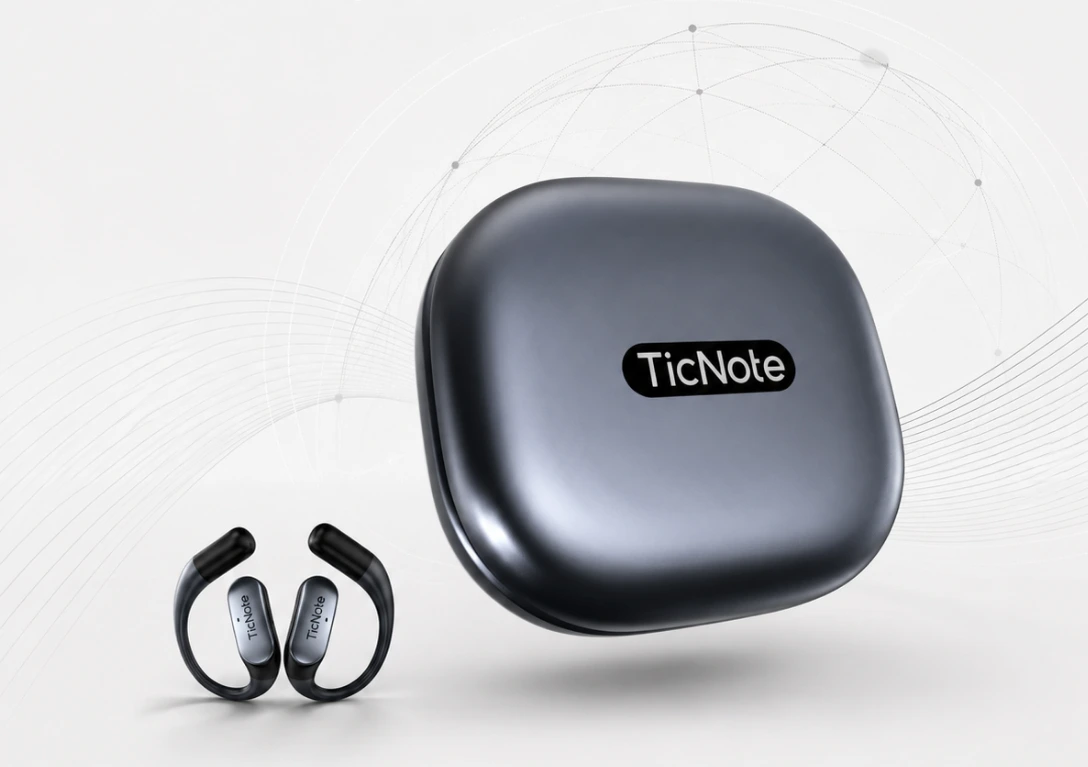
Key features
- Earbuds / charging case dual modes with automatic switching: earbuds mode for online meetings and work calls, case mode for in-person room capture
- Automatic call recording: records and transcribes both sides when you answer on the earbuds
- Real-time transcription and live translated subtitles: practical for multilingual vendor or client calls with 17 live languages
- 120+ languages after recording: broader post-meeting transcript and translation coverage
- AI Summary with 100+ templates: faster handoff after back-to-back calls
- Export Your Notes to Notion and Obsidian: useful when notes must move into an existing workflow
- Project Knowledge Base and Ask AI: lets users search across meetings later
- ~22-hour battery: better fit for full-day remote use
Pros
- $249.99 is lower than many premium flagship earbuds plus separate meeting-note software
- Captures calls, transcripts, summaries, and translations in one workflow
- 32GB case storage is unusually high for earbud-style meeting hardware
- Works across phone, desktop, and browser rather than locking you into one ecosystem
Cons
- Sync-based workflow is less immediate than 4G
- Translation reading depends on your phone screen
- Earbud-form capture won't replace a dedicated boom mic in every noisy office
TicNote Pods 4G: Best for mobile professionals who need meeting earbuds with live summaries between appointments
This one fits the consultant, sales rep, or field manager who leaves a client site and needs the recap before the next stop. If you're in transit most of the day, the real issue isn't whether earbuds sound good. It's whether the meeting can be recorded, uploaded, and summarized before you're back at your laptop.
That's the advantage of built-in 4G eSIM. Recording and upload can happen without keeping your phone nearby, which is a real difference when you're walking between buildings or driving to the next appointment. If that's your workflow, Check TicNote Pods 4G details.
At $299.99, it adds Live Summary and Quick Summary to the same dual-mode setup: earbuds for online meetings, case for in-person capture. It also supports automatic call recording, offline recording with sync on reconnect, real-time transcription in 17 live languages, 120+ languages after recording, Listen Translation, Conversation Translation, dual mics plus ENC, 10m pickup, and about 13 hours with 4G on or 22 hours with 4G off.
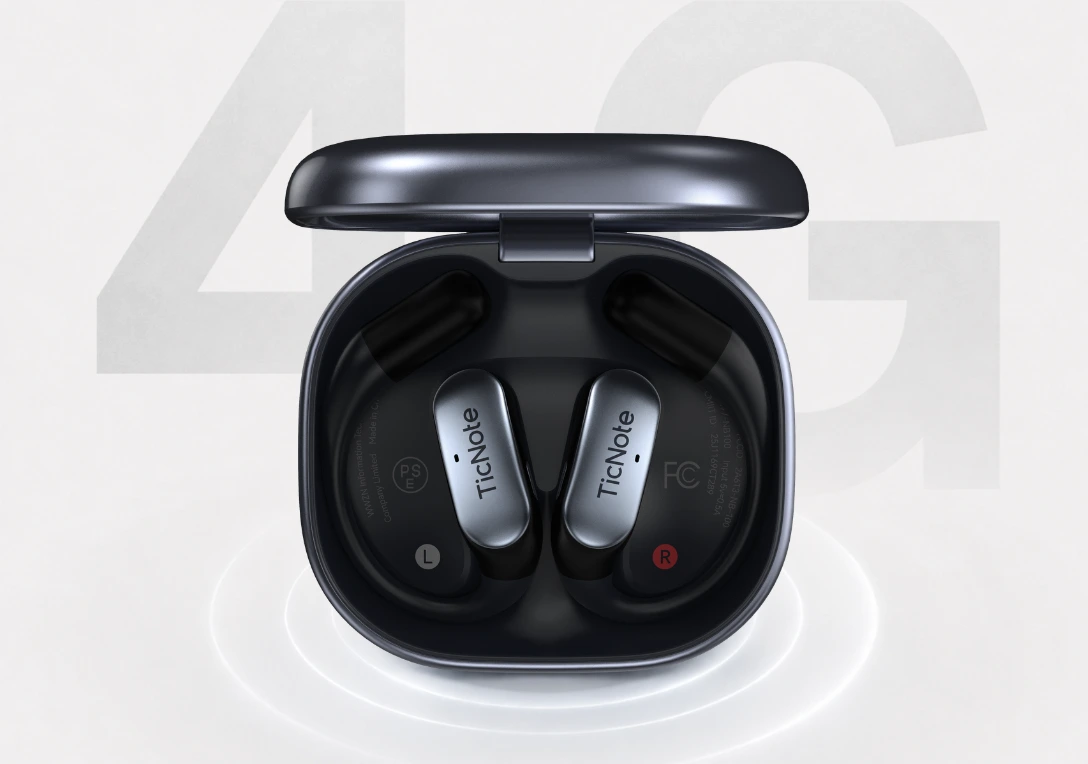
Key features
- Built-in 4G eSIM: works away from Wi-Fi and without keeping your phone nearby
- Live Summary: useful before the next client stop
- Quick Summary: full recap when recording ends
- Dual recording modes: earbuds for calls, case for room capture
- Conversation Translation and Listen Translation: supports multilingual meetings
- Sales Coach skill: relevant for users reviewing customer calls after the meeting
- Cross-platform and TicNote Connecting: useful when teams review notes inside existing AI workflows
Pros
- $299.99 buys phone-free upload and faster post-meeting follow-through
- Live Summary is genuinely useful for field work, not a vanity feature
- Offline recording reduces risk when mobile signal drops
Cons
- Battery drops to about 13 hours with 4G on
- More expensive than call-first earbuds if you don't need summaries or recording
- Reading translations still depends on your phone screen
Jabra Elite 10 Gen 2: Best for hybrid professionals who need dependable meeting earbuds and long wear comfort
I'd pick Jabra for the person spending 3 to 6 hours a day on Teams and client calls who cares more about comfort and call stability than AI output. It's a work-call-first choice, and that's exactly why it stays relevant.
Key features
Call quality, long-wear comfort, strong ANC, multipoint pairing, and platform-neutral support across laptops and phones.
Pros
- Comfortable for long days
- Reliable for voice calls across devices
- Good choice if you don't need meeting records
Cons
- No built-in transcript, summary, or translation workflow in the earbud itself
Apple AirPods Pro 2: Best for Apple users who want seamless earbuds for meetings on MacBook, iPhone, and iPad
If your day is MacBook to iPhone to iPad and back again, AirPods Pro 2 are hard to beat for instant pairing and device switching. They're excellent for Apple-heavy work, but weaker as a cross-platform note-taking option.
Key features
Tight Apple ecosystem integration, strong ANC, solid voice pickup, and easy switching across Apple devices.
Pros
- Best convenience for Apple users
- Strong call quality for daily meetings
- Comfortable and easy to carry
Cons
- Meeting records require separate software
- Benefits narrow outside Apple ecosystems
Samsung Galaxy Buds3 Pro: Best for Samsung users who want earbuds for Teams meetings and Android-first workdays
These fit Galaxy phone and Windows laptop users who want ecosystem perks plus strong everyday calling. The value is more ecosystem-led than workflow-led.
Key features
Good call performance, ANC, Samsung integration, and Android-friendly controls.
Pros
- Strong fit for Samsung users
- Good everyday calling and commuting balance
- Easy choice for Android-first setups
Cons
- Limited value if you're not already in Samsung's ecosystem
- No native meeting-summary workflow
Sony WF-1000XM5: Best for commuters who need strong ANC before and after work calls
Some people take meetings from trains, airports, or busy streets. For them, isolation comes first. Sony earns its place here because ANC is excellent, but it's also a good example of why strong microphone test scores don't always equal the best real meeting performance in wind, movement, or video-call apps.
Key features
Class-leading ANC, compact size, strong sound, and good overall call performance.
Pros
- Excellent for commuting and travel
- Strong ANC before and after calls
- Good all-around premium earbud
Cons
- Fit is sensitive for some ears
- Heavy ANC strengths don't replace a transcript or summary workflow
If your priority is simply sounding clear, Jabra, Apple, Samsung, and Sony all make sense in the right ecosystem. If you also need searchable records, summaries, and translation after the call, this is where AI note takers by workflow and fit start to beat standard meeting earbuds.
How I evaluated meeting earbuds and AI note taker options
Most lists of earbuds for meetings are really lists of music earbuds that can also take a call. That misses how work actually feels: a 30-minute standup from your kitchen, a 50-minute client review on Teams, and a two-minute hallway recap all stress earbuds in different ways. So I used a work-call lens, not a music-first one.
Why most meeting-earbuds lists miss the point
For work, a clean microphone sample in a quiet room isn't enough. I care about whether the earbuds stay comfortable through three or four meetings, whether multipoint switching behaves when I jump from a phone call to a Windows laptop, and whether Zoom, Teams, and browser calls play nicely. I also care what happens after the meeting. If the product gives me nothing beyond audio, that's a different value from something that can turn recordings into transcripts and summaries I can search later.
Focus on the four variables that actually change the result
First is microphone reliability in real calls. That means how consistently people can hear you at home, in an open office, walking outside, or from a coffee shop.
Second is comfort and battery across a workday. Earbuds that feel fine for 20 minutes can become annoying by meeting three, and battery claims often drop once ANC, multipoint, or long calls are involved.
Third is compatibility and switching. The best meeting earbuds should behave predictably across Windows laptops, MacBooks, iPhones, Android phones, and the apps people actually use.
Fourth is post-meeting workflow value. Some earbuds end when the call ends. Others add recordings, speaker-separated transcripts, summaries, translation, and exports.
| Tool | Works well when | Falls short when | Best for |
| TicNote Pods Wi‑Fi | You want meeting capture, searchable transcripts, and Wi‑Fi sync without paying for 4G | You need live uploads away from Wi‑Fi | Remote manager who wants searchable notes after every Zoom review |
| TicNote Pods 4G | You move between sites and need recording, upload, and summaries without a phone nearby | You mostly work at one desk and don't need 4G | Field consultant who needs a summary before driving away |
| Jabra Elite 10 Gen 2 | You want strong comfort and reliable voice pickup for long calls | You need built-in transcript and summary tools | Hybrid worker on back-to-back calls |
| Apple AirPods Pro 2 | You're deep in Apple's ecosystem and want simple switching | You use Windows and Android equally often | Apple-based executive who wants simple call switching |
| Samsung Galaxy Buds3 Pro | You use Samsung devices and want solid calls plus ANC | You mix ecosystems often | Galaxy user commuting between meetings |
| Sony WF-1000XM5 | You want top-tier noise control for trains, flights, and cafés | You prioritize post-meeting notes over ANC | Commuter who needs noise control between calls |
Expect lab scores and real meetings to disagree
Microphone test scores often diverge from real meeting performance because the call app compresses audio, your room adds echo, your internet drops packets, and your mic position changes when you turn your head. Wind, speaking volume, and how Teams versus Zoom processes voice can also change what the other side hears.
A plain example: an earbud can sound excellent in a quiet lab recording, then sound thin and inconsistent during a Teams call from a busy café because espresso machines, head movement, and upload instability all hit at once.
How to choose the right earbuds for meetings, calls, and post-meeting notes
Most people pick meeting earbuds by sound first. I think that's backwards. The better filter is where your meetings happen, what you need 10 minutes after the call ends, and how much ecosystem lock-in you already live with across your phone and laptop.
If I work mostly from a home office and want every Zoom or Teams call to end with a transcript I can actually use, I'd pick TicNote Pods Wi-Fi. Earbuds mode fits online meetings, case mode works better when I shift to an in-person conference room, and Export Your Notes plus Ask AI make follow-up faster when I need action items in Notion or a quick client recap. If that sounds like your setup, See which TicNote Pods fit your workflow.
If I'm bouncing between client sites, airports, and calls, the better answer is TicNote Pods 4G. The difference is simple: I don't have to trust café Wi-Fi or remember to sync later. Live Summary helps during the meeting, and Quick Summary gives me usable notes before the next stop. Standard call earbuds can sound excellent, but they still don't create a searchable meeting record on their own.
If you mainly want the safest non-AI choice, keep it simple. Jabra Elite 10 Gen 2 is the best mixed-device pick for Windows, Mac, iPhone, and Android workdays. AirPods Pro 2 make the most sense if you already use an iPhone and Mac. Galaxy Buds3 Pro fit Galaxy users best. Sony WF-1000XM5 is the strongest commuting option when noise control matters as much as call quality.
Here's the shortcut. If you only need clearer calls, skip AI features. If the pain starts after the meeting because you forget decisions or next steps, buy AI note-taking earbuds. If you handle multilingual conversations, prioritize translation support across 120+ languages after recording. And if your week mixes video calls with room conversations, two recording modes matter. For a deeper breakdown of AI notes versus basic recording in live rooms, that tradeoff is worth understanding.
Conclusion: when standard meeting earbuds are enough and when an AI note taker earbud earns its keep
The best earbuds for meetings aren't just the pair with the strongest ANC or the biggest brand name. They're the pair that removes friction across the full meeting cycle: hearing clearly, sounding clear, and remembering what was actually decided two hours later. If your pain is mostly during the call, standard picks from Jabra, Apple, Samsung, and Sony are usually enough because they deliver reliable comfort, call quality, and easy device pairing.
If the real cost shows up after the call, the math changes. Missed follow-up, fuzzy action items, and multilingual confusion create more damage than a slightly weaker fit or shorter battery life, which is where AI note-taking earbuds start to earn their price. That's also why bot-free Zoom note-taking options are worth a look if you want capture without adding another meeting participant.
Here's the fastest next step: list your last five work meetings and mark whether the pain happened during the call or after it. Then buy for that category, not for the spec sheet.


