


 Extension


TL;DR: Which AI note taker is best for lawyers?
I've finished a 45-minute client intake, realized three key facts never made it into my notes, and then lost another 20 minutes rebuilding the call from memory. That problem repeats across internal case meetings, phone calls, and in-person conversations, which is why lawyers don't just need an AI note taker. We need one that fits consent rules, privilege-sensitive workflows, and the reality that many important conversations happen outside Zoom.
I compared six tools against five legal buying criteria: privacy posture, consent workflow fit, transcription quality, in-person capture, and budget. My bottom line is simple: there isn't one best option for every firm. TicNote AI Voice Recorder stands out for in-person and phone-call capture, Jamie is best for bot-free online meeting notes, Rev is the strongest pick when you need human-reviewed transcripts, and Sonix is best for high-volume transcript turnaround. If you want the best AI note taker for lawyers overall, TicNote is the strongest fit for most legal teams because it covers the conversations other tools miss.
Quick Picks: 6 AI note takers for lawyers at a glance
If you want the short list first, start here. I mapped each pick to a specific legal scenario, because "best overall" doesn't help much when your real question is whether you need better deposition transcripts, cleaner intake call notes, or a device that works in a courthouse hallway.
For lawyers comparing hardware-first tools, this AI note-taking device comparison is a useful companion to the software picks below.
| Tool | Best for | Works well when | Falls short when | Starting price or pricing model | Privacy or workflow note |
| TicNote AI Voice Recorder | Solo and small-firm lawyers who need one device for in-person meetings and phone calls | You switch between client intake, office meetings, and phone calls on the same day | You want a pure software-only tool with no hardware to carry | $159.99 hardware, Plus plan included, optional Pro with device at $79/yr | Hardware capture helps with in-person conversations; review consent and retention rules before recording |
| TicNote Watch | Lawyers moving between hallway talks, courthouse conversations, and Bluetooth calls | You need fast, discreet capture without pulling out a phone | You prefer long-form desktop-first transcription workflows | $249 hardware | Wrist-based workflow fits mobile legal work; still requires clear consent handling |
| Jamie | Attorneys who want bot-free online meeting notes | You don't want a meeting bot joining Zoom or Teams | You need dedicated in-person hardware capture | App subscription | Bot-free setup may fit internal meetings better than recorded client calls in stricter settings |
| Rev | Depositions, witness statements, and transcripts where human review matters | Transcript accuracy matters more than speed alone | You want low-cost, instant notes across every casual conversation | Custom or subscription pricing | Human review can help in high-stakes records, but turnaround and cost can rise |
| Plaud | Lawyers who prefer a small device-first workflow | You want a compact recorder for calls and meetings | You need the most transparent all-in cost upfront | Hardware-based pricing plus subscription options | Device workflow is practical for attorneys, but compare ongoing subscription math carefully |
| Sonix | Firms handling large volumes of recorded audio | You process many interviews, statements, or archived recordings | You need purpose-built hardware for live capture in the field | Usage-based or subscription pricing | Strong for transcription throughput; less tailored to mobile capture workflows |
- TicNote AI Voice Recorder: best fit if I need one device that handles both room conversations and phone calls at a clear upfront cost.
- TicNote Watch: best when my legal work happens on the move and I need faster access than a phone or laptop allows.
- Jamie: best for bot-free online meeting notes when participants dislike visible meeting assistants.
- Rev: best for deposition-style workflows where human-reviewed transcripts matter more than speed.
- Plaud: best for lawyers who want a compact recorder-first setup and don't mind comparing plans separately.
- Sonix: best for firms pushing a high volume of recorded audio through transcription each month.
6 best AI note takers for lawyers by legal workflow
The best AI note taker depends on where the conversation happens and how exact the record needs to be. I'd choose differently for a 30-minute client intake call, a 90-minute internal strategy meeting, a courthouse hallway conversation, and a recorded witness interview where verbatim detail matters. That's how I framed this list: problem first, then the tool, then the proof, with the trade-offs left in.
| Legal workflow | Best fit |
| Client calls + in-person meetings | TicNote AI Voice Recorder |
| Hallway conversations + mobile capture | TicNote Watch |
| Remote consults + internal video meetings | Jamie |
| Depositions + witness interviews | Rev |
| Pocketable hardware recording | Plaud |
| High-volume transcript processing | Sonix |
TicNote AI Voice Recorder: Best for solo attorneys who need one tool for client calls and in-person legal note capture
If I were bouncing between office intake calls, conference-room meetings, and the occasional recorded client conversation, this is the one I'd keep closest. The appeal isn't just transcription. It's lower friction. Earphone mode magnetically attaches to a phone to record and transcribe calls, while Speaker mode handles meetings and conversations in the room without forcing me into a meeting-bot workflow.
That matters in legal practice because note capture often happens in messy environments, not neat Zoom calendars. TicNote is built for discreet recording, strong audio quality, and fast post-call review. You can compare dedicated AI recorder options by use case if you're weighing device-first tools.
Explore TicNote for in-person legal note capture
The proof is concrete: a 3-mic array with pickup up to 10m, 25-hour battery life, 64GB of storage for about 434 hours, time-stamped transcripts with automatic speaker identification, AI summaries, highlights, annotations, a Project Knowledge Base for organizing client matters, and Ask AI across projects. For simple daily legal work, the Contract Review skill is a real differentiator, and TicNote Connecting lets ChatGPT or Claude access TicNote data without copy-pasting.
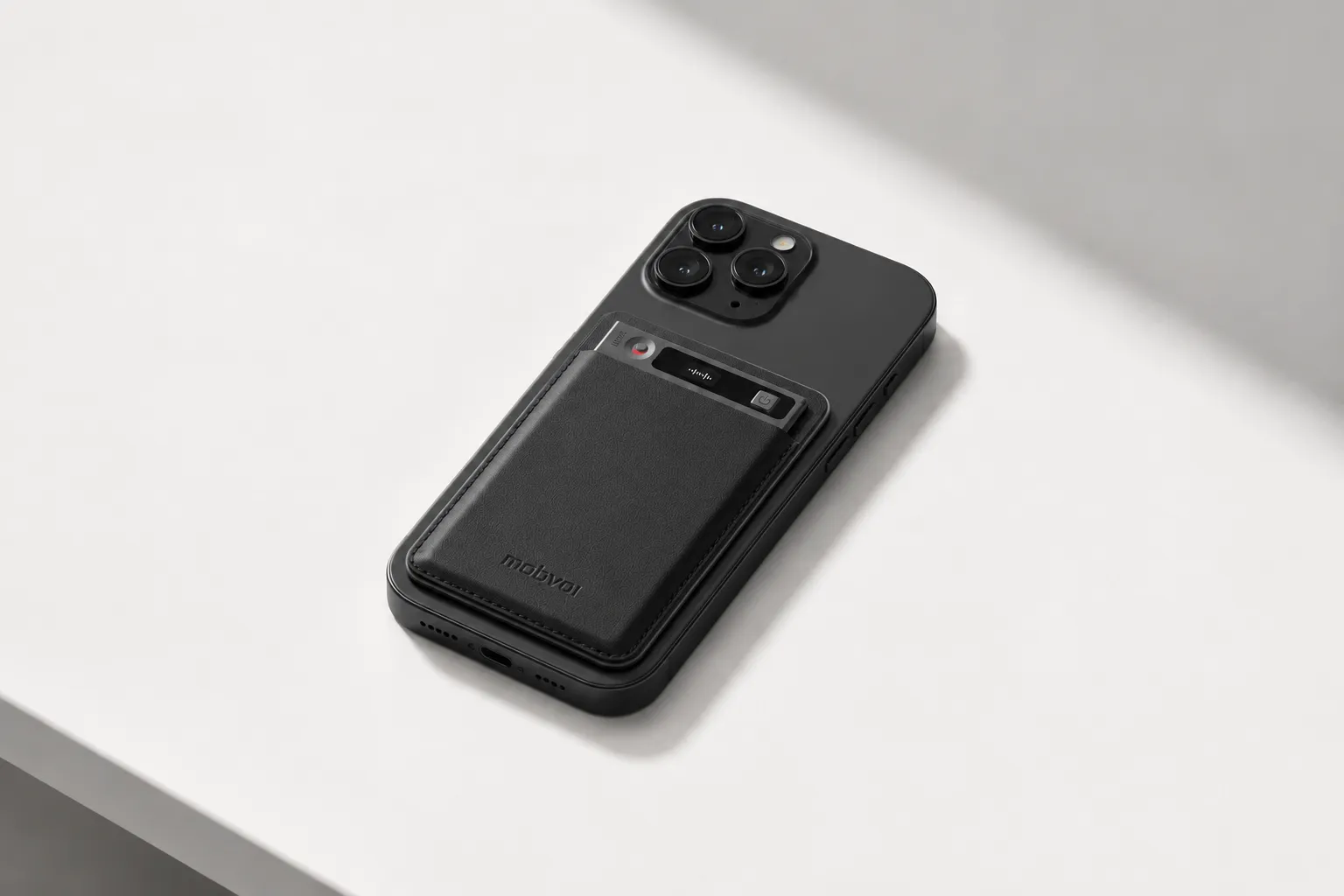
Key features
- Earphone mode for phone-call capture
- Speaker mode for meetings and in-room conversations
- 3-mic array with pickup up to 10m
- Automatic speaker identification
- AI meeting summaries with 100+ templates
- Contract Review skill
- Project Knowledge Base
- TicNote Connecting
- Export to Notion and Obsidian
- Privacy claims: end-to-end encryption, on-device processing for key AI features, and data not used to train AI models
- Baseline: up to 120+ transcription/translation languages, 25-hour battery life, 64GB storage
Pros
- Hardware starts at $159.99
- Plus plan is included for hardware users with 600 transcription minutes/month
- Pro with device is $79/year for 2,100 minutes/month
- Pay-as-you-go minutes start at $6.99 for 1,000 minutes
- Card-sized, 3mm-thin design is easy to carry
- Cross-platform access on phone, desktop, and browser
Cons
- Security review is still required because GDPR alignment is self-claimed
- U.S.-based cloud may require extra approval for some firms
- If you only live inside meeting apps, dedicated hardware may feel unnecessary
TicNote Watch: Best for attorneys who need a wearable AI recorder for hallway conversations, courthouse movement, and quick call capture
Some legal conversations happen while you're walking, waiting, or moving between rooms. If I couldn't keep pulling out my phone during informal but important conversations, I'd look at TicNote Watch.
The fit here is simple: a dedicated recording button, Discreet Recording Mode with a persistent red-dot indicator, Bluetooth call recording, live transcription on the wrist in 17 languages, and One-Tap Highlight for marking key moments before they disappear. It's more niche for legal work than the card recorder, but for mobile practitioners it solves a real problem.
Proof points are solid: over 24 hours of continuous recording, dual omnidirectional microphones with 3 to 5m pickup, AI summaries on the watch face, an AI Journal that combines meetings with daily timeline data, Shadow Recap linking body-signal changes to recorded meetings, and a READINESS score each morning.
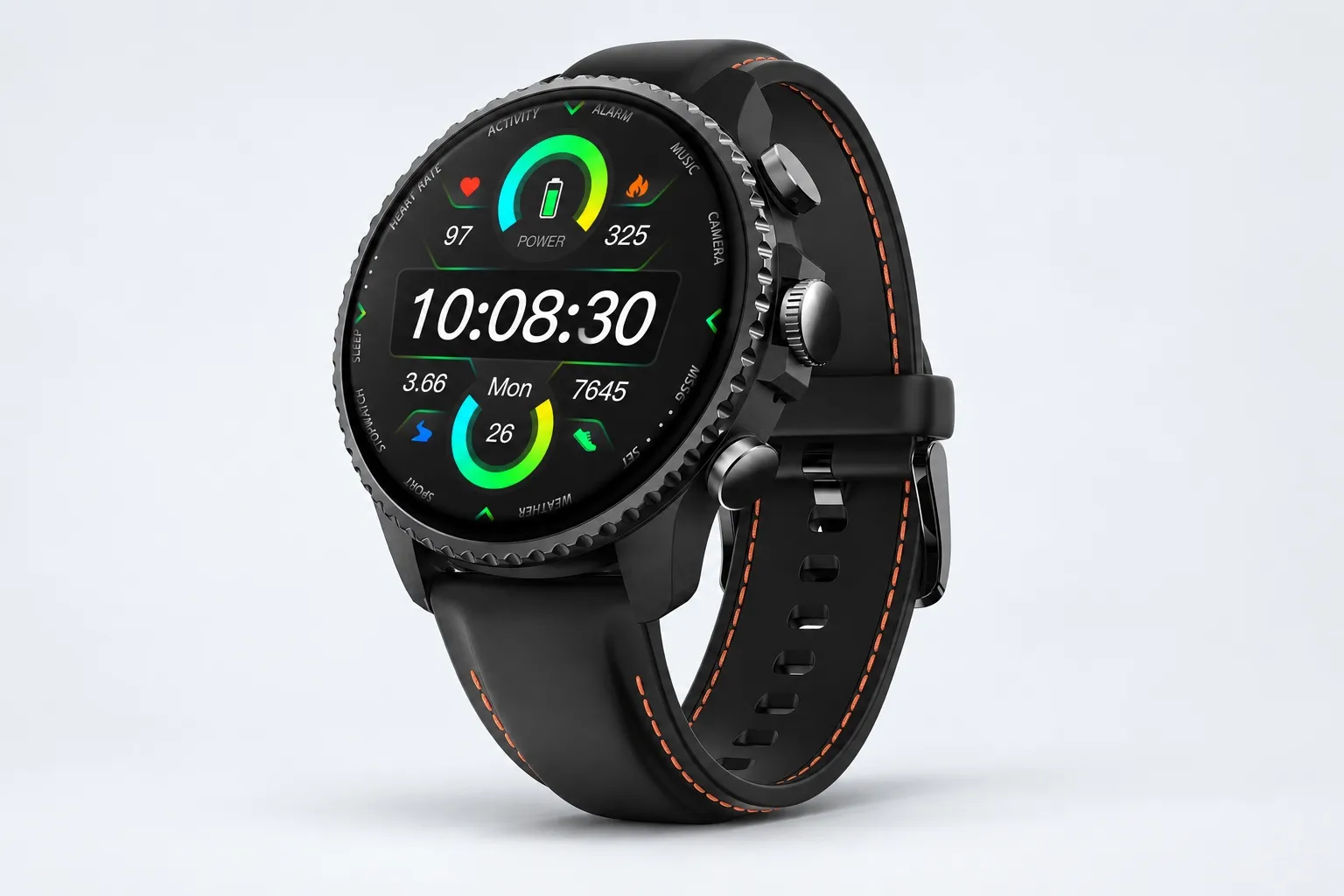
Key features
- One-Tap Highlight — Press the middle button on the watch to mark an important sentence mid-meeting (rotate the crown to switch selection). Works offline, and marks carry into the transcript for post-meeting review.
- Bluetooth call recording — Answer calls directly on the watch, and both sides are recorded and transcribed. No need to pull out your phone or take extra steps.
- AI Journal — An auto-generated daily timeline that combines your meetings, exercise, sleep, and health data. Random Thoughts you capture during the day are automatically tagged into that day's Journal.
- Shadow Recap — Connects notable changes in your body signals (heart rate, stress, sleep vs. your personal baseline) with meetings recorded during the same time period. Generates a daily insight card at the top of your Journal, a full AI-written analysis, and a shareable recap card.
- READINESS — A morning score based on your sleep, heart rate, and stress data. Helps you decide whether to schedule deep work or light tasks for the day.
- Speaker-identified transcripts and summaries — Every recording produces a full, time-stamped transcript with automatic speaker identification. AI summaries are ready the moment recording ends, with 100+ templates to choose from or customize.
- Project Knowledge Base — Group recordings into projects, auto-indexed and searchable, with AI-powered Q&A across all your content. Ask "which client mentioned budget constraints last month" and get the answer instantly.
- Contract Review skill — Reads contract files and generates visual HTML review reports with risk analysis, clause heatmaps, and side-by-side comparison between two contracts.
- TicNote Connect for ChatGPT or Claude — Lets AI assistants like ChatGPT, Codex, and Claude directly read and edit your TicNote data — recordings, summaries, and knowledge base — with no app switching or copy-pasting.
Pros
- Hardware is $249
- Plus plan included with 600 transcription minutes/month
- Over 24-hour continuous recording
- Full charge in under 2 hours
- 14-day standby
- Built-in GPS and health tracking if you already want a smartwatch
Cons
- Wellness features add cost and complexity if you only want meeting notes
- Pickup range is 3 to 5m, not 10m
- A wearable may not fit formal conference-room recording policies
Jamie: Best for attorneys who want bot-free AI meeting notes for online calls
If most of my work happened on remote consults and internal video meetings, I'd want notes without a bot joining every call. That's Jamie's pitch.
It's positioned around bot-free recording, structured summaries, Ask AI for case-context recall, and privacy and compliance-by-design messaging. For lawyers who mostly work online, that's a cleaner experience than hardware-first tools.
Key features
- Bot-free recording
- High transcription accuracy positioning
- Structured summaries
- Ask AI for instant recall
- Privacy and compliance focus
Pros
- Bot-free workflow feels less intrusive
- Strong fit for virtual meetings
- Quick structured outputs
Cons
- Weaker for phone calls and offline in-person capture than dedicated hardware
- Pricing should be verified before publication if added later
Rev: Best for firms that need legal meeting transcription software with optional human review
For deposition prep, witness interviews, and recorded statements, I care less about flashy summaries and more about transcript confidence. That's where Rev fits.
Rev is better thought of as a transcription and review tool than a pure note taker. Its value is AI transcription plus the option for human transcription when verbatim output matters more than speed.
Key features
- AI transcription
- Human transcription option
- Searchable transcripts
- Security-focused workflow messaging, subject to editorial verification
Pros
- Stronger fit when verbatim output matters
- Good for review-heavy legal teams
Cons
- Can be slower or more expensive than pure AI note takers
- Overkill for quick intake summaries
Plaud: Best for lawyers who want a small device-first AI recorder for meetings and calls
Some attorneys just want a pocketable recorder that captures conversations without depending on meeting software. That's Plaud's lane.
Its appeal is mobility and simple capture, not legal-specific workflow depth. If I only cared about getting the audio and transcript into an app, it's worth a look.
Key features
- Hardware-first recording modes
- Portable design
- App-based transcription workflow
Pros
- Simple hardware setup
- Easy to carry
Cons
- Subscription math deserves scrutiny
- Less legal-specific help than TicNote's Contract Review skill and knowledge-base features
- Compare long-term cost carefully
Sonix: Best for small and mid-sized law firms handling high audio volume
When a firm has a backlog of interviews, hearings, and long recordings, the problem shifts from capture to throughput. Sonix is strongest when fast transcript processing, searchable text, formatting, and exports matter more than discreet live recording.
That makes it useful for teams processing large audio libraries rather than lawyers who need to capture a phone call or hallway conversation on the fly.
Key features
- Fast transcription positioning
- Searchable transcripts
- Formatting tools
- Export options
- Security messaging, subject to editorial verification
Pros
- Strong throughput for large audio libraries
- Practical transcript workflow
Cons
- Less legal-specific guidance on consent and privilege
- Weaker in-person hardware capture than dedicated devices
How I evaluated legal AI note taker options
Most lists of AI note takers for lawyers are too generic to be useful. They rank tools like ordinary meeting apps, but legal buyers don't buy for generic meetings. I evaluated these options against the situations that actually create risk or value in practice: intake calls, privilege-sensitive strategy sessions, phone conversations, conference-room meetings, and in-person discussions where you may need to decide not to record at all.
Why most AI note taker lists do not help lawyers
The gap is simple: broad feature lists ignore legal workflow. A tool can have good summaries and still fail if it makes consent awkward, stores data in ways your firm can't control, or works well only on Zoom while your intake happens by phone or across a desk. That's also why I looked closely at AI note takers versus basic voice recorders for in-person meetings, because for lawyers, capture method matters as much as transcription quality.
The 5 decision variables for AI note taking in legal practice
Consent workflow fit means the tool can be introduced without disrupting how you obtain consent before recording. If the recording step feels clumsy, lawyers skip it.
Privacy and data control means where data is stored, what encryption is claimed, whether content trains models, and what admins can retain, delete, or restrict.
Transcript usefulness means more than accuracy. I looked for speaker labels, time stamps, search, and summaries that are good enough to support follow-up work.
In-person and phone capture means whether the tool can reliably record office consults, conference-room meetings, and calls, not just browser meetings.
Budget clarity means total cost, including hardware, subscription tiers, minute caps, and whether overages stay predictable at volume.
Quick comparison
| Tool | Works well when | Falls short when | Best for |
| TicNote | You need one setup for intake calls, office consults, and room conversations | You want a pure browser app with no hardware purchase | Solo attorney handling intake calls and office consults |
| Otter | Your firm runs mostly remote meetings and wants fast shared notes | You need better phone and in-person capture flexibility | Practice manager standardizing remote consult notes |
| Fireflies.ai | You want broad meeting integrations and searchable call records | You need stronger offline or physical-room capture | Small firm with heavy Zoom and Google Meet use |
| Plaud Note | You want a dedicated recorder for mobile and in-person use | You need richer team admin controls or clearer scaling costs | Attorney recording consults away from the desk |
| Notta | You need multilingual transcription and simple cloud workflows | You need a legal-specific workflow lens | Multilingual client communication teams |
| Rev | You process high transcript volume and care about transcript-first workflows | You want all-in-one AI meeting automation | Firm administrator processing high transcript volume |
This ranking is scenario-based, not universal. For most lawyers, the right pick is the one that fits consent, capture, and retention policy without adding friction.
How to choose the right AI note taker for your legal practice
Stop asking which tool has the most features. I'd start with three questions instead: where do your conversations actually happen, what has to happen right after the meeting, and how much risk your firm is willing to take on recorded content. That framework gets you to a better answer faster than any generic feature checklist.
If most of your legal work happens in person or on the phone, I'd point a solo or small-firm lawyer to TicNote AI Voice Recorder. Earphone mode records phone calls, Speaker mode handles room conversations, and the 3-mic array captures voices from up to 10m away. Afterward, you get searchable transcripts, summaries, and project-based organization, which matters more than a flashy dashboard when you're trying to find one statement from a client intake two weeks later. If you want a broader comparison of meeting recorders, this guide on AI note takers for meetings is a useful cross-check.
For attorneys who spend the day moving between courthouse halls, networking events, and Bluetooth calls, TicNote Watch is the better fit. Discreet Recording Mode lets you capture fast conversations without pulling out a device, One-Tap Highlight marks key lines in the moment, and on-wrist summaries reduce note loss between meetings.
If your firm mostly runs remote consults and internal video meetings, Jamie is the clearest fit. Its bot-free workflow avoids the visible meeting bot that many lawyers and clients dislike, while still producing structured AI meeting notes for attorneys.
When transcript defensibility matters more than speed, I'd choose Rev. For depositions, witness statements, and recorded interviews, a transcript-first workflow is usually more important than instant recap.
Plaud makes sense if you want a minimal hardware-first recorder. It's portable and simple, but it's less compelling when you need legal-specific downstream analysis.
Sonix fits firms processing long audio files at volume. Search, formatting, and export matter more there than discreet capture.
One last point: compare total annual cost, not the starting price. Include hardware, transcription minute limits, AI credits, overage rates, and pay-as-you-go usage. A tool that starts at $0 or $19.99 per month can cost far more over 12 months once your team records 20 to 40 hours a month.
When lawyers should avoid AI recording and take manual notes instead
Some legal conversations shouldn't be recorded at all, even if the tool is secure. The real question isn't convenience. It's whether creating an audio file increases privilege, discovery, consent, or retention risk more than it improves the record.
Use manual notes when the recording itself creates exposure
I default to handwritten or typed notes in five situations: a first consultation before consent is clearly documented, a highly sensitive strategy session, a discussion that includes third-party confidential information, any conversation where local consent law is unclear, and live proceedings with courtroom or tribunal recording limits. In those moments, a full transcript can become a broader risk surface than the conversation itself.
A short structured note is often safer because it captures only what the firm needs: facts, decisions, and next steps. A one-page note is also easier to classify, retain, and delete under firm policy than a 45-minute audio file plus transcript.
Apply a simple firm-wide rule
Before I record, I ask four questions: Can I explain the purpose in one sentence? Do I have the required consent? Can I store the file under an approved retention policy? Can I defend why a transcript is better than handwritten notes? If any answer is no, I don't record.
Use a tighter note template instead
My fallback is simple: matter name, date, participants, consent status, issues discussed, action items, and follow-up deadlines. That's usually enough to preserve the substance without preserving every word. AI can still help later by organizing approved notes, but this is one area where risk discipline matters more than automation.
Conclusion
The best choice here isn't the AI note taker with the longest feature list. It's the one that matches the conversations your firm actually records, the consent steps you must follow, and the retention risk you're willing to carry.
If most of your work happens in offices, hallways, client intake rooms, or on live phone calls, hardware-first options make the strongest case. TicNote stands out because it handles both in-person and phone capture in one device, while TicNote Watch is the better fit when you want more discreet, on-the-go recording. Jamie is a strong pick for remote meetings, Rev still makes sense for transcript-first legal workflows, and Sonix fits firms processing large volumes of recorded audio. If you're weighing a device-first versus app-first setup, that distinction usually matters more than one extra AI summary feature.
No tool removes the need for consent checks, security review, and a written policy for when not to record. In under 10 minutes, list the three conversation types your firm records most often, note whether they happen by phone, video, or in person, and compare two tools against those exact scenarios before you run a small pilot. Readers who need a device-first option can explore TicNote for in-person legal note capture.