


 Extension

TL;DR: Which AI note taker is best for site visits?
I'm walking a 40-minute construction site with gloves on, stopping for punch items, talking over generators, and trying to remember which subcontractor promised what. That's why site visits break normal meeting-note workflows: I need one-hand capture, stronger noise handling, offline reliability, and notes I can turn into follow-up the minute the walk ends.
In this guide, I compare wearable, card-style, app-based, and meeting-bot tools for real field conditions, not quiet conference rooms. The short answer is simple: TicNote Watch is the best wearable AI note taker for site walks, TicNote AI Voice Recorder is better for larger noisy areas and longer walkthroughs, Otter.ai fits lighter app-first use, Krisp works best for noisy phone or laptop meetings, and Plaud NotePin is the simplest wearable alternative. If you want the best overall AI note taker for site visits, it's TicNote Watch for mobility and TicNote AI Voice Recorder for louder, longer walkthroughs.
Quick picks: the best AI note takers for construction site visits
AI note taking has changed fast, but site visits still punish the wrong setup. If you want the shortlist first, this section gives you the fast answer now, then the deeper comparisons later, plus a role-and-environment matrix so you can match the tool to how you actually move through a site.
Quick picks table
| Product | Best for | Works well when | Falls short when | Starting price |
| TicNote Watch | Field supervisors who need hands-free capture during active site walks | You need notes without pulling out a phone, and one-tap recording on the wrist is faster with gloves or while climbing stairs | You need far-field pickup across a large, noisy area | $249 |
| TicNote AI Voice Recorder | Inspectors and consultants doing longer walkthroughs in louder spaces | You need noise reduction, up to 10m pickup, 25-hour battery, and 64GB local storage for full-day or multi-day visits | You want true wrist-worn hands-free capture | $159.99 |
| Otter.ai | App-first users doing lighter site follow-up and trailer conversations | The phone can stay out and the environment is calmer | You are walking, gloved, or offline-first | Free plan available |
| Krisp | Coordination calls and AI meeting notes for noisy environments | The main problem is software noise cancellation on calls | You are doing physical site walks without a phone or computer | Paid plans apply |
| Plaud NotePin | Buyers who want a dedicated wearable AI note taker for site walks | Discreet wearable capture matters most | You need a fuller project-output workflow or long-range pickup | Paid hardware |
If you want more context on dedicated hardware before the full roundup, this comparison of AI note-taking devices is useful because site work usually breaks app-only tools first.
Best-for matrix by role and environment
| Role | Best category | Why it fits |
| Construction managers | Card-style recorder | Better for mixed environments: trailer meeting at 8 a.m., noisy slab walk at 10, and client recap after lunch |
| Field supervisors | Wearable | One-hand or no-hand capture is the win when you're moving, pointing, and managing crews |
| Inspectors | Card-style recorder | Longer battery, stronger pickup, and local storage matter more than discretion on formal walkthroughs |
| Property managers | App | Many visits are shorter, quieter, and followed by quick tenant or vendor updates from the phone |
| Consultants | Wearable or card-style | Wearable fits active walkthroughs; card-style fits longer, client-facing inspections with more detailed follow-up |
My short version: if I'm constantly in motion, I pick TicNote Watch. If I expect louder conditions, longer visits, and more formal deliverables, I pick TicNote AI Voice Recorder.
How I evaluated AI note takers for jobsite walkthroughs
Most AI note taker roundups are built around Zoom calls and conference rooms. That misses what actually happens on a site walk: you're moving, pointing, wearing gloves, dealing with fan noise or traffic, and you still need clean notes you can hand off the same day. So I judged these tools as field gear first and transcription software second.
Why most AI note taker lists do not help field teams
Transcript accuracy matters, but it isn't the whole job. On a walkthrough, I care just as much about whether I can start recording with one hand, keep my eyes on the site, capture comments while walking, and turn the result into something useful for closeout, punch lists, or client follow-up. That's also why the line between an AI note taker and a basic recorder matters more in the field than it does at a desk.
Focus on the 4 variables that decide field performance
Mobility and capture speed. If a tool takes 3 taps and a screen unlock, I'll miss the moment. Wearables and hardware recorders usually win here.
Noise and pickup range. Mechanical rooms, open lots, and active renovations expose weak microphones fast. I looked at how close speakers had to be and whether background noise buried action items.
Privacy and offline control. Some visits happen in occupied buildings, healthcare settings, or consent-sensitive environments. Offline capture and sync-later options matter.
Workflow quality after the walk. A raw transcript is not enough. I scored time stamps, speaker labels, summaries, action items, visual outputs, and export into project documentation.
| Tool | Works well when | Falls short when | Best for |
| TicNote Watch | You need instant, one-hand capture while walking | You need the longest pickup distance in very large spaces | Superintendents and consultants who talk while moving |
| TicNote AI Voice Recorder | You want stronger room pickup and offline hardware capture | You want fully hands-free wearability | Inspectors and property managers doing longer walkthroughs |
| Otter.ai | You can use a phone in quieter visits | Noise, distance, and phone handling get in the way | Solo consultants doing light site notes |
| Krisp | You already record elsewhere and need cleaner speech | It isn't purpose-built hardware for in-person walks | Teams cleaning audio before documentation |
| Plaud NotePin | You want a small wearable for quick spoken notes | Post-visit outputs are less mature for documentation-heavy workflows | Mobile professionals who prioritize discretion |
5 best AI note takers for site visits and inspections
I ordered this list by field fit, not brand popularity. A live site walk is its own environment: you're moving, dealing with noise, losing signal, and trying to turn rough observations into usable follow-up. That's why a wearable, a card-style recorder, an app, and a call-focused tool each win in different conditions.
TicNote Watch: Best for field supervisors who need to start recording without stopping the walk
I keep coming back to the same problem on active jobsites: when I'm climbing stairs, opening doors, or pointing out issues, pulling out a phone is awkward at best and unsafe at worst. A wrist-worn recorder fits that workflow better because I can hold the top button for 2 seconds and start or stop recording anytime, anywhere without breaking stride. On-site visits make a watch extremely convenient because you can start recording at any time and all speakers' voices can be automatically identified. You can see how wearable note-taking devices work in practice if you want the broader category view.
That fit isn't theoretical. TicNote Watch shows live transcription on the wrist in 17 languages, creates a full time-stamped transcript with automatic speaker identification, and keeps working offline so recordings sync later. Check TicNote Watch details for hands-free site visits
Its field proof points are practical: dual omnidirectional mics with intelligent noise reduction and 3 to 5 m pickup, over 24 hours of continuous recording, and single files up to 5 hours with auto-segmentation. One-Tap Highlight works offline, so I can mark the exact sentence that matters mid-walk for follow-up. After the visit, AI summaries, 100+ templates, photos synced to transcript timestamps, and Project Knowledge Base turn scattered observations into documentation. If I'm handing notes to procurement or PMs, Supplier Management and Task Breaker are the two skills that make the notes usable fast.
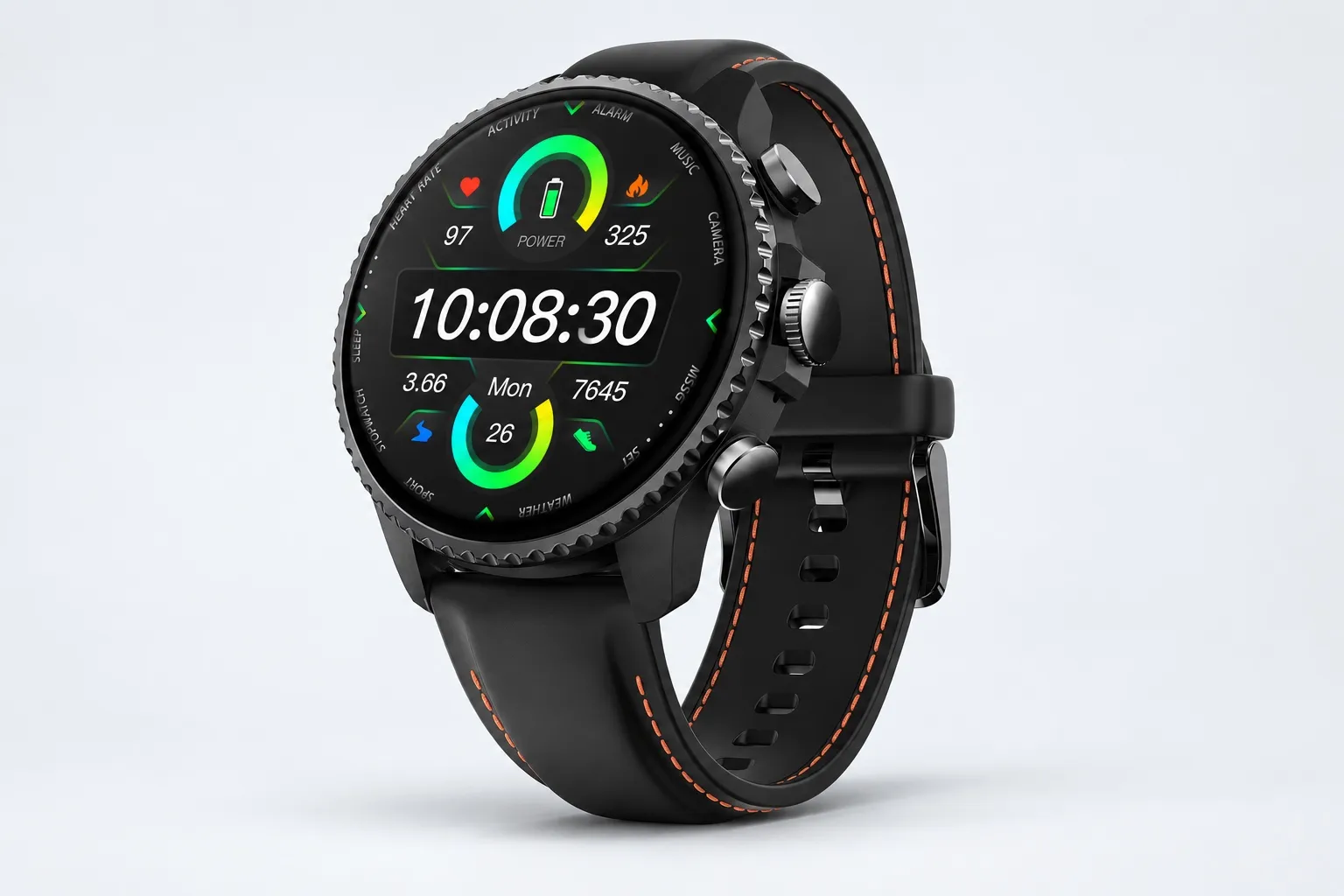
Key features
- Dedicated top recording button: start capture fast during a moving walkthrough
- One-Tap Highlight: mark an exact sentence mid-walk for follow-up
- Automatic speaker identification: helps track who said what on multi-person inspections
- Offline recording, sync on reconnect: useful in basements, plant rooms, and remote properties
- AI summary and 100+ templates: faster handoff after the visit
- AI Journal and Shadow Recap: AI Journal builds a daily timeline from meetings, exercise, sleep, and health data; Shadow Recap links body-signal changes to recorded meetings so I can review which visits were most stressful
- READINESS, heart rate, SpO2, stress, sleep, GPS, and 100+ sports modes: useful extra context if you're already wearing a watch all day
Pros: $249, includes 600 transcription minutes per month on the Plus hardware plan, true wrist-worn recording, over 24 hours continuous recording, 17 live languages.
Cons: 3 to 5 m pickup isn't the best option for very large noisy spaces, and if you don't want a smartwatch, a card-style device makes more sense.
TicNote AI Voice Recorder: Best for inspectors and consultants who need stronger pickup in larger noisy spaces
When I'm doing a warehouse check, a plant visit, or a long property inspection, people are often several meters apart and background noise never really stops. In that setup, a card-style recorder is easier than relying on a phone app and stronger than a small wearable when range matters.
This is the better choice when the venue is large and noisy because it can capture audio from up to 10 meters away, reduce noise, and still identify speakers automatically. The 3-mic array, offline recording with sync on reconnect, full time-stamped transcript, and AI summaries ready when recording ends are the core reasons it works. See TicNote AI Voice Recorder for longer walkthroughs
The rest of the workflow is what makes it useful after the walk: 25-hour battery life, 64 GB local storage for about 434 hours, Visual Report & Slides, Project Knowledge Base, export to Notion and Obsidian, and the same Supplier Management or Task Breaker skills to turn recordings and files into structured outputs.
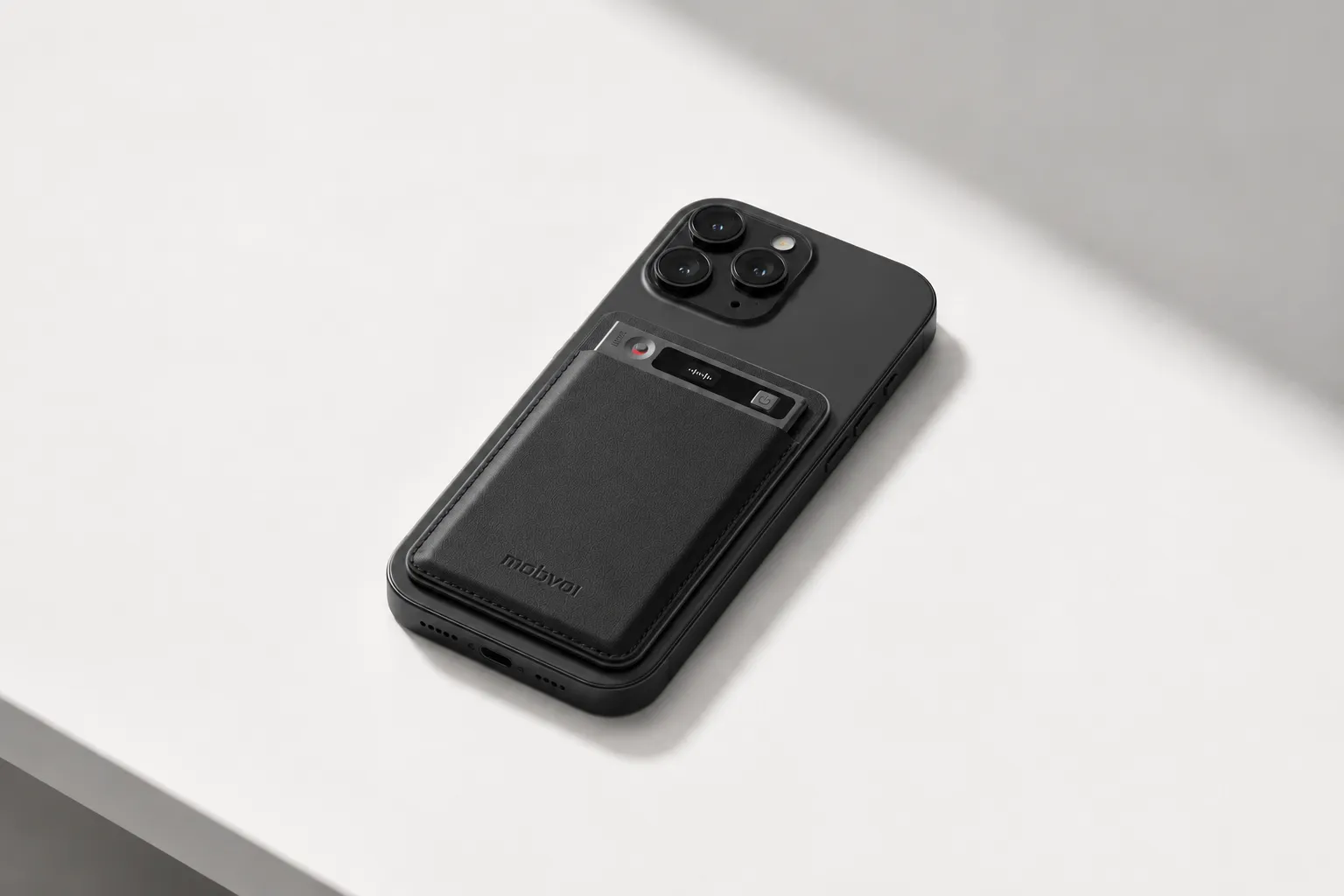
Key features
- 3-mic array up to 10 m: better fit for large rooms and open sites
- 25-hour battery: handles a full week of visits
- 64 GB local storage: reduces the risk of running out of space mid-project
- Summary templates and Visual Report & Slides: turn raw audio into shareable documentation faster
- Export to Notion and Obsidian: useful for handoff
- Supplier Management or Task Breaker skill: generate structured project outputs from recordings and files
Pros: $159.99, 10 m pickup, 25-hour battery, 64 GB storage, card-sized 3 mm thin design.
Cons: not as hands-free as a watch during active walks, and its phone-call modes matter less if your use case is purely on-site.
Otter.ai: Best for property managers who mainly want app-based notes after calmer walk-throughs
If I already run most of my work from a phone and mainly need searchable transcripts and shared notes, Otter.ai is still a practical pick. It fits trailer meetings, quieter inspections, and office follow-up better than active walking. The app workflow is familiar, collaboration is easy, and the barrier to entry is low.
Key features
- Searchable transcripts: fast review after the visit
- Team sharing: useful for sending notes to office staff or clients
Pros: familiar app workflow and low barrier to entry.
Cons: weaker fit for one-hand capture, noisy outdoor walks, and offline-first field use.
Krisp: Best for coordination calls and AI meeting notes in noisy environments
Krisp makes more sense when the site visit includes phone or laptop conversations from a truck, trailer, or temporary office. If the real problem is background noise on the call, not capturing a moving in-person walk, its software-first approach is helpful.
Key features
- Noise cancellation: the main reason to choose it
- Meeting note support: useful for remote follow-up after the call
Pros: good add-on for noisy call environments.
Cons: not a true AI recorder for inspections and site visits when you need standalone hardware.
Plaud NotePin: Best for buyers who want a simpler wearable AI note taker for site walks
Plaud NotePin is the wearable alternative I'd consider if form factor is the priority. It's built for discreet capture on the move and suits buyers who want a lighter wearable workflow, but the workflow depth and output layer aren't as developed here as what I get from the TicNote options above.
Key features
- Wearable convenience: easy to keep on during moving walks
- Basic transcription workflow: suited to simple capture and review
Pros: wearable format suits moving walks.
Cons: less detail here than the TicNote workflow, range, and output depth presented above.
How to choose the right AI note taker for your site walks
I'd choose this the same way I plan a walkthrough: where will the conversation happen, what has to exist 30 minutes later, and who needs the notes after I leave. A quiet owner update in a trailer needs a different tool than a two-hour plant inspection with gloves on, background noise, and three follow-up owners waiting for action items.
Pick for movement first
If you're walking while talking, I'd start with TicNote Watch. The wrist form factor matters more than people think. A dedicated recording button is faster than unlocking a phone, and offline recording helps when the site has weak service. On active walks, automatic speaker identification and one-tap highlights also make the transcript easier to hand off later. If that's your workflow, you can compare the TicNote Watch for hands-free walkthrough notes.
Pick for bigger, louder spaces
For warehouses, plants, mechanical rooms, and longer inspection paths, I'd use TicNote AI Voice Recorder. Its 3-mic array, noise reduction, and up to 10 m voice pickup fit spread-out environments better than most phone apps. It also records offline, then syncs later, which is useful in concrete buildings with poor reception. If your walks are long and noisy, review the TicNote AI Voice Recorder for longer site inspections.
Match the tool to the follow-up
If most of your real note work happens before and after the walk, Otter.ai is often enough. The app workflow is lighter, shared summaries are quick, and it works well when the deliverable is a recap rather than project-ready documentation. If you're also weighing device-first vs app-first note capture, that tradeoff becomes obvious fast.
Krisp is the better pick when your main problem is field call clarity. In that case, software noise cancellation matters more than carrying another recorder.
If you want a wearable but don't want a smartwatch, Plaud NotePin is the simpler option.
Use this decision tree
- Are you walking while talking? Yes: TicNote Watch.
- No. Is the space large or noisy? Yes: TicNote AI Voice Recorder.
- No. Do you need offline capture? Yes: pick a dedicated recorder.
- No. Do you need project-ready outputs like summaries, highlights, and exportable documentation? Yes: TicNote.
- No. Do multiple stakeholders need handoff notes? Yes: Otter.ai for lighter team sharing.
My shortlist rule is simple: under $20 a month and light follow-up, start with an app; for 2 to 10 users and recurring site documentation, pick dedicated hardware; for higher follow-up complexity, choose the tool that turns recordings into transcripts, summaries, and shareable project outputs without extra cleanup.
Privacy, consent, and offline capture checklist for AI recorders on site visits
On a site visit, the best recorder isn't just the one with the cleanest transcript. It's the one you can legally and practically use in a noisy stairwell, a tenant-occupied unit, or a basement with no signal. I treat recording on site as a three-part check: permission, offline reliability, and clean handoff into project records.
Confirm consent before you hit record
Before I start, I confirm site policy, client or tenant permission, and whether other contractors, residents, or visitors are in earshot. If the site is occupied or the visit involves third parties, I use a simple verbal notice at minimum, and I switch to written notice when the owner, tenant, or compliance team requires it. The U.S. FTC says disclosures should be clear and conspicuous, which is a good standard even when your jobsite policy is less formal.
Use offline capture where signal is weak
Basements, mechanical rooms, rural properties, and secure facilities break cloud-first workflows fast. That's why offline recording with sync-later matters: you capture first, process later, and don't lose the visit because Wi-Fi drops. Dedicated hardware such as TicNote Watch and TicNote AI Voice Recorder both support offline recording with later sync, which is a better fit for fieldwork than app-only tools. If you're comparing form factors, this guide to AI recorders by use case is a useful shortlist.
Check privacy and export controls
I look for local storage, encryption claims, transcript access controls, retention settings, and whether files can move into controlled team systems. If notes stay trapped in a consumer app, they usually die there.
Document the visit like evidence
After each walk, I verify five things: summary accuracy, action items, owner for each issue, timestamp references, and final upload into the project file. A transcript alone isn't enough. The goal is usable documentation that supports follow-up, disputes, and closeout.
Conclusion: the best AI note taker depends on how you move through the site
After testing this category for fieldwork, I don't think the real question is which tool makes the prettiest transcript. The real question is which one still works when you're walking a slab, dealing with wind and equipment noise, managing consent, and turning rough notes into a follow-up before the next stop.
That's why the category split matters more than the feature list. Wearables usually win when I need one-hand capture and fast highlights while moving. Card-style recorders are stronger for longer walkthroughs, wider pickup, and louder spaces. Phone apps fit lighter site visits with lower privacy risk, while meeting bots only make sense when the "site visit" is actually a remote call.
No AI note taker removes the need for site policy, consent checks, or human review of action items. If you want a fast shortlist, take 10 minutes and write down your last three site visits: noise level, movement level, privacy needs, and final deliverable. That will usually point you to one device category before you test anything. If you want a deeper framework for in-person recorder fit, privacy, and workflow tradeoffs, start there.


