


 Extension


TL;DR: Which Offline Voice Recorders Are Worth It?
Offline voice recorders now fall into three clear camps: phone apps that still record with no internet, dedicated hardware that saves locally first, and hybrid devices that capture offline but sync later for transcription and notes. If you need the best all-around option for professional work, I'd pick TicNote AI Voice Recorder because it gives you true offline capture, 64GB of local storage, 25 hours of battery, and structured post-meeting output after you reconnect.
For quick scenario picks, I'd use TicNote Watch for discreet mobile capture, Plaud Note for slim call-and-meeting recording, Sony ICD-UX570 for simple local-only recording with no app dependency, and Zoom H1essential for interviews and field audio. In short: the offline voice recorders worth it are TicNote AI Voice Recorder for most professionals, TicNote Watch for mobility, Sony ICD-UX570 for simplicity, and Zoom H1essential for the best offline interview capture.
Quick Picks: Best Offline Voice Recorder Options by Scenario
Offline voice recording isn't one category anymore. I'd pick based on what happens before and after the recording: do you just need clean local capture, or do you also need searchable notes, call handling, and a usable transcript later? Here are the fastest answers if you want the right fit without reading a full spec sheet.
Best for professionals who need offline recording plus AI notes
I'd choose TicNote AI Voice Recorder for consultants, executives, journalists, and lawyers who need local capture first and organized notes later. At $159.99, it gives you 25 hours of battery, 64GB of storage, a 3-mic array with pickup up to 10m, and Earphone and Speaker modes for calls or in-room meetings. The real advantage is what happens after capture: searchable transcripts, summaries, highlights, speaker identification, and project-based retrieval.
Best for discreet on-the-go capture
TicNote Watch is the one I'd wear to conferences, hallway chats, travel days, and walking note sessions. It costs $249 and solves the awkwardness problem with a dedicated recording button, Discreet Recording Mode, Bluetooth call recording, over 24 hours of continuous recording, One-Tap Highlight, and offline recording with sync when you reconnect.
Best for slim call-and-meeting capture
Plaud Note makes sense for phone-first users who mainly want a thin recorder for calls and short meetings. I'd put it behind TicNote if you care about a richer post-recording workflow, but it's still a reasonable card-style option when portability matters most.
Best for simple local-only recording
Sony ICD-UX570 is the safest pick if you want a familiar recorder with no app dependence. I'd use it for lectures, dictation, and straightforward local files where reliability matters more than transcripts.
Best for interviews and field audio
Zoom H1essential is the better choice when microphone quality matters more than AI workflow. For sit-down interviews, ambient capture, or travel audio, it gives you the strongest audio-first setup. If you want a deeper device comparison, this guide to AI recorders for meetings and calls covers where smart workflow tools start to matter.
5 Best Voice Recorders Offline for Meetings, Calls, Interviews, and Travel
Most lists mix up three different things: recording without internet, syncing later, and AI processing after the fact. I separated those on purpose. Every pick here can capture audio locally first, then handle export, transcription, or summaries later when you reconnect, which is the only honest way to judge a voice recorder offline.
If you're still deciding between dedicated hardware and your phone, this guide on when a recorder beats a smartphone is worth a quick read before you buy.
TicNote AI Voice Recorder: Best for professionals who need offline recording plus structured notes after meetings and calls
I think of the consultant or lawyer who leaves the house at 8 a.m., sits through three in-room meetings, takes two client calls from a taxi, and still needs clean follow-ups by dinner, often with spotty internet all day. That's where this fits best. It records locally, stays card-sized and just 3mm thin next to your phone, and gives you two practical modes: Speaker mode for room conversations and Earphone mode for calls.
The proof is in the workflow. You can capture offline, sync when you're back online, and turn that raw audio into time-stamped transcripts, automatic speaker identification, and AI summaries built from 100+ templates. On paper, that's useful. In practice, it's what turns a recording into real work output, whether that's using Sales Coach after a client call or Contract Review after a recorded negotiation. You can Check TicNote AI Voice Recorder details if that end-to-end workflow is what you need.
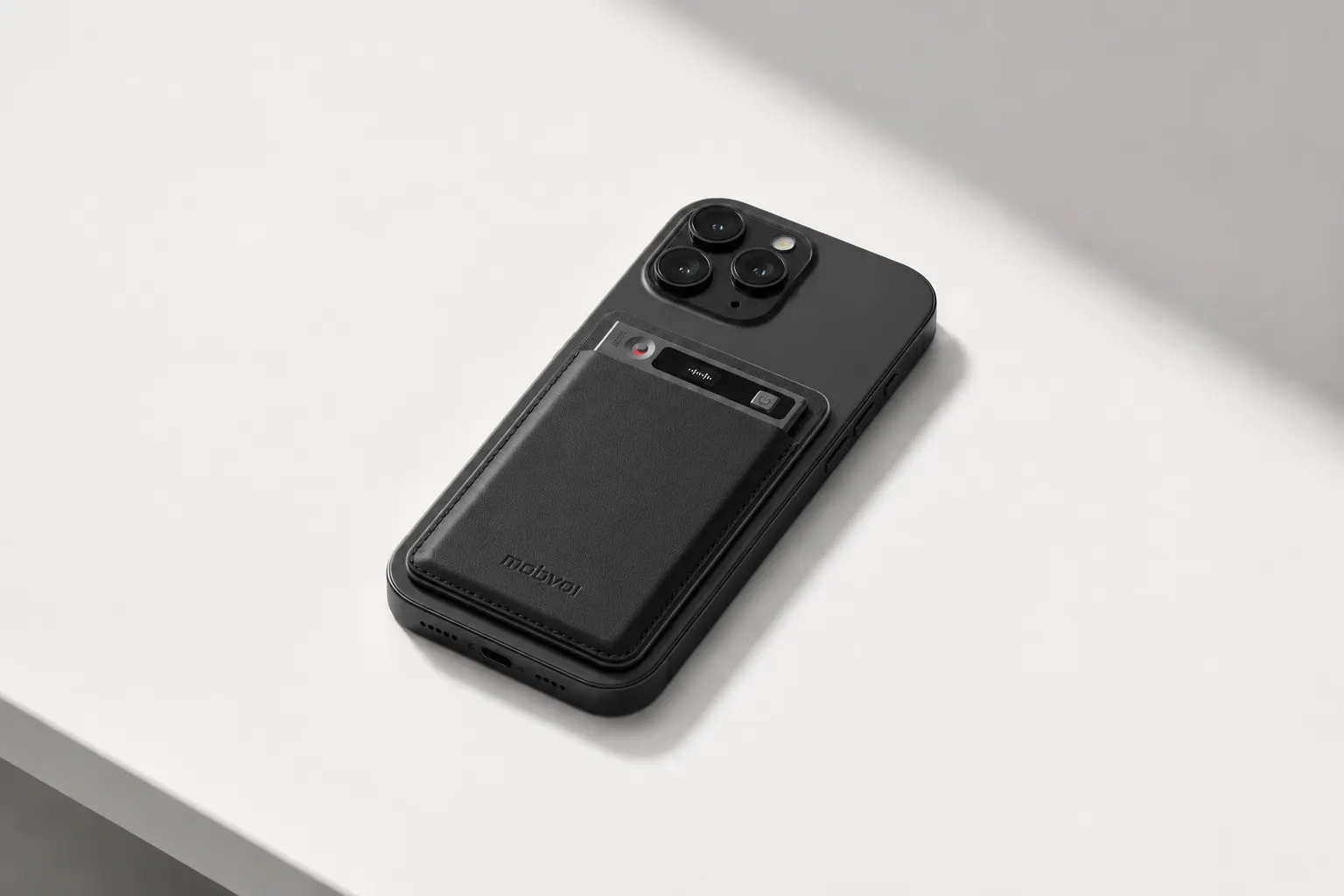
Key features
- Earphone mode magnetically attaches to the phone for call recording workflow.
- Speaker mode captures in-room meetings with a 3-mic array and up to 10m pickup.
- Offline recording saves locally, then syncs on reconnect.
- 25-hour battery and 64GB storage, good for about 434 hours.
- Time-stamped transcripts with automatic speaker identification.
- AI summaries, notes, and templates across 100+ formats.
- Project Knowledge Base for searchable recordings across clients or matters.
- Skills such as Sales Coach and Contract Review turn recordings into usable deliverables.
- Exports directly to Notion and Obsidian, plus cross-platform review on phone, desktop, and browser.
Pros
- Hardware starts at $159.99.
- Strong battery life for a full workweek of meetings.
- 64GB is far more forgiving than most app-only setups.
- Better post-recording workflow than simple offline recorders.
Cons
- The AI value is strongest after sync, not as a fully on-device end-to-end system.
- If you want a purely screen-free recorder, you may not use the app features much.
TicNote Watch: Best for mobile professionals who need a privacy-focused recorder always on the wrist
If you're a sales rep, journalist, or frequent traveler, the hard part isn't usually remembering to record. It's having a recorder ready during hallway chats, taxi conversations, trade-show intros, and the 4-minute walk between meetings. That's why the watch form factor works. A dedicated top recording button cuts friction, Random Thought captures up to 60 seconds, and Discreet Recording Mode lets you record with the screen off and a red-dot indicator.
It also handles Bluetooth call recording, which makes it more practical than a fitness watch with a memo app bolted on. Over 24 hours of continuous recording, One-Tap Highlight that works offline, AI summaries on the watch face, AI Journal, Shadow Recap, and a READINESS score make it unusually good for people who want work notes and body-state context in one device. If you're comparing device types, See TicNote Watch features.
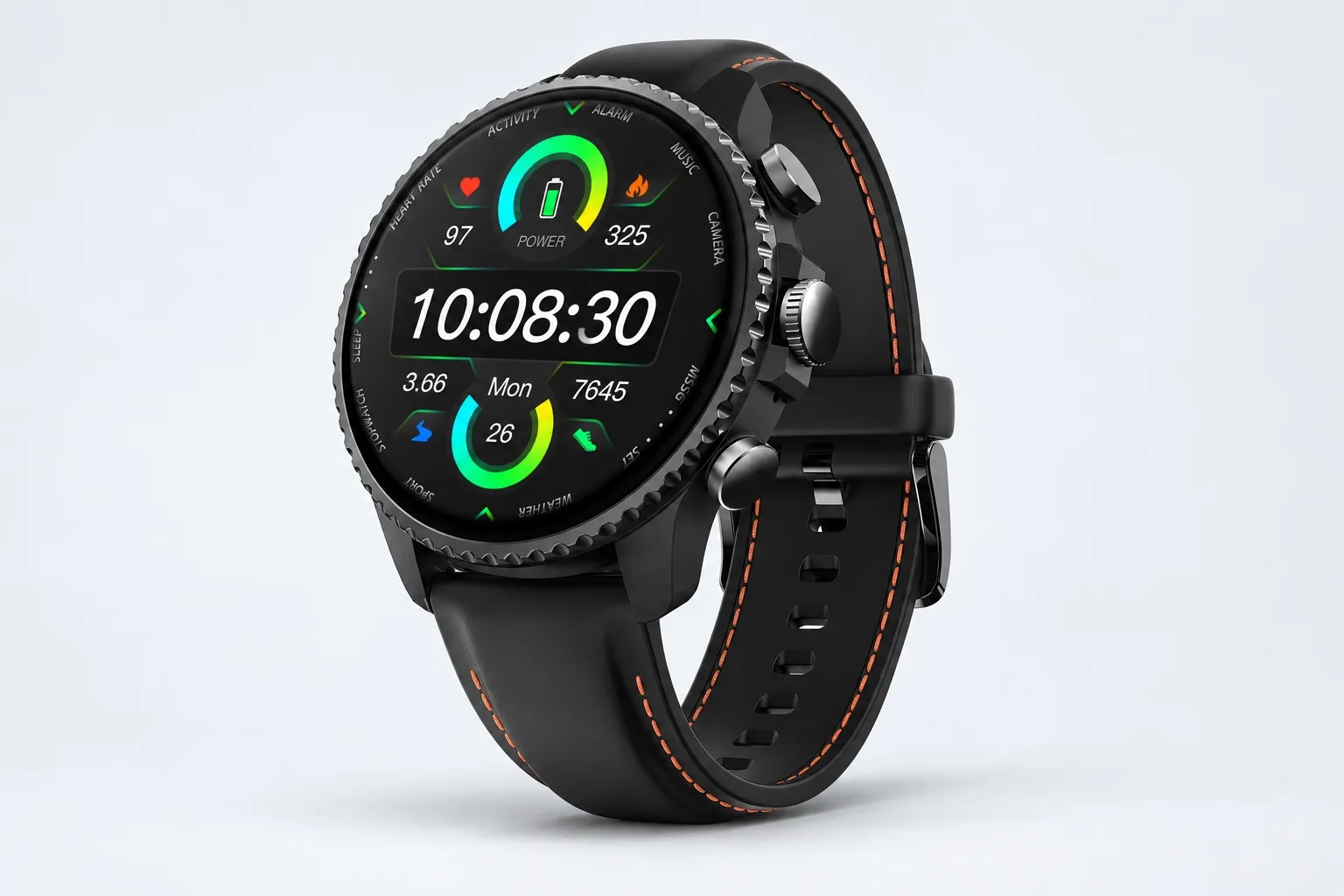
Key features
- Dedicated recording button for fast start and stop.
- Discreet Recording Mode for less obtrusive capture.
- Bluetooth call recording and transcription workflow.
- One-Tap Highlight marks key moments offline and carries them into the transcript.
- AI Journal creates a daily timeline of meetings, thoughts, and health data.
- Shadow Recap links stressful or important meetings to body signals.
- READINESS score helps plan demanding days.
- Offline capture with sync later.
Pros
- $249 gets you recording plus smartwatch utility.
- Over 24 hours of recording is strong for a wearable.
- On-wrist summaries are genuinely useful when you're moving.
- More discreet than pulling out a phone.
Cons
- The 3 to 5m pickup is less ideal for larger rooms than a dedicated meeting recorder.
- A smartwatch isn't the best fit if you only want desk or podium recording.
Plaud Note: Best for users who want a slim call recorder they can keep on a phone
This is the recognizable alternative if your priority is a very thin, attachment-style recorder for calls and everyday meetings. I see the appeal. It's easy to understand, easy to carry, and attractive for buyers already comparing card-style devices.
Where it fits best is lighter capture needs. If portability matters more to you than a deeper offline-to-notes workflow, it's a sensible option to consider.
Key features
- Phone-adjacent recording workflow.
- Local capture expectations for calls and nearby conversations.
- Strong portability appeal.
Pros
- Slim form factor.
- Straightforward use case for calls and meetings.
Cons
- Verify subscription cost, privacy terms, and export workflow before buying.
- Check how well offline capture turns into usable notes if that's important to you.
Sony ICD-UX570: Best for students and professionals who want a recorder without internet and without app setup
This one is for the person recording lectures, depositions, voice memos, or interviews who just wants local files and physical buttons. No companion app to learn. No cloud pipeline to configure. You press record, save the file, and keep ownership of it.
That simplicity is the point. If your workflow is manual and privacy means keeping recordings off cloud services by default, Sony still makes sense.
Key features
- Simple physical controls.
- Local storage workflow.
- Pocketable recorder design.
- Good fit for lectures, dictation, and straightforward interviews.
Pros
- No app dependency.
- Easy file ownership.
- Familiar recorder behavior.
Cons
- Limited transcription workflow.
- Weak fit for calls.
- Lower value if you need summaries or searchable archives.
Zoom H1essential: Best for journalists and interviewers who need better offline audio quality than an app
Picture a field interview in a noisy cafe or a travel note recorded on a windy street. In those situations, mic quality matters more than AI. That's where the Zoom fits. It's built for users who care about better raw audio for interviews, ambient notes, and spoken content they plan to transcribe or edit later.
I wouldn't pick it for call-heavy workflows. I would pick it when the recording itself is the asset.
Key features
- Creator-grade portable recorder positioning.
- Better fit for interviews and field notes.
- Local-first capture.
Pros
- Stronger audio focus than phone apps.
- Better suited to interviews and field work.
Cons
- Weak call workflow.
- No built-in AI note pipeline.
- More gear to carry than card-style or wrist-based options.
How I Evaluated Offline Voice Recorders
Most "best offline" lists lump together three different jobs: recording without internet, transcribing without internet, and syncing later. For anyone handling board meetings, client calls, source interviews, or travel days in airplane mode, that shortcut is useless. What matters is simple: what still works with zero signal, where the file lands first, and what only happens after you reconnect.
Why generic offline lists miss the real privacy test
A spec sheet won't tell you much about a 90-minute board meeting, a recorded client call from a phone, an interview in a noisy cafe, or a red-eye flight with no signal for six hours. In those situations, I care less about app-store claims and more about failure points: does recording start without login friction, does audio save locally, and does the device stay usable when Wi-Fi and cellular are both gone?
That's the gap I used to judge these tools. I separated capture from cloud features. If a recorder needs an account handshake at the moment of capture, I don't treat it as truly offline-ready.
I scored four variables that actually decide the winner
Offline capture integrity means the device records locally with no internet and no account dependency when you hit record. That's the first filter.
Privacy control means where files live first, whether sync is optional, and how clearly the company explains encryption and data use. NIST notes that clear data handling and encryption controls are core to reducing exposure in digital systems.
Reliability in the real world covers battery life, storage headroom, mic pickup, and one-touch operation. A recorder with 25 hours of battery and 64GB of local storage is simply safer for long workdays than one that depends on your phone surviving till 7 p.m.
Post-recording workflow is what happens after capture. Can you turn audio into a transcript, summary, searchable archive, or role-specific output quickly once you're back online? That's where tools differ most, especially if you need bot-free meeting notes and call summaries instead of raw audio files.
| Tool | Works well when | Falls short when | Best for |
| TicNote AI Voice Recorder | Long meetings, phone calls, and offline capture that syncs into AI notes later | You want fully local-only, no-cloud workflow forever | Professionals who need reliable capture first and transcript workflow after |
| TicNote Watch | Hands-free capture, walking notes, and Bluetooth calls | You need the strongest room audio from farther away | Mobile professionals who record on the move |
| Plaud Note | Slim everyday carry for calls and meetings | You need maximum storage headroom or longer endurance | Light daily business use |
| Sony ICD-UX570 | Simple local recording with minimal setup | You want AI summaries or modern search workflow | Privacy-first users who prefer classic digital recorders |
| Zoom H1essential | Cleaner interview audio and better mic results | You need discreet pocket carry or call recording | Journalists and field interviews |
That framework kept the ranking honest: first, can it capture offline without drama; second, what happens to the file after that.
How to Choose the Right Voice Recorder Without Internet for Your Workflow
The mistake I see most people make is looking for one universal winner. In practice, the right device depends on where your conversations happen, how sensitive they are, and what has to happen after the recording ends. Offline capture is only step one. The real question is whether you also need searchable notes, call recording, clean local files, or a fast path into your existing workflow.
If my week is packed with client meetings, internal reviews, and follow-up tasks, I'd pick TicNote AI Voice Recorder. It records offline, covers room conversations in Speaker mode, and handles phone calls in Earphone mode, which matters because calls and in-person meetings usually need different capture setups. After that, it does the work most professionals actually care about: transcripts, summaries, highlights, Project Knowledge Base organization, and exports to Notion or Obsidian. If you want a deeper look at the device and post-call process, you can also see how an AI recording device fits meetings, calls, and lectures while reviewing how TicNote fits offline recording workflows.
If your conversations happen while walking floors, moving between gates, or catching someone in a hallway, TicNote Watch makes more sense. A wrist button removes friction, Discreet Recording Mode lets you capture without pulling out a phone, One-Tap Highlight marks important moments mid-conversation, and Bluetooth call recording helps when your phone would be awkward. For mobile-first users, it's easy to see why TicNote Watch fits this workflow.
For the simplest offline recorder, I'd choose Sony ICD-UX570. It's a better fit for lectures, dictated notes, and long-term file storage when local audio matters more than summaries or AI output.
If interview sound quality comes first, Zoom H1essential is the right call. Better microphones and stronger field usability beat extra workflow features when the audio itself is the asset.
Plaud Note fits buyers who want a thin, phone-adjacent call recorder first. That said, I'd check software costs, export flexibility, and privacy expectations carefully before buying, because slim hardware doesn't automatically mean lower total friction.
One last filter: budget. A device that costs $159.99 or $249 upfront can be cheaper over 12 months than a lower-cost recorder that pushes you into a recurring transcription plan. Match total cost to recording volume and follow-up needs, not sticker price alone.
Conclusion: What Actually Makes the Best Offline Voice Recorder?
The best offline voice recorder isn't the one with the longest feature list. It's the one that still captures clearly when Wi-Fi drops, your phone is in airplane mode, or you're on the move, then fits what you need to do next. That's the real test: reliable local recording first, usable workflow second.
In practice, the right pick is usually simple. If you're a student or you mostly want local files for lectures and voice notes, a straightforward recorder is enough. If you run interviews, better microphones and cleaner pickup matter more than smart extras. If you handle meetings and calls all week, a hybrid device usually gives you more value because it records offline, then helps you organize transcripts, summaries, and follow-up after you reconnect.
That's why TicNote AI Voice Recorder stands out when offline capture and fast follow-up both matter. Its 3-mic array, 25-hour battery, and 64GB local storage cover the recording side, while the reconnect workflow is built for people who need notes they can actually use. If you want a deeper look at AI note-taking hardware and workflow tradeoffs, that's the comparison I'd read next. TicNote Watch is the better fit when mobility, discreet use, and quick capture matter more.
Before you buy, take 10 minutes and list your three most common recording situations. Then decide whether capture quality, privacy, or follow-up is your real bottleneck, and compare devices against that. Explore TicNote options if you want to see how hybrid offline recording workflows work in practice.