


 Extension

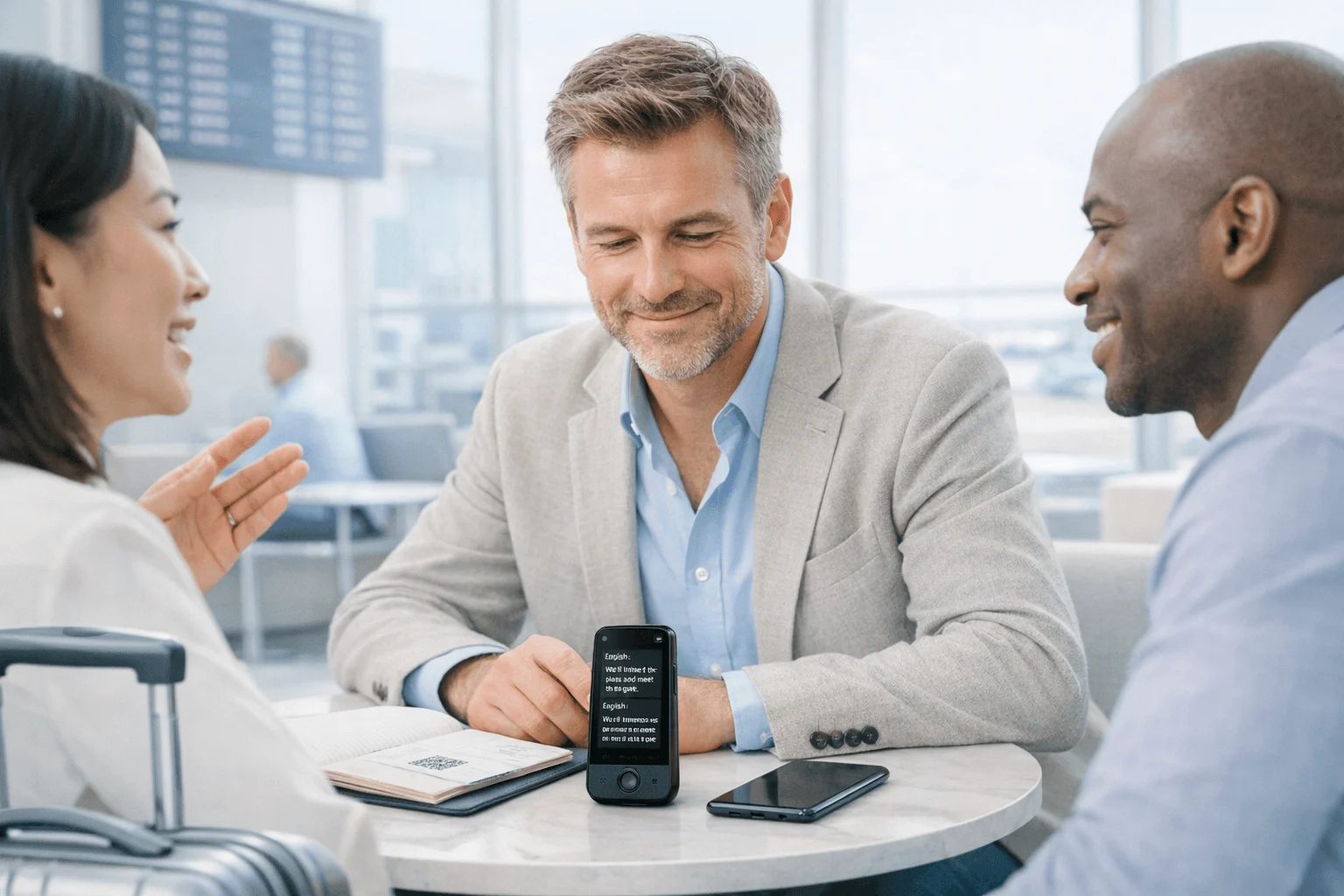
TL;DR: Voice recorders with translator quick answer
Voice recorders with translation aren't just dictation gadgets anymore. The best ones now handle recording, transcription, live subtitles, translated conversations, and post-meeting summaries in one workflow. My top pick is TicNote Pods 4G because it can record, upload, summarize, and translate over built-in 4G, so you don't have to wait for nearby Wi-Fi.
Quick answer: TicNote Pods 4G is best for field work, travel, and phone calls because it supports live upload and real-time outputs on the move. TicNote Pods Wi-Fi is best for remote workers and global Wi-Fi users who want a lower upfront cost. A smartphone app plus separate recorder is the budget fallback if you only need occasional translation and can live with extra steps, weaker call recording, and less reliable post-meeting workflow. In the rest of this guide, I break down what these devices are, how listen translation and conversation translation work, and what matters most for meetings, travel, calls, remote work, battery, storage, privacy, upload workflow, and AI outputs. The best voice recorder with translator for most professionals is TicNote Pods 4G.
Quick Picks: best voice recorder with translator options by use case
The category has split into three clear camps: always-connected hardware for people in transit, Wi-Fi-first devices for desk and hybrid work, and a cheaper phone-and-app setup for occasional use. If I needed a fast answer, I'd start with the table below, then match the pick to how you actually record: on the road, on calls, or only once in a while.
| Product | Best for | Translation mode | Recording method | Connectivity | Battery | Storage | Price |
| TicNote Pods 4G | Field work, travel, client visits | Listen Translation, Conversation Translation | Earbuds, charging case, automatic call recording | 4G eSIM + Bluetooth | ~13 hrs with 4G on / ~22 hrs with 4G off | 32GB case, around 2,150 hrs | $299.99 |
| TicNote Pods Wi-Fi | Remote meetings, students, global Wi-Fi users | Listen Translation, Conversation Translation | Earbuds, charging case, automatic call recording | Wi-Fi + Bluetooth | ~22 hrs | 32GB case, around 2,150 hrs | $249.99 |
| Phone + translation app | Occasional use on a budget | App-based live translation | Phone mic, manual uploads | Cellular or Wi-Fi via phone | Depends on phone | Depends on phone | Lower upfront cost |
Best pick for field work and travel
I'd choose TicNote Pods 4G for sales reps, consultants, and travelers who leave one meeting and need usable notes before the next taxi ride ends. The built-in 4G eSIM matters because it can push Live Summary during the meeting and Quick Summary the moment recording stops, without waiting for your phone or office Wi-Fi.
The fit is practical, not theoretical: Listen Translation and Conversation Translation cover cross-language discussions, automatic call recording captures both sides when you answer on the earbuds, and the dual mics with ENC noise cancellation can pick up voices from up to 10 meters. Battery lands at about 13 hours with 4G on or 22 hours with 4G off, and the 32GB case stores roughly 2,150 hours. Price is $299.99, and hardware users get the Plus plan with 600 transcription minutes per month.
Best pick for remote meetings and global Wi-Fi users
If most of your meetings happen at a desk, in a classroom, or anywhere with stable internet, TicNote Pods Wi-Fi is the cleaner buy. You skip the 4G premium, keep Wi-Fi and Bluetooth, and still get global availability with no regional lock.
What I like here is the workflow: record, use Listen Translation or Conversation Translation when needed, then trigger Wi-Fi fast transfer for auto-transcription after upload. You also get automatic call recording, about 22 hours of battery, and the same 32GB case capacity of around 2,150 hours. Price is $249.99, and the Plus plan is included for hardware users.
Best budget-friendly fallback
A phone-and-app setup makes sense if you only record occasionally and care most about spending less upfront. The tradeoff is real: uploads are usually manual, phone batteries fade faster in long sessions, and call capture is less dependable.
I wouldn't pick that route for confidential client work, long multilingual meetings, or hands-free travel days. It works best as a light-duty fallback, not as the core tool for serious meeting records.
How I evaluated AI voice recorder translator devices
This category has changed fast. Most "best" lists still treat every recorder as if it solves the same job, but multilingual work breaks that logic fast. A tool that survives a 45-minute client call may fail in a supplier negotiation, a remote standup, or a noisy trade show hallway.
Why most voice recorder with translator lists do not help buyers
What I care about isn't whether a device can translate in theory. I care about when the translation appears, how the audio gets uploaded, and what I have in hand 10 minutes after the meeting ends.
That's the gap. Generic spec lists tell you battery size, storage, and supported languages. They don't tell you whether you can record both sides of a call, capture room audio from across the table, sync later without losing context, or avoid an hour of manual cleanup.
In real workflows, that matters more than the headline feature. A traveler may need Listen Translation for one-way understanding. A consultant in a two-person negotiation may need Conversation Translation. A remote team lead may care less about live subtitles and more about getting a searchable transcript, speaker labels, and a usable summary before the next meeting.
For more context on capture tradeoffs, this guide on dedicated recorders versus phones for meetings and interviews is a useful baseline.
The 4 decision variables for a meeting recorder with translation
Translation mode. I checked whether each device supports live translated subtitles, Listen Translation, and Conversation Translation. Those are different jobs, not interchangeable features.
Capture workflow. I looked at whether it records calls, room audio, and offline sessions, then how it syncs. TicNote Pods 4G can upload in real time without a phone nearby, while the Wi-Fi version fits a sync-later workflow.
Post-meeting output. Good hardware is only half the job. I scored devices on time-stamped transcripts, speaker identification, summaries, searchable notes, and role-based tools like English Tutor, Sales Coach, and Travel Assistant.
Mobility and trust. Battery, storage, connectivity, and privacy controls matter daily. The difference between about 13 hours with 4G on and about 22 hours on Wi-Fi changes who can rely on it all day.
Quick comparison
| Tool | Works well when | Falls short when | Best for |
| TicNote Pods 4G | You need call recording, room capture, live upload, and fast summaries while moving between meetings | You don't want to pay for always-on connectivity or mostly work at one desk | Field consultants who need translated notes before they reach the next client site |
| TicNote Pods Wi-Fi | You want earbud recording, translation, and full AI notes with global availability and Wi-Fi sync | You need constant real-time upload away from Wi-Fi | Remote workers who need multilingual meeting records without a 4G plan |
| Generic app-based setup | You mostly record scheduled meetings in stable phone or laptop environments | You need reliable hallway capture, hardware call recording, or less distracting workflows | Budget-conscious students or occasional travelers who only need light translation and transcription |
3 best voice recorder with translator devices for real workflows
This category has changed fast. The best choice isn't the device with the longest feature list. It's the one that fits how you actually work: running between client sites, sitting in remote meetings all day, or recording the occasional travel conversation and sorting the file out later. That's how I ranked these picks.
If you want the short version, I'd match the workflow first. Mobile professionals who need notes before the next stop should look at TicNote Pods 4G. Remote workers and global users who can sync on Wi‑Fi will usually get better value from TicNote Pods Wi‑Fi. And if you only record a few short conversations a month, an app-based setup can be enough, even though it adds more manual work.
TicNote Pods 4G: Best for mobile professionals who need live translation and notes before the next stop
I think of the person leaving a client office, walking to the car, and already needing the recap. That could be a field consultant, a sales rep covering three cities in two days, or a traveler handling supplier meetings back to back. In that workflow, the biggest problem isn't just recording. It's getting usable notes and translated context before the next appointment starts.
That's where TicNote Pods 4G fits better than a sync-later device. Its built-in 4G eSIM lets it record and upload in real time without needing your phone nearby, so the work continues while you move. Live Summary runs while the meeting is still happening, and Quick Summary appears right after recording stops. If your day depends on fast follow-up, that difference matters more than one extra feature on a spec sheet.
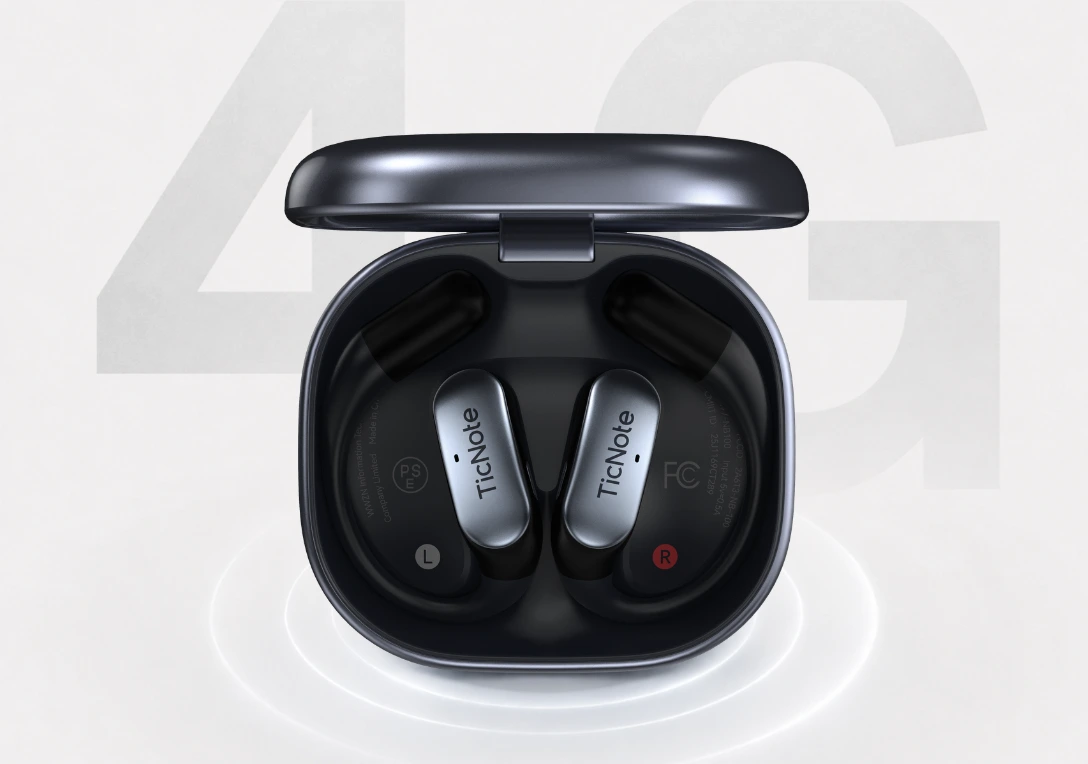
The proof points line up with that mobile use case. Listen Translation helps when you need one-way listening in a vendor talk or station announcement. Conversation Translation works better for two-person exchange. Automatic call recording captures both sides when you answer on the earbuds. The earbuds and charging case switch between dual modes automatically, so you can use the buds for calls and the case for room recording. Add dual mics, ENC noise cancellation, and up to 10m pickup, and it has the hardware to handle noisy real-world spaces.
On the software side, it goes beyond transcription. You get real-time transcription and live translated subtitles in 120+ languages for transcription and translation, with 17 live languages. Record offline and it syncs when you reconnect. The transcript is time-stamped and includes automatic speaker identification. Summaries can use 100+ templates, and Ask AI plus Project Knowledge Base make repeated recordings searchable instead of scattered. For role-specific output, Sales Coach and Travel Assistant Skills are genuinely useful, and exports to Notion and Obsidian make the handoff cleaner. Battery life is about 13 hours with 4G on or about 22 hours with 4G off, and the 32GB case stores roughly 2,150 hours.
Key features
- Built-in 4G eSIM: keeps upload and summary moving when you're away from Wi‑Fi or your phone.
- Live Summary and Quick Summary: useful when you need action items before the next appointment.
- Listen Translation and Conversation Translation: fit vendor meetings, travel, and multilingual conversations.
- Automatic call recording: captures both sides when you answer on the earbuds.
- Project Knowledge Base and Ask AI: help turn many recordings into searchable follow-up.
- Sales Coach or Travel Assistant Skills: connect raw recordings to role-specific outputs.
Pros
- Costs $299.99 and solves a real mobile problem that cheaper Wi‑Fi models don't.
- Real-time upload works without phone proximity thanks to built-in 4G eSIM.
- Live translated subtitles support 120+ languages, with 17 available live.
- Dual mics, ENC noise cancellation, and 10m pickup are built for field use.
- Includes the hardware Plus plan with 600 transcription minutes per month, plus 32GB case storage.
Cons
- Battery life drops to about 13 hours with 4G on.
- Upfront price is higher than the Wi‑Fi model.
- Translation and live features work best with connectivity, so the fastest experience depends on signal.
TicNote Pods Wi‑Fi: Best for remote workers and global users who want translation without paying for 4G
If most of your day happens at a desk, in a co-working space, or on back-to-back calls, the job looks different. You still want translated subtitles, searchable transcripts, and quick summaries, but you probably don't need live upload while you're in a taxi between meetings. You need the earbud form factor, lower cost, and a workflow that works reliably wherever you are.
That's why I'd point most remote workers and students to the Wi‑Fi model first. It keeps the core translation and recording workflow, but lowers the price by $50 compared with the 4G version. It also avoids a regional lock, which matters if you're buying from outside one launch market or moving across countries.
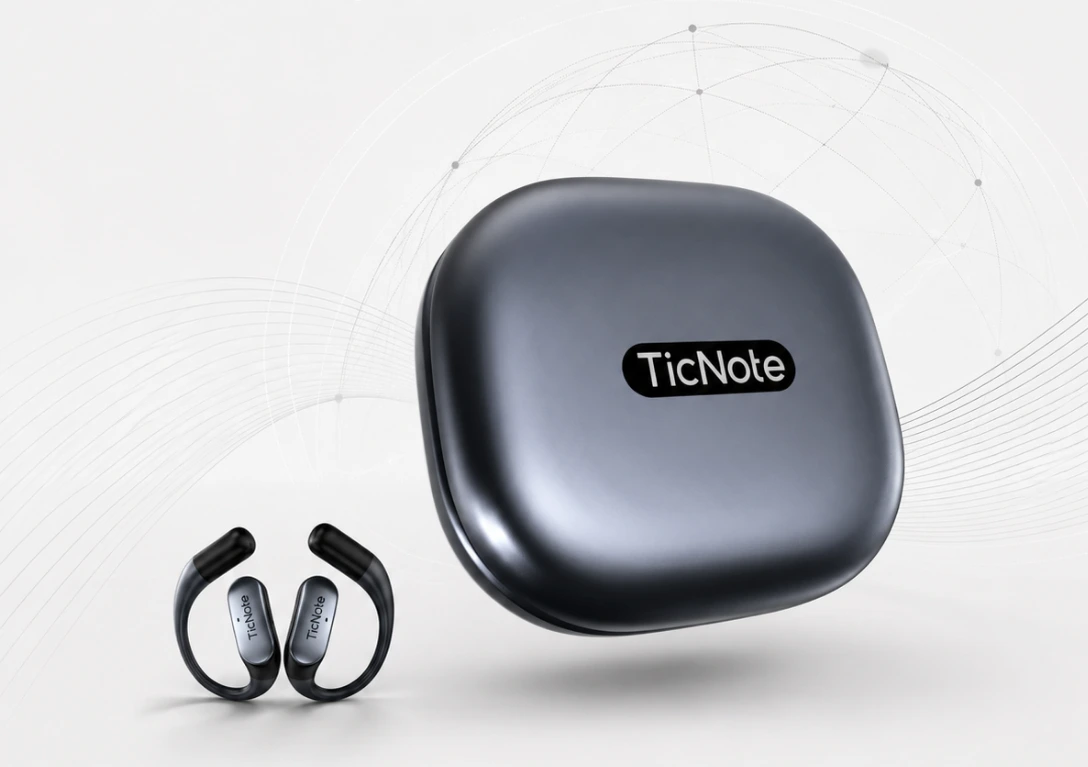
The feature set still covers most real-world use. It works over Wi‑Fi and Bluetooth with no regional lock. Wi‑Fi fast transfer helps move recordings quickly and starts auto-transcription after upload. You still get Listen Translation, Conversation Translation, automatic call recording, earbuds and charging case dual modes, dual mics with ENC noise cancellation, and 10m pickup. It also supports real-time transcription and live translated subtitles in 120+ languages for transcription and translation, with 17 live languages.
For review and follow-up, it keeps the parts that matter: offline recording with sync on reconnect, time-stamped transcripts with speaker identification, summaries from 100+ templates, Mindmap, Ask AI, and Project Knowledge Base. I also like the English Tutor Skill here for language learners or multilingual teams that want recordings to become practice material, not just archives. Cross-platform access and exports to Notion and Obsidian help if you already have a notes system. Battery life is about 22 hours, storage is the same 32GB case with roughly 2,150 hours, and the price lands at $249.99. If you want a broader comparison of meeting-focused devices, this AI meeting recorder breakdown is useful context.
Key features
- Wi‑Fi fast transfer: speeds up upload and auto-transcription when you get back online.
- Global no-lock availability: easier for international buyers and distributed teams.
- Listen Translation and Conversation Translation: practical for remote collaboration and bilingual meetings.
- Automatic call recording: useful for people who take work calls through earbuds.
- English Tutor Skill: turns recordings into language-learning support for students and global teams.
- Project Knowledge Base: keeps recurring meetings searchable across devices.
Pros
- Costs $249.99, which is a clearer value if you don't need built-in 4G.
- About 22 hours of battery life is better for long workdays.
- No regional lock makes it easier to buy and use globally.
- 32GB charging case stores roughly 2,150 hours of recordings.
- Includes the hardware Plus plan with 600 transcription minutes per month.
Cons
- No built-in 4G, so it can't live-upload away from Wi‑Fi.
- If you record offline, summaries arrive after reconnect and upload.
- Less suited to field workers who need notes before they get back online.
App-based recorder plus translation app: Best for occasional users who only need basic translation on a tight budget
This setup fits a narrower workflow, but it can be enough. I'd put it in front of a student recording a short lecture excerpt, or a traveler saving a few restaurant or station conversations, then manually uploading files later. If you only need a basic transcript or rough translation a few times a month, using your phone's recorder plus a separate translation or transcription app can cost a lot less upfront.
The tradeoff is friction. In practice, you're usually juggling two or three steps: record, upload, wait, then organize the output yourself. That's fine for short, low-stakes use. It becomes annoying fast when you need call recording, automatic speaker separation, long local storage, cleaner microphone pickup, or post-meeting AI outputs like summaries, Q&A, and role-specific follow-up.
Another issue is consistency. Phone mics vary, background noise hits harder, and privacy terms differ by app. Some apps are strong at translation but weak at recording. Others transcribe well but don't handle multilingual conversations cleanly. If I only needed occasional capture on a budget, I'd accept those tradeoffs. If I needed dependable meeting notes or repeated cross-language work, I wouldn't.
Key features
- Low upfront cost: usually the cheapest way to test the workflow.
- Flexible app choice: you can swap transcription or translation apps as needed.
- Good enough for short recordings: fine for occasional travel or study use.
Pros
- Lowest entry cost if you already own a smartphone.
- Easy to start with no extra hardware purchase.
- Works for short conversations, quick voice memos, and infrequent uploads.
Cons
- More manual steps for upload, transcription, translation, and organization.
- Usually weaker for call recording and automatic speaker identification.
- Storage, battery drain, and microphone quality depend on your phone.
- Privacy review takes more work because policies vary across apps.
How to choose the right voice recorder translation device for your workflow
Most people choose this category the wrong way. I'd start with where your conversations actually happen, what you need 5 minutes after they end, and how much setup you'll tolerate to get there. That matters more than a long feature sheet because a device that works perfectly at a desk can fail fast in a taxi, airport lounge, or client site.
Pick 4G if your conversations happen on the move
If I were a consultant, sales rep, or frequent traveler, I'd choose TicNote Pods 4G first. The reason is simple: built-in 4G eSIM means it can upload in real time without a phone nearby, so I'm not waiting to get back to Wi-Fi before anything happens. Live Summary shows up while the meeting is still running, and automatic call recording covers earbud calls when plans change mid-day.
That combination fits field work better than a sync-later device. When you leave a 40-minute client visit and need to brief your manager before the next stop, speed beats theory. If that's your workflow, Check TicNote Pods 4G details.
Choose Wi-Fi if you mostly work from stable internet or across borders
If your days are mostly Zoom calls, classes, coworking sessions, or international travel with unpredictable carrier support, I'd go with TicNote Pods Wi-Fi. It keeps Listen Translation, Conversation Translation, real-time transcription, and 32GB storage, but lowers the upfront cost to $249.99 and avoids regional lock.
That tradeoff makes sense for remote workers, students, and distributed teams. You still get multilingual capture and post-meeting AI without paying the 4G premium. For that setup, Explore TicNote Pods Wi‑Fi.
Compare the post-meeting workflow, not just the recording
This is where ROI usually shows up. I'd compare time-stamped transcript quality, speaker identification, summary templates, Ask AI, Mindmap views, role-based Skills like Sales Coach or English Tutor, and exports to Notion or Obsidian. A recorder that saves even 10 minutes after four meetings a day gives back more value than one that only captures audio.
If you want a broader framework, this guide on choosing an AI recorder for meetings and calls covers the decision criteria well.
Verify privacy and compliance before you buy
Recording laws vary by country and, in the U.S., often by state. The FTC's advice is clear: privacy claims should be specific and verifiable. So check consent rules for calls and meetings, encryption in transit and at rest, retention controls, admin access, and whether your data is used to train models.
TicNote says its setup is private by default, recordings and transcripts are encrypted, and user data is not used to train AI models. That's a strong starting point, but I'd still match those claims against your company policy and legal requirements before rollout.
Conclusion: which multilingual voice recorder for meetings makes the most sense
The best choice isn't the device with the longest feature list. It's the one that removes the most friction from the way you already work. In practice, ROI comes from matching translation mode, capture method, upload path, and post-meeting outputs to your actual week, not to a spec sheet.
If I needed one answer for most professionals, I'd pick TicNote Pods 4G. It makes the most sense when your conversations happen on the move and you need live summaries, live translated subtitles, and uploads without waiting for Wi-Fi. The built-in 4G, dual recording modes, and automatic call capture solve a real problem: getting usable notes before the next meeting starts.
If your work is mostly remote, international, or desk-based, TicNote Pods Wi-Fi is the smarter value. You still get translation features, call and room recording, and the same AI outputs, but at a lower price if you're fine with a sync-first workflow. For occasional, low-stakes use, app-only setups are still fine, especially if you don't mind weaker capture and more manual cleanup. If you also want a smaller wearable form factor for calls and daily recall, this guide to wearable AI note takers for meetings and calls is worth a look.
No option is perfect. Noisy rooms still hurt accuracy, unstable connectivity still slows uploads, and strict privacy rules may require a tighter approval process before any cloud sync happens.
Here's the fastest next step: list the last five conversations you wish you'd captured better. Mark each one as in person, on a call, or while traveling. That pattern usually makes the right device type obvious in under 10 minutes.