
 Extension


TL;DR: Which AI Note Taker fits consulting meetings best?
I've had the same consulting nightmare twice: miss one client commitment in a 45-minute discovery call, then spend two hours after a workshop and a hallway debrief trying to rebuild what actually got said. That's why I don't look for a transcript tool anymore. I look for one system that works on Zoom, at a client site, and in the messy hybrid follow-up that happens afterward.
After testing device-based recorders, bot-based assistants, and botless workflows, the real tradeoff came down to four things: meeting environment, consent risk, deliverable quality, and monthly cost. My short answer: TicNote AI Voice Recorder fits consulting meetings best overall, especially for in-person and privacy-sensitive capture; Otter.ai is best for remote collaboration; Fireflies.ai is best for integration-heavy teams; and Fathom is the best low-cost option.
Quick picks: the best AI note takers for consulting meetings
If you're skimming, this is the short answer. I tested these tools against the way consulting meetings actually happen: Zoom calls, client-site workshops, hallway follow-ups, and phone calls that never make it onto the calendar.
Best overall by meeting environment
| Tool | Best for | Works best in | Bot or botless | Privacy posture to verify | Starting cost |
| TicNote AI Voice Recorder | Consultants who need one device for client-site meetings and phone calls | In-room meetings and calls | Botless device capture | Self-described private-by-default, on-device processing, optional sync | $159.99 hardware with included Plus plan |
| TicNote Watch | Independent consultants who capture hallway chats and fast follow-ups | Informal, in-person, and hybrid contexts | Botless wearable capture | Same self-described privacy posture | $249 hardware with included Plus plan |
| Otter.ai | Remote consulting teams that need shared notes | Virtual meetings | Software assistant | Verify workspace controls, retention, and participant notice | Plan-based software pricing |
| Fireflies.ai | Firms that push notes into CRM and project systems | Scheduled online meetings | Bot-based or app-based depending on setup | Verify bot consent flow and third-party integrations | Plan-based software pricing |
| Fathom | Solo consultants who want simple virtual notes | Zoom-style calls | Meeting assistant | Verify recording disclosure and storage settings | Free tier plus paid tiers |
| tl;dv | Compliance-conscious teams on virtual platforms | Recorded online meetings | Meeting assistant | Verify admin controls, consent workflow, and data residency | Plan-based software pricing |
For consulting-specific hardware options, I found this comparison of dedicated AI note-taking devices useful because it separates room capture from call capture.
What each pick is really buying you
TicNote AI Voice Recorder buys you coverage across the two hardest consulting scenarios: client-site rooms and live phone calls, with botless capture and exports to Notion or Obsidian.
TicNote Watch buys you speed. It's the one I'd pick for hallway chats, workshop sidebars, and multilingual follow-ups when pulling out a laptop would kill the moment.
Otter.ai buys you shared team notes. Fireflies.ai buys you workflow automation into CRM and project systems. Fathom buys you easy virtual summaries with a low starting cost. tl;dv buys you stronger review controls for recorded online meetings.
The real split is simple: if your work happens beyond scheduled Zoom calls, device-based capture matters more than another meeting bot.
6 best AI note takers for consulting meetings
This isn't a generic ranked list. I'm looking at these tools the way a consulting team actually buys them: by meeting environment, consent risk, bot versus botless capture, and whether the output is good enough to turn into a client deliverable the same day.
If you spend one morning in a client workshop, then jump into a steering call from your phone, the right tool changes fast. That's why each pick below starts with the consulting situation first, then the workflow fit, then the proof.
TicNote AI Voice Recorder: Best for consultants who need a botless AI note taker for in-person consulting meetings and client calls
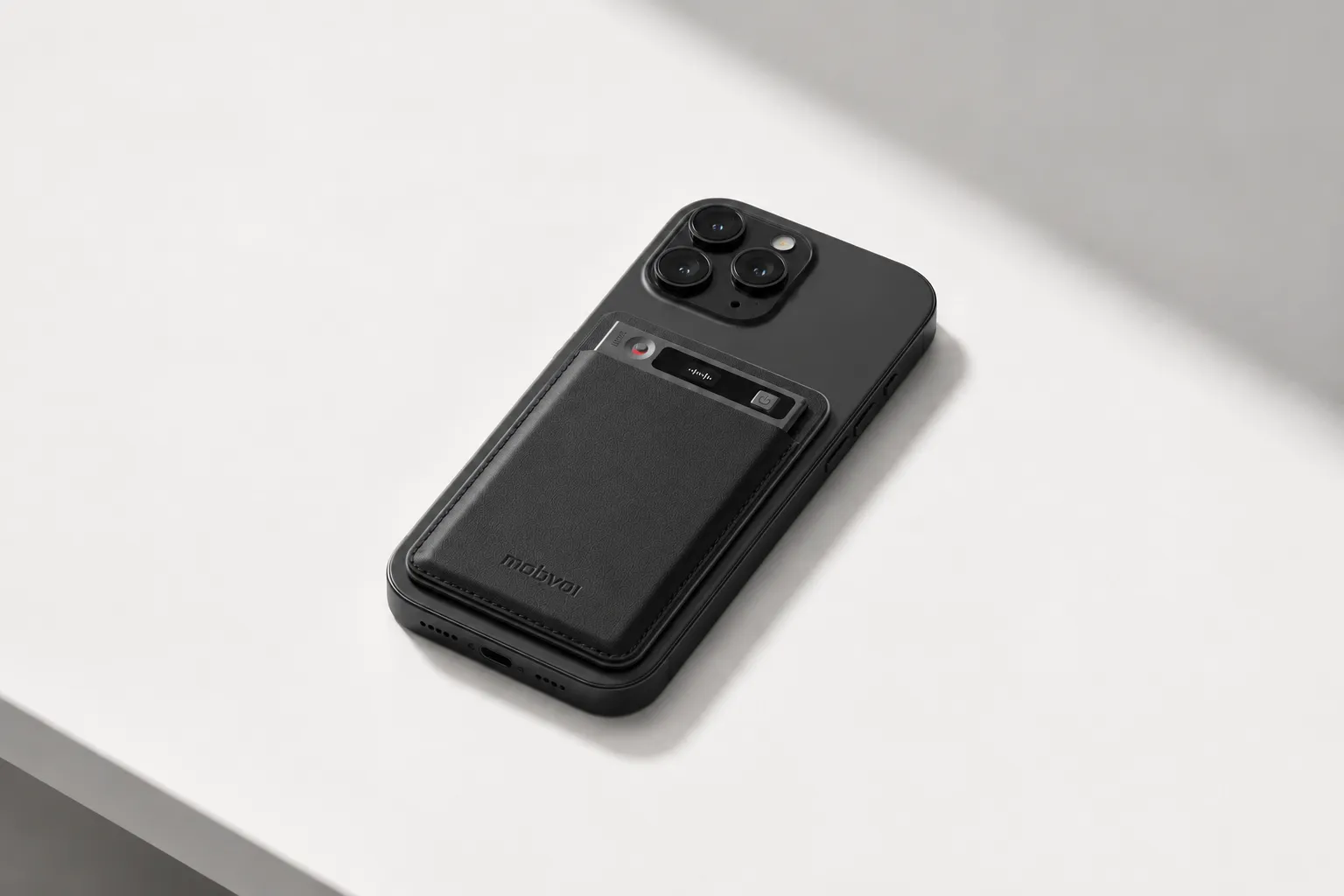
I'd pick TicNote AI Voice Recorder when my day starts in a 60-minute client workshop and ends with a follow-up phone call in the cab back. In that setup, I don't want to ask a client to admit a meeting bot, and I don't want to juggle two recording tools.
The fit is simple: Earphone mode handles calls by attaching to the phone, while Speaker mode captures room conversations. That matters when consultants communicate with multiple clients every day and need the recording process to disappear into the background so they can stay focused. If you want a closer look at the botless note-taking workflow for consultants, TicNote is the cleanest example I found.
Proof-wise, the hardware is unusually practical for consulting fieldwork: a 3-mic array with pickup up to 10m, offline recording with sync on reconnect, 25-hour battery life, and 64GB of storage for about 434 hours. On the software side, it offers real-time transcription and live translated subtitles in 120+ languages, including 17 live languages, automatic speaker identification, 100+ summary templates, Generate Visual Report & Slides, a Project Knowledge Base, and consulting-specific Skills such as Competitor Analysis, Contract Review, Finance Assistant, and Supplier Management. TicNote Connecting also gives access through ChatGPT or Claude, with exports to Notion and Obsidian, so your meeting record can become project memory instead of one more isolated transcript.
Key features
- Earphone and Speaker modes: one device covers both phone calls and room meetings, so I don't need separate apps or a meeting bot.
- Offline recording with sync on reconnect: useful on client sites with weak Wi-Fi or while traveling between meetings.
- Multilingual transcription and live subtitles: helps on cross-border projects with 120+ transcription languages and 17 live languages.
- Generate Visual Report & Slides: turns a meeting into a presentation-ready output faster than rewriting notes by hand.
- Project Knowledge Base: groups meetings by client or workstream for searchable AI Q&A later.
- TicNote Connecting and Bring Your Own AI Model: lets teams access notes through ChatGPT or Claude and choose supported external models.
- Consulting-ready Skills: accelerates common work like competitor scans, contract review, finance summaries, and supplier comparisons.
- Notion and Obsidian export: useful if your team already runs delivery or knowledge management there.
Pros
- Botless capture is a better fit for privacy-sensitive client meetings and in-person workshops.
- Handles both calls and room audio with one card-sized device.
- Strong room pickup at up to 10m makes it more practical for workshops than most wearables.
- Outputs go beyond summaries into slides, reports, and searchable project knowledge.
- Project grouping and AI Q&A make it easier to track client information across weeks of meetings.
Cons
- Up-front hardware cost is $159.99.
- GDPR alignment is self-claimed, so buyers should still run their own privacy and legal review.
- Heavy weekly usage may push some teams into higher minute or credit tiers.
TicNote Watch: Best for independent consultants who need an AI note taker for hybrid consulting meetings, hallway chats, and travel days
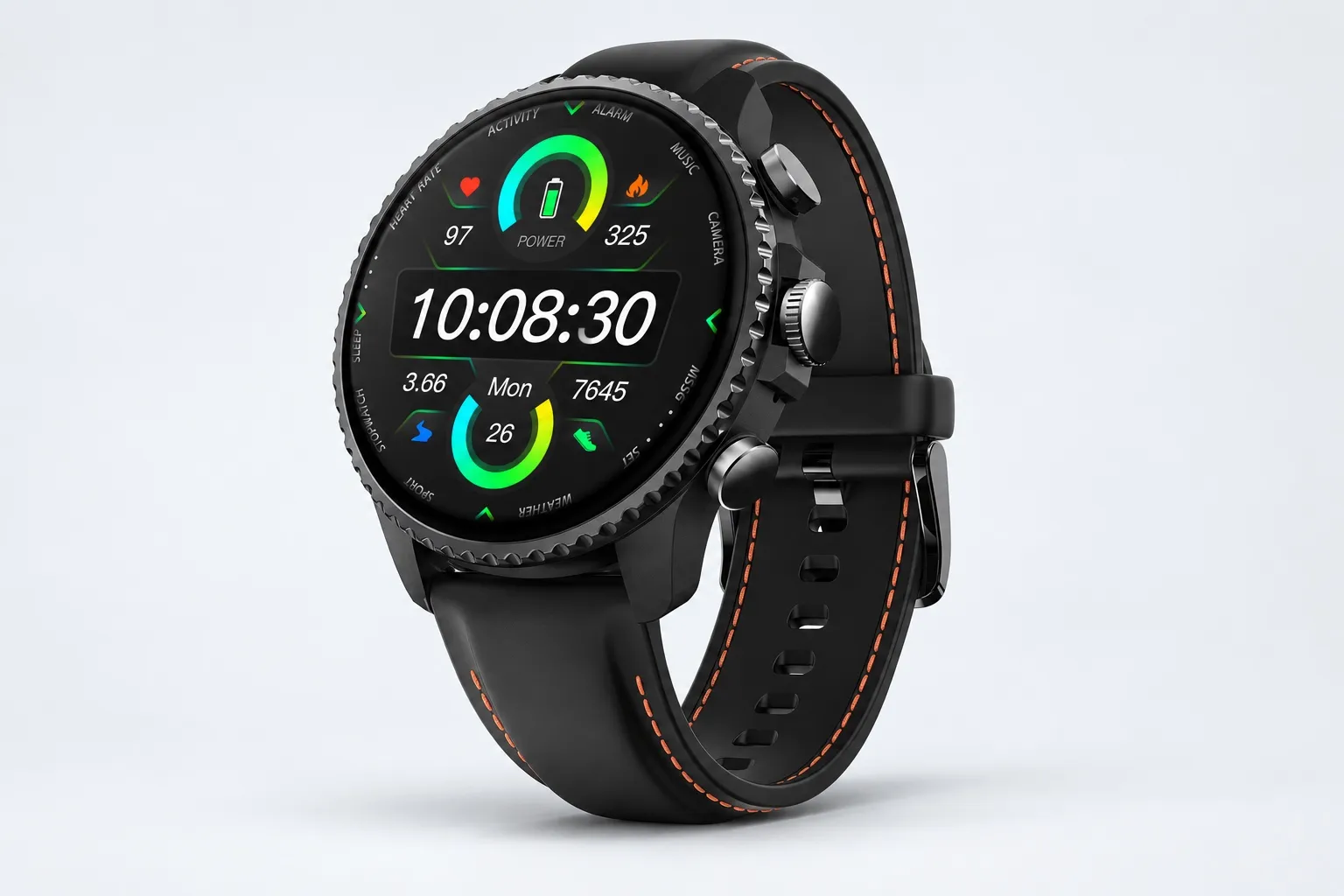
Some consulting days happen away from the laptop. You leave a breakout room, capture a 60-second insight while walking, take a Bluetooth call from the watch, and want the summary visible before you get back to your seat.
That's where TicNote Watch fits. The dedicated top recording button makes capture fast, Discreet Recording Mode keeps the screen off with a persistent red-dot indicator, One-Tap Highlight works offline, and AI summaries can be pushed to the watch face. The watch also records Bluetooth calls and supports over 24 hours of continuous recording with a 3 to 5m pickup range.
It's especially useful for independent consultants whose work blends client conversations with constant travel. Random Thought capture, AI Journal, Shadow Recap, and the READINESS score connect notes with your day, while 24-hour heart rate, SpO2, stress, sleep tracking, 100+ sports modes, and built-in GPS make it more of a field companion than a pure meeting recorder.
Key features
- Dedicated recording button and Random Thought capture for fast note capture between sessions.
- Discreet Recording Mode with red-dot indicator for lower-friction informal capture.
- Bluetooth call recording and AI summaries on the watch face.
- AI Journal and Shadow Recap connect meetings with health and energy signals.
- 24-hour wellness tracking, GPS, and sports modes support travel-heavy workdays.
Pros
- Great for hallway chats, site walks, airport transfers, and hybrid days.
- One-Tap Highlight works offline, which is useful during travel.
- Easier to carry than a phone-plus-recorder setup.
- Good fit when work and mobility are tightly linked.
Cons
- Shorter 3 to 5m pickup range than the card recorder.
- Less suitable for large workshops or wider boardroom layouts.
- Better as a personal capture tool than a team standard.
Otter.ai: Best for consulting teams who run most client work over Zoom and need collaborative AI meeting notes for consultants
When three people from the same team leave a remote steering committee and all need the same transcript, summary, and action list right away, Otter makes sense. I'd use it when collaboration matters more than discreet capture.
Its strength is shared transcripts, team collaboration, and live support for virtual meetings. That makes it practical for distributed consulting teams, but weaker for in-person workshops and privacy-sensitive client settings where botless capture is preferred.
Key features
- Shared transcripts for team review
- Collaborative notes and action items
- Live support during virtual meetings
Pros
- Strong fit for Zoom-heavy consulting workflows.
- Easy for multiple team members to review the same call.
- Good when speed of post-call alignment matters most.
Cons
- Not the best option for in-person client workshops.
- Bot-based capture may raise objections in some client settings.
- Less flexible for spontaneous offline recording.
Fireflies.ai: Best for operations-heavy firms that want an AI meeting assistant for consultants with stronger workflow automation
Some firms care less about the transcript itself and more about where the notes go next. If your ops lead wants meeting content pushed into CRM, project tools, and searchable archives, Fireflies is the more relevant fit.
Its main appeal is integrations, speaker handling, and searchable notes. That's useful for consulting operators who value retrieval and downstream automation, though bot-based meeting capture is still a tradeoff and in-person capture isn't the core strength.
Key features
- CRM and workflow integrations
- Searchable meeting notes
- Speaker-aware transcripts
Pros
- Better fit for firms building process around meetings.
- Stronger downstream automation than many basic note tools.
- Helpful for searchable archives across client accounts.
Cons
- Some clients won't want bots in meetings.
- In-person room capture isn't the main use case.
- Can be more operations-friendly than consultant-friendly.
Fathom: Best for solo consultants who want a low-cost AI recorder for client meetings held mostly online
If I were a solo consultant running discovery calls and weekly check-ins online, Fathom would be one of the simplest places to start. The appeal is straightforward virtual note capture without much setup.
It's known for a low-friction entry point, simple virtual notes, and ease of use. The tradeoff is scope: it's better for individual online workflows than firm-wide automation or mixed in-person capture.
Key features
- Simple virtual meeting notes
- Easy setup for solo use
- Free-entry appeal
Pros
- Good starting point for independent consultants.
- Low barrier to trying AI note capture.
- Works well for recurring online client calls.
Cons
- Limited breadth beyond virtual meetings.
- Not built for larger consulting team workflows.
- Less compelling for hybrid or on-site work.
tl;dv: Best for firms that prioritize AI note taker with compliance and privacy checks on virtual meetings
Some consulting rollouts start with procurement, not the delivery team. If security review, admin controls, and compliance conversations come before adoption, tl;dv is worth a closer look.
The fit is enterprise-style remote meeting capture and review workflows, with stronger emphasis on compliance and security discussions than lightweight solo tools. I'd evaluate it mainly for scheduled virtual meetings, not spontaneous in-person client conversations.
Key features
- Compliance- and security-oriented positioning
- Virtual meeting review workflows
- Enterprise-friendly controls
Pros
- Better fit for procurement-led evaluations.
- Useful when compliance review is a gating issue.
- Designed around scheduled virtual meetings.
Cons
- Not the best match for ad hoc in-person capture.
- Less useful for hallway chats or client-site workshops.
- Should be judged primarily in a remote-meeting context.
How I evaluated AI meeting notes for consultants
Most AI note taker roundups reward one thing: clean transcription on a standard Zoom call. That misses how consulting work actually happens. I evaluated these tools by whether they produce a defensible record, preserve client trust, turn conversations into usable outputs, and keep costs predictable across a month of mixed meeting volume.
Why most AI note taker lists do not help consultants
A consultant might have a 30-minute discovery call at 9 a.m., a 90-minute workshop after lunch, and a red-eye debrief recorded from an airport lounge at 10 p.m. Those are three different capture problems. Notes also aren't the end product. They become action logs, workplans, proposal inputs, steering committee updates, and sometimes compliance evidence.
The 4 decision variables for consulting meetings
Meeting environment matters because Zoom, conference rooms, client-site workshops, hallway chats, and phone calls all demand different capture methods. Consent and privacy risk matters because a visible bot, cloud upload, or local device changes how comfortable clients feel. Deliverable readiness matters because some tools stop at a transcript while others generate summaries, searchable project knowledge, or even slides. True monthly cost matters because the real number includes hardware, subscriptions, minute caps, and add-on credits at light, medium, and heavy use.
If your work includes in-person sessions, this breakdown of AI note takers versus dedicated recorders for live meetings is worth reading before you default to a Zoom bot.
| Tool | Works well when | Falls short when | Best for |
| TicNote AI Voice Recorder | You need client-site, phone, and room capture in one device | You want software-only buying with no hardware | Consultants doing hybrid fieldwork |
| TicNote Watch | You capture hallway chats, travel debriefs, and quick stakeholder updates | You need 10m room pickup from a wrist device | Independent consultants on the move |
| Otter.ai | You run frequent online interviews and need live notes fast | You need discreet in-person capture | Remote discovery calls |
| Fireflies.ai | You want recurring meeting automation across shared team workflows | A bot joining client meetings creates friction | Internal reviews and recurring Zoom calls |
| Fathom | You want clean free meeting summaries for Zoom-heavy use | You need in-person or phone capture | Solo consultants on video calls |
| tl;dv | You review recordings asynchronously across distributed teams | You need offline or hallway capture | Internal knowledge sharing |
Bot vs. botless for consulting meetings
Botless setups reduce friction when you're on client premises, handling sensitive interviews, or recording side conversations where a meeting bot would feel intrusive. Bot-based assistants are still fine for internal retros, weekly PMO calls, and recurring remote meetings where every participant expects recording. For consulting meetings, the right choice usually depends less on transcript quality and more on where the conversation happens and how much visible recording changes the room.
How to choose the right consulting meeting note taker
Most consultants don't need the "best transcript." They need the tool that turns a 45-minute client conversation into usable outputs with acceptable privacy risk, in the meeting environments they actually work in. That shifts the decision fast: choose based on capture setting, consent exposure, post-meeting deliverables, and what your real monthly usage will cost.
Pick for client-site work
If most of my week happens in client offices, workshops, interviews, and executive reviews, I'd choose TicNote AI Voice Recorder. Its botless device capture avoids the awkwardness of inviting a meeting bot, offline recording helps when guest Wi-Fi fails, and the 3-mic array picks up voices from up to 10m away. The flip between room capture and phone-call recording also fits consulting work better than Zoom-only tools. If that's your reality, it's worth seeing how device-based meeting capture works before you compare another bot app.
What makes it stronger for consultants is what happens after the meeting. Generate Visual Report & Slides can turn a client debrief into presentation-ready material, Project Knowledge Base makes prior interviews searchable across a workstream, and role-based Skills such as Startup COO or Task Breaker help convert raw notes into action plans instead of dead transcripts.
Match the tool to your virtual workflow
If your firm lives on Zoom, choose Otter.ai when team collaboration matters most. Choose Fireflies.ai when the real priority is pushing notes into downstream systems and automations. Choose Fathom if you're a solo consultant who wants low-cost call notes and can live with weaker support for in-person work. The tradeoff is simple: bot-led tools are efficient for scheduled virtual calls, but they're much weaker in workshops, side conversations, and on-site interviews.
Choose wrist capture for in-between moments
If you need to capture hallway chats, airport ideas, and quick client follow-ups between meetings, TicNote Watch fits best. Random Thought lets you save a sub-60-second idea without opening an app, One-Tap Highlight marks key lines during a conversation, AI Journal organizes those moments into a daily timeline, and Shadow Recap links meetings with stress and energy patterns. I'd recommend it most to independent consultants and business development-heavy roles, not to teams running large-room facilitation.
Run a procurement-led pilot before rollout
If procurement is driving the decision, choose tl;dv for a virtual-first, compliance-led evaluation. Then run a 2- to 3-week pilot that tests consent language, storage controls, export paths, and whether summaries actually become client-ready deliverables. That pilot will tell you more than any feature grid.
Privacy and compliance checklist for AI note takers with compliance and privacy
I wouldn't buy any AI note taker for client work until legal, IT, and the people who actually run meetings can answer the same short due-diligence checklist. In consulting, one bad recording decision can create more risk than a missed note ever would, especially across cross-border projects, regulated clients, and hybrid workshops.
What to verify before recording client meetings
Use this checklist before you approve any tool:
- Confirm consent rules by region. In the U.S., consent laws vary by state, while the GDPR requires a lawful basis and clear purpose limitation.
- Verify data residency. Ask where audio, transcripts, and backups are stored, not just where the company is headquartered.
- Check encryption in transit and at rest.
- Ask whether your meeting data trains vendor models. If the answer isn't a clear no, stop.
- Review deletion controls, including hard-delete timing and admin-managed retention.
- Confirm role-based access, SSO, and audit logs.
- Test exportability so you can move records into Notion, Obsidian, or your firm archive.
- Ask whether the product supports offline capture or forces immediate cloud upload.
How to pressure-test botless AI note taker and bot-based options
Botless capture and meeting bots create different risks. A bot visibly joins Zoom or Teams, which makes notice easier but can alarm clients and expand what gets stored in the meeting platform. Device-based capture feels more discreet, but that doesn't remove the need for explicit notice when law, contract terms, or client policy require it.
That's why I treat privacy claims as test items, not selling points. If a vendor says it is private by default, uses end-to-end encryption, supports on-device processing, and does not train models on customer data, ask for documentation, admin controls, and exact exceptions. TicNote makes those kinds of claims, and they're directionally useful, especially for in-person meeting capture with tighter privacy tradeoffs, but buyers should verify every one during security review.
A simple policy for consultants and firm operators
Write a one-page internal rule set. Include approved client consent language, meeting-type exceptions, retention periods, who can access transcripts, and where exports may go, such as Notion or Obsidian. If your policy fits on one page, teams actually follow it.
Conclusion: what actually makes an AI note taker worth it for consultants?
After testing this category against real consulting work, I don't think the best tool is the one with the longest feature list. It's the one that fits where your meetings happen, how sensitive the conversation is, and what needs to happen next. In practice, the payoff comes from fewer missed commitments, faster follow-up, and stronger client-ready outputs, not from transcription alone.
That's why the winners split by scenario. TicNote AI Voice Recorder is the practical pick for in-person sessions, client-site meetings, and botless capture. Otter.ai still works well for shared remote notes. Fireflies.ai is strong when automation after the meeting matters most. Fathom is the easy low-cost option for virtual-heavy teams. tl;dv makes sense for compliance-led virtual rollouts. And TicNote Watch stands out for consultants who capture ideas between meetings, during travel, or in quick hallway conversations.
If you want a fast next step, review last week's meetings by type, mark which ones would have triggered privacy review, and shortlist two tools for a 7-day pilot. If in-person capture matters, this guide to AI recorders by use case gives you a good second filter. TicNote AI Voice Recorder