


 Extension
TL;DR: Best AI Note Taker picks for interviews
The market has split into two camps: device-based recorders for in-person, phone, and on-the-go interviews, and app-based tools that work best in scheduled remote meetings.
Fast picks: best for mixed phone and in-person interviews, TicNote AI Voice Recorder; best for discreet field conversations, TicNote Watch; best for remote video interviews, Otter; best budget remote option, Fireflies; best multilingual post-upload transcription, Sonix; best bot-free laptop workflow, Granola; best for searchable team archives, Gong. If you only want the short answer, TicNote is the best AI recorder for interviews for most people because it covers the most interview settings with the least recording friction.
Quick Picks: the best AI interview recorder options by scenario
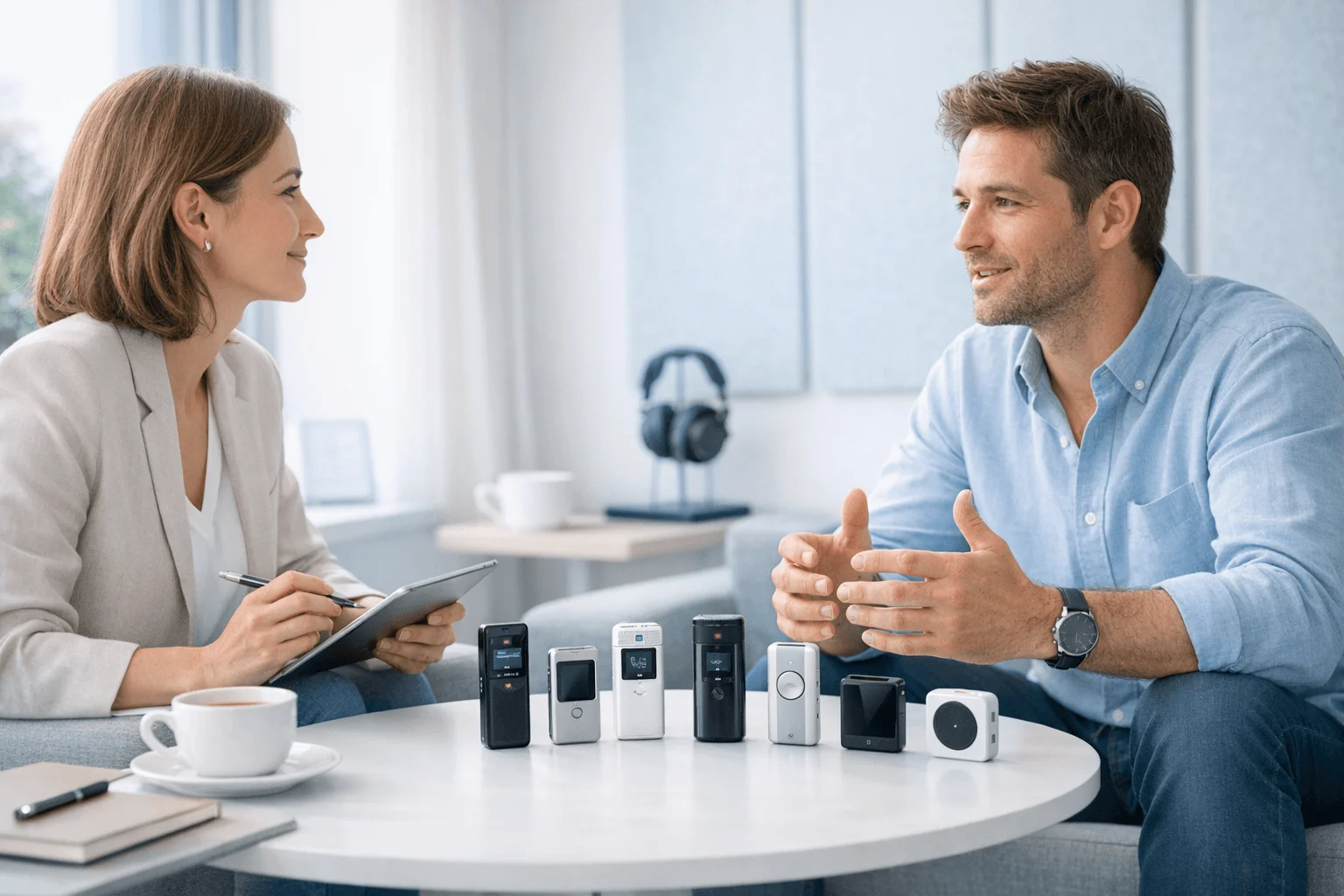
If you want the short answer first, start here. I'd pick by interview context, not brand awareness, because a recorder that works for a 45-minute Zoom interview can fail badly in a phone call, a noisy lobby, or a same-day field interview. For a broader breakdown of AI recorders by real-world use case, this is the shortlist I'd scan first.
| Product | Best interview setting | Why it stands out | Starting price / plan context | Key trade-off |
| TicNote AI Voice Recorder | In-person and phone interviews | Dedicated hardware, call capture modes, 25-hour battery | $159.99 device; cloud plan included | Extra device to carry |
| TicNote Watch | On-the-go and hallway interviews | Wrist-based capture, discreet start, records Bluetooth calls | $249 device; Plus plan included | Shorter mic reach than card recorder |
| Otter.ai | General remote interviews | Fast live notes and searchable transcripts | Free tier; paid plans from about $17/mo | Best when interviews happen in apps it supports |
| tl;dv | Zoom and Google Meet interviews | Strong meeting recording workflow and clip sharing | Free tier; paid plans from about $18/mo | Built mainly for remote video |
| Fathom | Sales or recruiting video calls | Good summaries and action items at the end of calls | Free plan available; team plans extra | Limited value for in-person interviews |
| Granola | Desktop interview note support | Clean meeting notes without heavy setup | Paid plan from about $18/mo | Not a field recorder |
| Happy Scribe | Uploaded audio and multilingual transcription | Useful for post-interview transcript cleanup | Pay-as-you-go and subscription options | You usually record elsewhere first |
Quick picks by role
Journalists: TicNote AI Voice Recorder. I'd trust it for a 45-minute source call or a two-person cafe interview because it handles both phone capture and room audio.
Recruiters: Fathom for same-day candidate screens on Zoom, because summaries and follow-ups are ready right after the call.
UX researchers: tl;dv for remote user interviews, especially when you need clips, timestamps, and easy sharing with product teams.
Consultants: TicNote AI Voice Recorder for client calls and in-room stakeholder interviews, with searchable transcripts and speaker labels after back-to-back meetings.
Legal teams: Happy Scribe for uploaded recordings when review accuracy and transcript editing matter more than live meeting automation.
Managers: TicNote Watch for hallway conference interviews or on-the-go check-ins where pulling out a phone would add friction.
What these picks are optimized for
Some tools are best as an AI recorder for in-person interviews, where battery life, mic pickup, and offline capture matter most. Others work best for phone interviews, especially when they can reliably capture both sides of the call. Remote-first tools like Otter.ai, tl;dv, Fathom, and Granola make the most sense when your interviews already happen in Zoom, Meet, or on your desktop.
7 best AI recorders for interviews
The best AI recorder for interviews isn't the one with the longest feature list. It's the one that creates the least friction in the moment you need to capture: a Zoom interview with a candidate, a phone call with a source, a hallway conversation at a trade show, or a two-person interview across a café table. I'd choose differently for each of those because where the conversation happens, how visible recording can be, and what I need to do with the transcript afterward matter more than any single spec.
That's why this list starts with context first. Some tools are built for remote meetings and shared review. Others are better when you need a physical device that can handle calls, in-person conversations, offline capture, and later search across dozens of recordings. If you also want a deeper hardware comparison, this guide to AI note-taking devices for meetings and calls is useful alongside the picks below.
TicNote AI Voice Recorder: Best for journalists, consultants, and recruiters who need one device for phone and in-person interviews
The biggest headache in interview work is switching tools. I might use a recorder for a face-to-face interview in the morning, then need an app for a phone screening in the afternoon, then spend the evening moving files around so transcripts live in one place. That handoff creates errors, missed recordings, and extra admin.
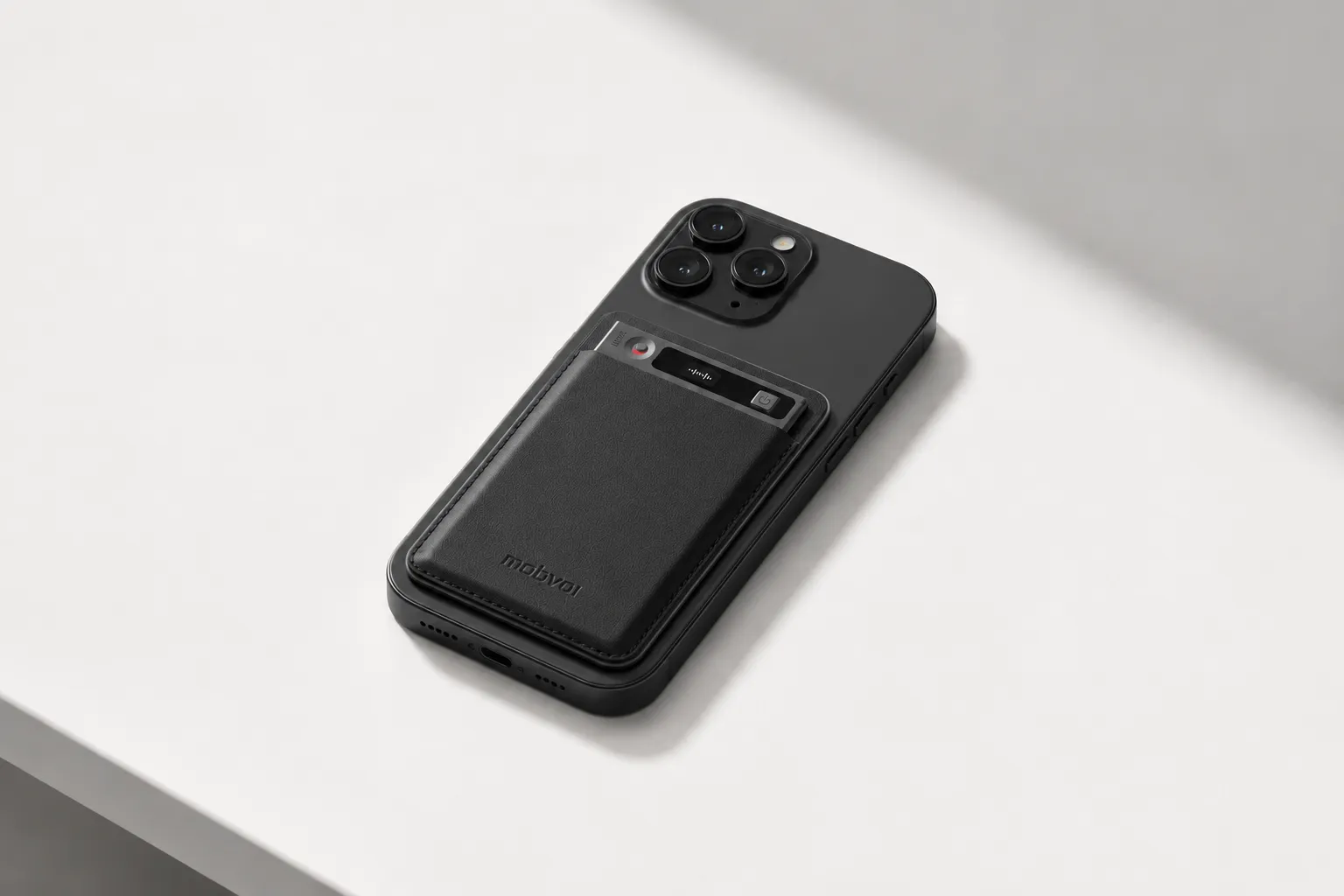
TicNote fixes that by giving me one hardware workflow for both situations. In Earphone mode, it magnetically attaches to my phone to record and transcribe calls. In Speaker mode, it handles live conversations in the room. If I'm bouncing between candidate calls, source interviews, and client conversations, that matters more than flashy extras. You can Check TicNote AI Voice Recorder details if that phone-plus-room setup is what you need.
The proof is in the capture and post-interview workflow. Its 3-mic array picks up voices from up to 10 meters away, which is far more useful for conference rooms and roundtable interviews than most compact gadgets. Battery life is rated at 25 hours, and 64GB of storage holds about 434 hours of recordings, so I'm not worrying about space in a heavy interview week. It records offline and syncs later, then turns each session into a time-stamped transcript with automatic speaker identification, support for 120+ transcription and translation languages, and summaries from 100+ templates.
What makes it stand out from a basic recorder is what happens after capture. The Project Knowledge Base lets me group interviews by beat, client, or hiring project and search across them later. Ask AI can answer questions across projects, which is useful when I vaguely remember a quote from three weeks ago but not which interview it came from. For recruiters, the HR Recruiting skill goes further by turning recordings and uploaded files into interview questions and candidate evaluation reports.
Key features for interview work
- Earphone mode for phone call recording: magnetically attaches to your phone, captures both sides of the call without app restrictions or carrier permission
- Speaker mode for in-room interviews: 3-mic array picks up voices from up to 10m away, so you can place it on the table and focus on the conversation
- Time-stamped transcripts with speaker identification: verify quotes against the original audio, know exactly who said what
- One-tap highlight during recording: mark a key moment mid-interview, find it instantly in the transcript later
- Offline recording with sync on reconnect: record in a basement conference room or a rural site visit, sync when you're back online
- Project Knowledge Base: group interviews by client, beat, or hiring project, search across all of them at once
- Ask AI: ask "what did the candidate say about salary expectations" instead of re-listening to the whole call
- Export to Notion and Obsidian: move transcripts into your existing research or hiring workflow
Pros
- Hardware starts at $159.99
- Includes a free Plus plan for hardware users with 600 transcription minutes per month and 1,500 monthly credits
- Very compact 3mm card-sized design
- 25-hour battery life
- 64GB storage for about 434 hours
- Handles both phone and room interviews with one device
Cons
- Sensitive compliance buyers should still run a full review because GDPR alignment is self-claimed and cloud use may require internal policy checks
- Heavy transcription volume may push you into paid plans or pay-as-you-go minutes
TicNote Watch: Best for field reporters and on-the-go interviewers who need a discreet AI interview recorder for quick conversations
Some interviews don't start with a calendar invite. They happen in a hallway after a keynote, beside a trade-show booth, or during the two minutes when a source finally says something worth keeping. In those moments, pulling out a phone or dedicated recorder can change the mood fast.
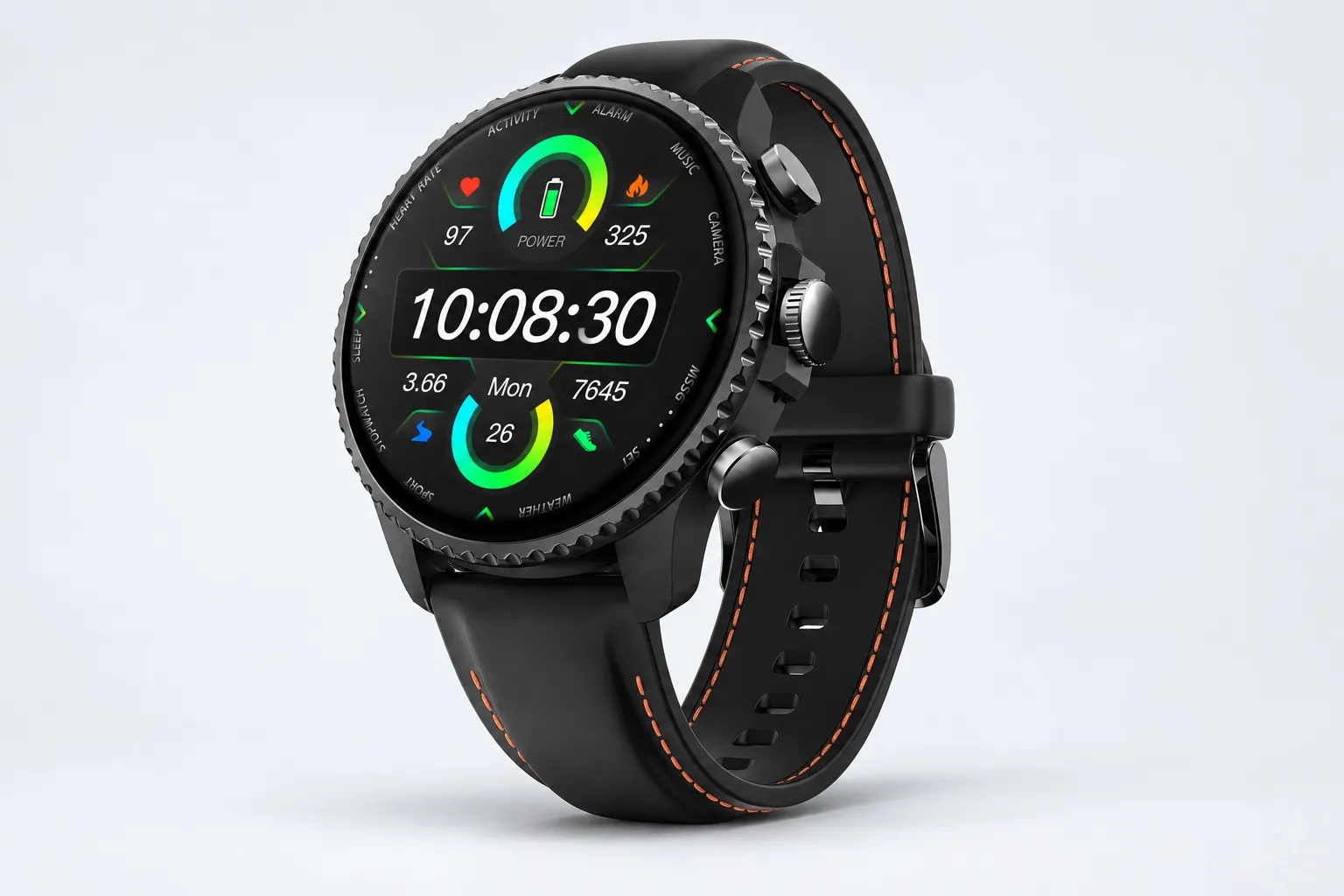
TicNote Watch is built for that kind of work. The dedicated top recording button lets me start capture quickly, and its Discreet Recording Mode keeps the screen off while showing a persistent red-dot indicator. It can also handle Bluetooth call recording on the watch, which makes it more useful than a simple voice memo wearable. If your interviews happen while you're moving, you can See TicNote Watch details.
The fit comes from speed and restraint. It records for over 24 hours continuously, uses dual omnidirectional mics with 3 to 5 meters of pickup and intelligent noise reduction, and supports live transcription on the wrist in 17 languages. One-Tap Highlight is smart for interview work because I can mark an important sentence during the conversation and find that highlight later in the transcript instead of scrubbing through an hour of audio.
There's more going on than recording. AI summary cards can be pushed to the watch face. AI Journal combines meetings, exercise, sleep, and health data into a daily timeline. Shadow Recap connects changes in body signals with recorded meetings, which can help heavy field workers spot which conversations caused stress spikes or fatigue. READINESS gives a morning score based on sleep, heart rate, and stress, while 24-hour heart rate, SpO2, stress, and sleep tracking plus 100+ sports modes and built-in GPS make it a legitimate smartwatch too.
Key features for interview work
- Dedicated top recording button: start recording in under 2 seconds, no phone needed
- Discreet Recording Mode: screen stays off, red-dot indicator shows you're recording — less intimidating than holding up a phone
- One-Tap Highlight: mark a quote mid-conversation, find it instantly in the transcript later
- Bluetooth call recording: record phone calls directly from the watch
- Live transcription on the wrist in 17 languages: glance at the transcript during the interview to catch something you missed
- AI summary cards on the watch face: review key points without opening your phone
- Over 24 hours of continuous recording: covers a full day of back-to-back interviews
Pros
- Costs $249
- Discreet wrist-based workflow for spontaneous conversations
- Watch-face AI summaries are genuinely convenient
- Over 24 hours of continuous recording
- Uses the same TicNote transcript, summary, speaker ID, and project search workflow
Cons
- 3 to 5m pickup is less room-wide than a larger dedicated recorder
- Health features add complexity if you only want a simple interview device
Otter.ai: Best for recruiters and managers who mostly run scheduled remote interviews and want a familiar AI interview transcription tool
If most of your interviews already happen on Zoom, Google Meet, or Microsoft Teams, Otter is still one of the easiest tools to understand fast. I've found it strongest when the workflow is predictable: scheduled remote interviews, recurring hiring loops, and team review after the call.
It fits because it turns live meetings into searchable transcripts with notes, speaker labels, and summaries inside a familiar workspace. That makes it useful for recruiters and managers who need to share takeaways quickly. The trade-off is simple: it's much better when the interview is already happening on a supported meeting platform than when you need to capture a surprise in-person conversation or a normal phone call.
Key features
- Live transcription during remote meetings
- Automatic summaries
- Speaker labeling
- Team sharing and workspace review
- Chat-style transcript search
Pros
- Easy remote interview workflow
- Broad familiarity across teams
- Fast to onboard for scheduled video calls
Cons
- Phone and in-person recording feel less natural than with dedicated devices
- Bot visibility can be a drawback in sensitive or high-trust interviews
tl;dv: Best for UX researchers who need remote video interview clips and review workflows
Remote research interviews create a different problem from reporting or recruiting in the field. The hard part usually isn't capture. It's finding the exact two-minute clip where a participant describes a broken flow, then sharing that moment with product and design teams.
That's where tl;dv fits. It's built for remote sessions where timestamps, clips, search, and post-call collaboration matter more than offline capture or phone recording. For UX research teams reviewing lots of recorded video interviews, that focus is a strength, not a limitation.
Key features
- Remote meeting recording
- Timestamps for key moments
- Clip creation from recorded sessions
- Search across transcripts
- Sharing for review workflows
Pros
- Strong review workflow for recorded video interviews
- Good fit for research teams that need shareable clips
Cons
- Narrow fit outside remote meetings
- Weak value for phone interviews or in-person field work
Fathom: Best for buyers who want a budget remote meeting recorder for interviews before paying for a stack
Sometimes you don't need a full research repository or device workflow. You just want a low-cost way to capture recurring video interviews, get a quick summary, and decide later whether a bigger subscription stack is justified.
Fathom works well in that lane. Its appeal is straightforward: easy remote meeting capture, transcript review, and summary output with a free-plan mindset that lowers the cost of trying it.
Key features
- Free-plan orientation
- Automatic summaries
- Transcript review for remote meetings
Pros
- Free entry point
- Simple remote interview setup
- Useful for recurring video calls
Cons
- Remote-first limits are real
- Poor fit for in-person journalism, source work, or field recruiting
Granola: Best for interviewers who want a bot-free laptop note taker during desk-based calls
A lot of people dislike meeting bots, especially when the other person notices one joining the call before the conversation even begins. If you work mostly from a laptop and want AI notes without that visible bot layer, Granola is an interesting fit.
I'd recommend it for a quieter desktop workflow where calls happen at your desk and you care more about low-friction notes than about using a dedicated recorder. It's not a field tool. It's a call-at-your-computer tool.
Key features
- Desktop capture during laptop-based calls
- AI-generated notes
- Review workflow after the conversation
Pros
- Low-friction desktop use
- Good fit for people who want to avoid visible meeting bots
Cons
- Not the right recording device with transcription for field interviews
- Weak fit for phone-heavy or in-person interview workflows
Happy Scribe: Best for multilingual teams that record first and process later
Some interview teams prefer to separate capture from transcription. Journalists may use a dedicated recorder in the field, consultants may collect audio files from multiple contributors, and compliance-heavy teams may want tighter control over what gets uploaded and when.
Happy Scribe makes sense in that workflow. Instead of trying to be your live capture layer, it focuses on multilingual transcription, editing, and cleanup after the interview is over. That's useful when post-production quality matters more than instant summaries during the conversation.
Key features
- Upload-based workflow for recorded files
- Multilingual transcription
- Transcript editing and cleanup
- Subtitle and transcript polishing
Pros
- Strong language coverage
- Flexible post-production workflow
- Useful when teams process interviews after recording
Cons
- Adds an extra step after every interview
- Offers less immediate capture support than all-in-one devices or live meeting apps
How I evaluated AI note takers for interviews
Most lists of the best AI recorder for interviews read like spec sheets. That doesn't help if you're trying to capture a source in a noisy cafe, log a candidate screen on Zoom, record a phone interview from your mobile, or work in a setting where visible consent matters as much as transcript quality. I evaluated these tools the way interview-heavy professionals actually buy them: by context, quote reliability, privacy burden, and the real cost of making them part of daily work.
Why most AI note taker lists do not help interview-heavy professionals
A demo-friendly feature set isn't the same as an interview-ready workflow.
Journalists, recruiters, UX researchers, consultants, legal teams, and managers don't just need "AI summaries." They need a recorder that starts fast, survives messy audio, separates speakers well enough to verify quotes, and doesn't create compliance problems. A remote meeting bot can look great in a product demo and still fail the moment the interview happens on a cell call, in a hallway, or across a table with three people talking over each other.
That's also why I don't treat device-based and app-based tools as direct substitutes. If your work shifts between room interviews, phone calls, and scheduled video meetings, the choice often comes down to whether a dedicated device or software note taker fits your capture habits, not which product has the longest feature list.
The 4 decision variables for interview recording
Capture context fit: whether the tool works where your interviews actually happen, including remote video, in-person conversations, phone calls, and on-the-go field reporting.
Transcript reliability signals: the practical markers of trust, including microphone pickup, speaker labeling, timestamps, and how quickly you can check a quote against the original audio.
Privacy and consent control: how visible the recording is, where files are stored, what encryption or training claims the vendor makes, and how much policy review your team needs before rollout.
Total cost and adoption friction: not just the sticker price, but device cost, monthly transcription limits, setup time, and whether people must change existing habits to use it consistently.
Quick comparison
| Tool | Works well when | Falls short when | Best for |
| TicNote AI Voice Recorder | You switch between phone interviews and in-room conversations and want one device for both; 3-mic pickup up to 10m helps in multi-person setups | You only record scheduled web meetings and don't want extra hardware | Mixed phone and room interviews |
| TicNote Watch | You capture hallway chats, field notes, trade-show conversations, or Bluetooth calls while moving | You need maximum pickup distance for larger rooms or formal panels | Mobile field conversations |
| Otter.ai | You run scheduled remote interviews and want fast transcripts and searchable meeting notes | In-person capture and phone-first workflows are less natural | Recruiters and managers on remote calls |
| Fathom | You live in Zoom meetings and want automatic notes with low manual effort | It depends on supported meeting platforms and scheduled calls | Remote interviews with quick summaries |
| tl;dv | You need to review user research calls, clips, and meeting moments across remote sessions | It is less useful for in-person interviews or ad hoc phone calls | UX research review workflows |
| Granola | You want a bot-free desktop workflow during online meetings and prefer lightweight notes at your desk | It doesn't solve field recording or room audio capture | Bot-free desk-based interviews |
| Happy Scribe | You already have recordings and need upload-first transcription, translation, or multilingual processing | It is not the best fit for live capture during the interview itself | Upload-first multilingual interview processing |
How these criteria shape the rankings
These rankings are scenario-first on purpose. A great remote meeting assistant and a great interview recording device solve different problems, so naming one universal winner would hide the tradeoffs that matter most. For interview-heavy work, the best option is usually the one that matches how you capture audio in the first place, then gives you reliable transcripts and a privacy model you can defend.
How to choose the right AI note taker for your interview workflow
The right tool usually has less to do with brand and more to do with where your interviews actually happen. I'd frame the decision around three questions: do you record in rooms, on calls, or while moving between locations; what has to happen after each interview; and how much privacy review your team requires before audio can hit the cloud.
Match the tool to the interview setting first
If my week includes a 30-minute Zoom interview, a 40-minute phone screen, and a 50-minute in-person conversation in one conference room, I'd rather not juggle three different tools. That's where TicNote AI Voice Recorder makes the most practical sense: Earphone mode handles phone capture by attaching to the phone, and Speaker mode handles room interviews on the same device. Afterward, I still get time-stamped transcripts, speaker identification, AI summaries, and project search, which matters more than raw recording time once interviews start stacking up. If that mix sounds like your workflow, you can Check TicNote AI Voice Recorder details.
If your interviews are quick, mobile, and socially sensitive, wrist-based capture is easier to live with. I'd pick TicNote Watch for hallway chats, trade-show conversations, or source check-ins where pulling out a phone changes the tone. The big advantage isn't novelty. It's lower friction: start from the wrist, mark a quote with One-Tap Highlight, and glance at watch-face summaries later when you need fast recall. In that kind of workflow, it makes sense to See TicNote Watch details.
Pick software when the interview is already scheduled online
For scheduled remote interviews, I'd keep it simple. Otter.ai and Fathom fit buyers who want live notes and a familiar meeting-assistant workflow inside Zoom or Google Meet. If your real work happens after the call, especially in UX or research teams reviewing recorded sessions, tl;dv is a better fit because clip-based review is the product, not just the transcript.
Granola fits a different buyer. If you want bot-free desktop notes and most interviews happen with your laptop already open, it's one of the cleanest laptop-first options. Happy Scribe works better when you record first and process later, especially if you work across multiple languages and want upload-based transcription plus editing rather than a live meeting assistant.
Run the budget math before you commit
This is where buyers often miscalculate. A device at $159.99 or $249 can beat recurring software subscriptions if you record across phone, room, and field settings instead of only remote meetings. Two remote-only tools at $19.99 to $29 per month each can put you near $480 to $700 a year, and you still may not have a clean way to capture mobile calls or in-person interviews.
That's also why it helps to understand the difference between AI note takers and traditional recorders before you buy. If your workflow crosses environments, hardware plus transcription can be cheaper and more reliable than stacking software around edge cases.
Test adoption in under a week
I'd pilot any shortlist with three interviews: one 30-minute Zoom call, one 40-minute phone screen, and one 50-minute in-person interview. Then score each tool on four things: did recording start fast, was speaker labeling usable, could I find one quote again in under 20 seconds, and did the summary reduce my write-up time by at least 50%.
That gives you the answer quickly: TicNote AI Voice Recorder if you need one system for calls and rooms, TicNote Watch if discretion and speed matter most, Otter.ai or Fathom for scheduled remote interviews, tl;dv for video research review, Granola for bot-free desktop notes, and Happy Scribe for multilingual upload workflows.
Privacy, consent, and security checks for a secure AI recorder for interviews
The best AI recorder for interviews often isn't the one with the slickest summary. It's the one your legal, HR, or security team will actually approve, and the one you can explain to an interview subject in one clear sentence. If consent is messy or storage rules are vague, adoption stalls fast.
Put consent first
Before I compare privacy features, I start with recording legality. In the U.S., consent rules vary by state, and internationally they vary by country and sector. The Digital Media Law Project notes that some jurisdictions allow one-party consent while others require all parties to agree before recording. That matters whether you're a journalist, recruiter, researcher, consultant, or manager.
Organization rules can be stricter than the law. A newsroom may require verbal disclosure on every source call. An HR team may ban recording candidate interviews unless approved in advance. A UX research team may need signed participant consent and a retention limit. In legal and healthcare settings, the bar is usually higher again. So check both the law and your internal policy before you hit record.
Review the vendor security checklist
Most buyers should ask six practical questions.
First, where is the data stored, and in which region? Second, are recordings and transcripts encrypted in transit and at rest? Third, does the vendor use customer data to train its AI models? Fourth, can admins set retention windows and permanently delete files? Fifth, can you export audio, transcripts, and summaries if you switch tools? Sixth, can the product record offline when the network drops?
Those checks matter because interview data ages into risk. A 38-minute candidate screen, a source interview, or a client call can contain salary details, health information, account numbers, or allegations that shouldn't sit in an open cloud folder for years.
Compare privacy posture by product type
Device-led tools and remote meeting apps don't create the same exposure. A cloud-first meeting bot usually joins calls visibly, depends on syncing, and pushes users toward centralized storage. That's convenient, but it creates more review points for compliance teams.
A device-led recorder gives you more workflow control. You decide when to record, whether to sync, and how visibly the capture happens in the room. That's one reason privacy-sensitive teams often prefer dedicated hardware for field interviews, offsite conversations, and phone calls.
TicNote takes that device-first approach. It describes itself as private by default, says customer data is not used to train AI models, states recordings and transcripts are encrypted, offers end-to-end encryption and on-device processing for key AI features, and says audio doesn't leave the hardware unless you choose to sync. Those are strong claims for buyers who want tighter control, especially in regulated workflows. But I'd still verify every claim in a formal security review before rollout. If you're evaluating tools for legal teams, this matters even more when comparing AI note takers built for legal work against general meeting apps.
Document the rules before rollout
Before your team adopts any meeting recorder for interviews, write the policy down.
Use a short checklist:
- approved consent language for phone, video, and in-person interviews
- storage location and who can access recordings
- retention windows for audio, transcripts, and summaries
- redaction process for sensitive names or identifiers
- approved interview contexts and prohibited ones
That documentation is what turns a useful recorder into a secure one.
Conclusion: which AI interview transcription tool is worth it?
The right choice usually isn't the tool with the longest feature list. It's the recorder that creates the least friction in the interview setting you actually use every week. If all your interviews happen inside Zoom or Google Meet, a remote-first app can be enough. But a lot of buyers need an AI recorder that works across calls, conference rooms, taxis, and field conversations without changing how they already work.
That's why I'd make the decision by context first, not by brand. For the broadest phone-plus-room coverage, TicNote stands out because it can handle phone calls in Earphone mode and in-person interviews in Speaker mode, with a 3-mic array, up to 25 hours of battery life, and 64GB of storage. If you need discreet mobile capture, TicNote Watch is the better fit because you can start recording from your wrist and review summaries later without pulling out your phone. For simpler remote interviewing, Otter.ai or Fathom make more sense. If your team lives on clips and research playback, tl;dv is stronger. If you want a bot-free desk workflow, Granola is the cleaner pick. If your process starts with file uploads and multilingual transcription, Happy Scribe is still useful.
My practical advice is simple: look at your last five interviews and label each one remote, phone, in-person, or on the move. Then shortlist only the tools that would have worked in at least three of those five situations. If your week regularly jumps between calls and real-world conversations, a wearable note taker for journalism and field interviews is worth comparing before you buy. That 10-minute exercise will give you a better answer than any feature matrix. TicNote AI Voice Recorder